
StarTech SV431DHD4KU Manual
PDF manual · 2 Pages
English



Quick check
Incorrect answer, please try again.
Chat with your StarTech SV431DHD4KU manual using AI
Get instant AI answers from your StarTech SV431DHD4KU manual
Ask anything about the StarTech SV431DHD4KU. Answers come from this manual, with the pages they are based on.
Ask a Question
Do you recommend SV431DHD4KU?
Yes NoFrequently Asked Questions
It lets you control four computers using one keyboard, one mouse, and two HDMI monitors. You can switch between systems quickly while keeping your workspace organized and efficient.
Is this answer helpful?
No. The switch is designed for plug-and-play use, so setup is handled through cable connections and power only. This makes it easy to integrate into existing workstations.
Is this answer helpful?
Yes. It is made for dual-HDMI setups, allowing two displays to be shared across connected computers. That is useful for users who rely on extended desktop workflows.
Is this answer helpful?
You can use the front-panel selection buttons or keyboard hotkeys. The hotkey method is especially convenient if your keyboard is connected to one of the HID ports.
Is this answer helpful?
In addition to a keyboard and mouse, you can connect supported USB devices, speakers, and other HID accessories. This helps keep your main tools available across all computers.
Is this answer helpful?
The switch supports 4K at 30Hz, which is suitable for general productivity, office use, and many professional tasks. It is less suited for fast-paced gaming or high-refresh media work.
Is this answer helpful?
Yes. The product is backed by a two-year warranty and lifetime technical support, which adds confidence for long-term deployment and troubleshooting assistance.
Is this answer helpful?
Advantages and Disadvantages
Advantages

- Controls up to four computers from one keyboard, mouse, and dual-monitor console.
- Dual HDMI support makes it ideal for productive multi-display workflows.
- No software or drivers are needed, keeping setup fast and simple.
- LED indicators and hotkeys make switching between systems easy.
- Includes audio and USB hub support for broader peripheral use.
Disadvantages

- Requires several cables for each connected computer, which can add clutter.
- Only supports HDMI-based systems, so non-HDMI video outputs need adapters.
- Wireless keyboard and mouse setups may need careful receiver placement.
- 4K support is limited to 30Hz, which may not suit high-motion use cases.
Product Specification
Type
KVM Switch
Ports
4
Monitor
2x HDMI
Keyboard/Mouse
USB
Audio
1x Jack
LAN
N/A
Resolution
3840x2160@30Hz
Special Features
2-Port USB 3.0 Hub
Product Description
StarTech 4-Port Dual-HDMI 4K KVM Switch: A Practical Hub for Multi-PC Workflows
The StarTech 4-Port Dual-HDMI 4K KVM Switch is built for people who want a cleaner, more efficient desk setup without sacrificing performance. It lets you control up to four computers using one keyboard, one mouse, and dual HDMI displays, making it a smart fit for offices, control rooms, and home workstations where switching between systems happens often. The setup focuses on convenience, with hardware-based control and no software or driver installation required.
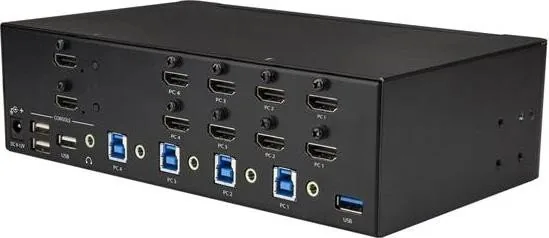
With support for dual HDMI connections, the switch is designed for users who work across multiple screens and need a smoother way to manage productivity. It also includes USB HID ports for keyboard and mouse input, plus USB hub ports for extra peripherals. That means you can keep essential devices connected while moving between computers with minimal disruption. The inclusion of audio support adds even more flexibility for users who rely on speakers or headphones during daily tasks.
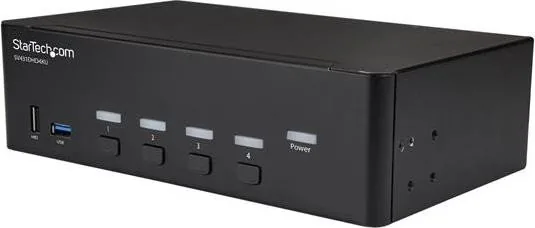
A standout feature is the simple port switching experience. Users can move between connected systems using front-panel buttons or convenient hotkey commands. Status LEDs help make operation easy at a glance by showing power, active port selection, and scan activity. The device also supports EDID handling to help keep display behavior consistent across connected computers, which is especially useful in mixed environments.
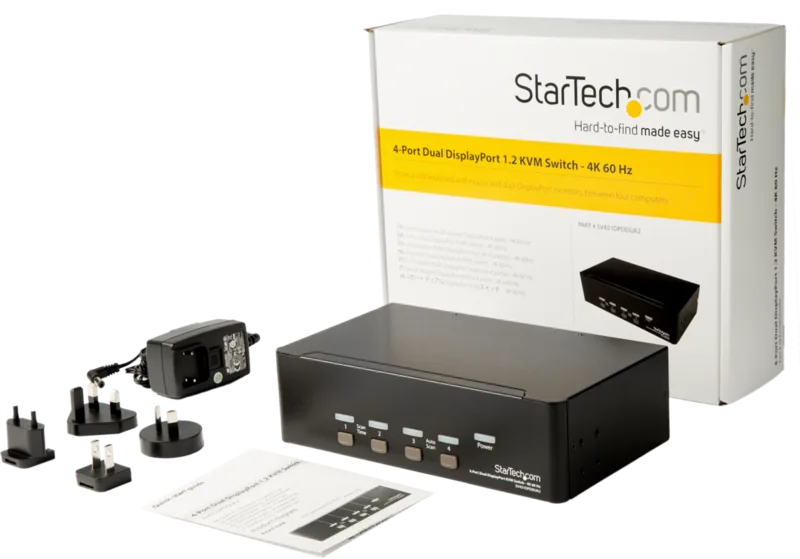
The StarTech 4-Port Dual-HDMI 4K KVM Switch Manual highlights a straightforward installation process: connect the console, attach each computer to the matching port set, power the unit, and begin working. Since the device supports common accessories like HDMI cables, USB-A/USB-C to USB-B cables, and audio connections, it fits into many setups without much planning. The product is backed by a two-year warranty and lifetime technical support, giving it extra value for long-term use.
Notes
- Best suited for users managing multiple HDMI computers from one desk.
- Requires matched cable connections for each PC on the same port set.
- Works well when you want fast switching without software overhead.
- Great for streamlined setups with dual monitors and shared peripherals.
Search for 67,706 Manuals online


Type-in Brand or Model