
StarTech SV231USBLC Manual
PDF manual · 2 Pages
English



Quick check
Incorrect answer, please try again.
Chat with your StarTech SV231USBLC manual using AI
Get instant AI answers from your StarTech SV231USBLC manual
Ask anything about the StarTech SV231USBLC. Answers come from this manual, with the pages they are based on.
Ask a Question
Do you recommend SV231USBLC?
Yes NoFrequently Asked Questions
It lets a laptop act as a temporary KVM console for accessing and managing a server. This is useful for troubleshooting, maintenance, and on-site administration without needing a full physical console setup.
Is this answer helpful?
No. The software is installed on the laptop only. The target server does not need any changes or extra software, which makes setup faster and less intrusive.
Is this answer helpful?
The adapter supports Windows 7, Windows 8.1, Windows 10, Mac OS 10.6 and later, and Linux 2.6.x to 3.13.x. Compatibility may vary by hardware and software revision.
Is this answer helpful?
It uses VGA for video. If a system has DVI-I analog output, a DVI-to-VGA adapter can be used. This makes it practical for many legacy and mixed environments.
Is this answer helpful?
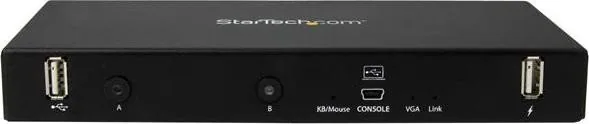
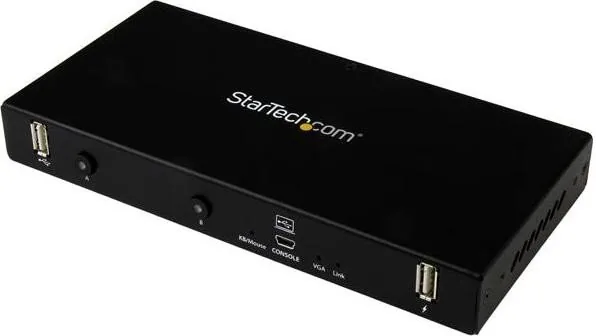
The LEDs show port activity, keyboard/mouse status, VGA presence, and console connection status. They help users quickly confirm whether the adapter and server are communicating properly.
Is this answer helpful?
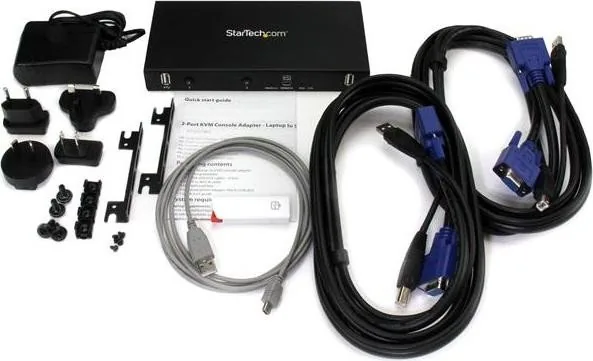
The package includes the 2-port laptop-to-KVM console adapter, mounting brackets, USB and VGA cables, a USB A to Mini-B cable, a USB software key, a universal power adapter, and a quick start guide.
Is this answer helpful?
Advantages and Disadvantages
Advantages

- Portable design makes it easy to use for field service and quick server access.
- Works with Windows, Mac, and Linux laptops for broad compatibility.
- No software changes are needed on the controlled server itself.
- LED indicators help confirm connection and activity status quickly.
Disadvantages

- Requires software installation on the laptop before the adapter can be used.
- Primary video support is VGA, so some systems may need adapters.
- Compatibility depends on supported operating systems and hardware requirements.
Product Specification
Type
KVM-Switch
Ports
2
Monitor
VGA
Keyboard/Mouse
USB
Audio
N/A
LAN
N/A
Resolution
1920x1200@60Hz
Product Description
StarTech 2-Port KVM Console Adapter for Fast Server Access
The StarTech 2-Port KVM Console is built for technicians who need quick, reliable access to a server from a laptop. Instead of carrying a full crash cart or changing anything on the target machine, this compact adapter turns a USB-equipped laptop into a practical KVM console. It is designed for hands-on troubleshooting, maintenance, and remote-style convenience in a portable form.
What makes it especially useful is its simple workflow. The adapter uses a small software package installed on the laptop, then connects through USB and VGA to the server or device being managed. Once configured, it can be connected or disconnected as needed, making it ideal for fast service calls and temporary access. The setup supports common desktop environments and helps reduce downtime when a system needs immediate attention.
A major advantage is flexibility. The unit works with Windows, Mac, and Linux systems, and it includes helpful hardware like mounting brackets, USB and VGA cables, a USB software key, and a universal power adapter. The LED indicators add confidence during use by showing port activity, video status, keyboard and mouse connection, and console activity at a glance.
For anyone comparing KVM solutions, the StarTech 2-Port KVM Console Manual highlights a product that focuses on practicality over complexity. It is especially appealing for admins who want a portable troubleshooting tool with no need to modify the controlled server. The adapter also supports easy disconnect/reconnect behavior, which is convenient when moving between tasks or systems.
Highlights
- Portable laptop-to-server console solution for fast administration
- Supports Windows, Mac, and Linux laptops with installed software
- Includes VGA and USB connectivity for straightforward setup
- LED indicators simplify status checks and connection troubleshooting
- No changes required on the controlled server before use
Notes
- Best suited for VGA-based environments
- Software installation is required on the laptop before first use
- Check compatibility needs if your hardware relies on DVI connections
- Warranty coverage and technical support add long-term value
Search for 67,706 Manuals online


Type-in Brand or Model