
StarTech SV231DVIUAHR Manual
PDF manual · 13 Pages
English



Quick check
Incorrect answer, please try again.
Chat with your StarTech SV231DVIUAHR manual using AI
Get instant AI answers from your StarTech SV231DVIUAHR manual
Ask anything about the StarTech SV231DVIUAHR. Answers come from this manual, with the pages they are based on.
Ask a Question
Do you recommend SV231DVIUAHR?
Yes NoVideo Manual
Xystec Dual-KVM-Switch für 2 PCs mit DVI/VGA, USB und Stereo-Audio
Frequently Asked Questions
The switch supports dual-link DVI resolutions up to 2560x1600 at 60Hz. Higher resolutions such as 3840x2400 are possible at lower refresh rates (for example 30Hz).
Is this answer helpful?
You can switch using the front-panel select button or hotkey sequences. The default hotkey starts with two quick presses of the left Ctrl key followed by the port number (e.g., Ctrl, Ctrl, 1). Hotkey behavior and leading Ctrl can be changed.
Is this answer helpful?
Yes. The unit includes a built-in USB 2.0 hub for the console, allowing you to share up to two high-speed USB devices between the connected computers.
Is this answer helpful?
Audio can either follow the currently selected computer (Audio Lock ON) or remain pinned to a chosen port while you operate another computer (Audio Lock OFF). Toggle and change with hotkey commands; audible beeps confirm state changes.
Is this answer helpful?
The KVM is compatible with any operating system that supports USB input devices. Some PC BIOS settings (PNP/USB IRQ, HALT ON ERROR) may need minor adjustments for optimal USB KVM operation.
Is this answer helpful?
The package includes the KVM switch, an instruction manual, a rubber foot pad set, and a universal power adapter (5VDC, 2000mA).
Is this answer helpful?
StarTech provides a three-year product warranty covering parts and labor and offers lifetime technical support via their support website for assistance, documentation, and downloads.
Is this answer helpful?
Advantages and Disadvantages
Advantages

- Supports high-resolution dual-link DVI up to 2560x1600@60Hz and higher at reduced refresh rates.
- Built-in USB 2.0 hub lets you share up to two high-speed USB devices between two computers.
- Audio switching with audio lock option allows audio to follow the selected computer or remain fixed.
- Multiple switching methods: front push-button, configurable hotkeys, manual and auto scan modes.
- Compact design with clear LED indicators and audible hotkey feedback for easy operation.
Disadvantages

- USB 2.0 hub limits throughput compared with modern USB 3.x devices.
- Maximum recommended USB cable length is 4.6 m (15 ft), limiting remote placement.
- No cascading support, so expansion beyond two systems requires additional switches.
- Higher-than-2560x1600 resolutions require reduced refresh rates, which may not suit all applications.
- Requires BIOS/USB settings adjustments on some PCs to ensure full compatibility.
Product Specification
Ports
2
Monitor
DVI-I (Dual-Link)
Keyboard/Mouse
USB
Audio
Speakers, Microphone
LAN
N/A
Resolution
2560x1600
Special Features
2-port USB 2.0 Hub
Product Description
StarTech SV231DVIUAHR Manual
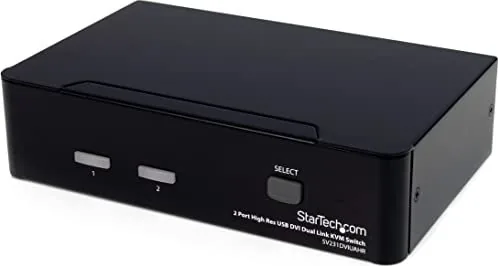
The StarTech SV231DVIUAHR is a 2-port high-resolution dual-link DVI USB KVM switch designed for environments that demand reliable, high-quality video and seamless peripheral sharing. It supports dual-link DVI resolutions beyond 1080p — up to 2560x1600 at 60Hz and higher resolutions at lower refresh rates — making it suitable for imaging, multimedia, and medical applications where detail and color fidelity matter. The unit integrates a USB 2.0 hub to share up to two high-speed USB devices between two connected computers and includes audio switching with configurable audio lock behavior.
Key Features and Use
Connecting two computers to a single DVI monitor, USB keyboard, and mouse is straightforward with the SV231DVIUAHR. The device provides physical push-button switching, intuitive hotkey control sequences, and an automatic scan mode to cycle through active systems. Hotkey commands start with a double-press of the leading Ctrl key (changeable to the right Ctrl) followed by additional keystrokes for actions like selecting ports, enabling auto-scan, manual scan, changing scan intervals, and toggling audio lock.
Installation is simple: connect the DVI display and USB console devices to the console ports, then link each computer using DVI and USB A-B cables. The KVM includes a universal power adapter and rubber feet for desktop placement. For certain PC BIOS configurations, minor USB/PNP settings adjustments may be recommended to ensure full functionality.
The front panel shows power/online and selected port LEDs, while the compact chassis houses all connectors for DVI, audio, and USB. The built-in tone generator provides audible feedback for valid or invalid hotkey commands, and scan times can be set to 3, 8, 15, or 30 seconds. Audio lock can follow the selected computer or remain pinned to a single port depending on user preference.
Practical Benefits
- Consolidates peripherals and monitor control for two systems, reducing desktop clutter.
- Supports high-resolution DVI applications suitable for professional displays and imaging tasks.
- USB hub and audio switching add flexibility for sharing devices and sound between systems.
- Hotkey customization and auto-scan improve workflow efficiency in multi-system setups.
Notes:
- Maximum recommended USB cable length is 4.6 m (15 ft).
- Power: 5VDC, 2000mA center-positive adapter included.
- Backed by a three-year warranty and lifetime technical support from StarTech.
Search for 67,706 Manuals online


Type-in Brand or Model