
StarTech SV215MICUSBA Manual
PDF manual · 13 Pages
English



Quick check
Incorrect answer, please try again.
Chat with your StarTech SV215MICUSBA manual using AI
Get instant AI answers from your StarTech SV215MICUSBA manual
Ask anything about the StarTech SV215MICUSBA. Answers come from this manual, with the pages they are based on.
Ask a Question
Do you recommend SV215MICUSBA?
Yes NoFrequently Asked Questions
You can share one VGA monitor, one USB keyboard, one USB mouse, stereo speakers, and a microphone between two computers using the integrated cables and color-coded connectors.
Is this answer helpful?
Switching is done via the included remote selector button or Hotkey Mode. Hotkeys are invoked by pressing Scroll Lock twice (default) or toggling to Ctrl, then entering the specific sequence to change KVM or audio focus or start auto-scan.
Is this answer helpful?
Yes. Initialize Mac keyboard mapping with the hotkey sequence (Scroll Lock, Scroll Lock, F2, Enter or Ctrl, Ctrl, F2, Enter). After initialization, the documented keyboard mapping converts PC keys to Mac equivalents.
Is this answer helpful?
The unit supports high-resolution video up to 2048x1536 and is rated for practical operation at 1920x1200 @ 60Hz with DDC2B. If you experience display issues, lower the resolution or refresh rate.
Is this answer helpful?
Try unplugging and replugging the keyboard/mouse from the console port to reset them. Verify hotkey sequences were entered correctly and reboot the computers if the switch needs resetting.
Is this answer helpful?
No external power adapter is required; the unit is powered via the connected computers' USB ports. Note that Keyboard Power On features may require unplugging power cords during installation to avoid unintended behavior.
Is this answer helpful?
StarTech provides a two-year warranty covering parts and labor for defects in materials and workmanship, plus lifetime technical support resources and downloads via startech.com.
Is this answer helpful?
Advantages and Disadvantages
Advantages

- Integrated cables reduce desk clutter and simplify installation.
- Supports high-resolution video up to 2048x1536 (practical 1920x1200 @60Hz with DDC2B).
- Independent audio and microphone switching for uninterrupted sound between hosts.
- Remote selector and hotkey control (double-Scroll Lock or Ctrl) offer flexible switching methods.
- Cross-platform compatibility with Mac, Windows, and Linux and Mac keyboard mapping support.
Disadvantages

- Fixed integrated cable lengths (24" and 47") may limit flexible placement of hosts.
- Limited to two ports—unsuitable for users needing more than two systems.
- Video capability subject to resolution/refresh limits; very high-end displays may be restricted.
- No external power adapter; relies on host USB power which can affect behavior if keyboard power-on features are present.
- Plastic housing and basic feature set may not meet needs of professional AV installations.
Product Specification
Type
Cable Switch
Ports
2
Monitor
VGA
Keyboard/Mouse
PS/2 & USB
Audio
Speaker, Microphone
LAN
N/A
Resolution
2048x1536
Product Description
StarTech SV215MICUSBA Manual — 2-Port VGA + USB Cable KVM Switch with Audio
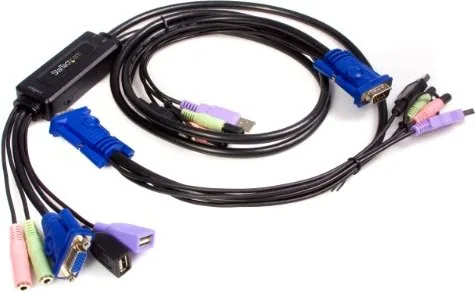
The StarTech SV215MICUSBA is a compact, cable-integrated 2-port KVM switch that lets you control two computers with a single VGA monitor, USB keyboard, USB mouse, and speakers. Engineered for SOHO, multimedia, and gaming setups, it supports high-resolution video up to 2048x1536 (and practical operation at 1920x1200 @ 60Hz with DDC2B) while simplifying workspace clutter by integrating the necessary cables into a single unit.
This KVM features independent audio and microphone switching so you can share speakers and a mic between systems without interrupting audio output. It includes a remote selector button for one-press switching and supports hotkey control (default invocation via double-Scroll Lock, configurable to Ctrl) for seamless toggling of KVM focus, audio focus, and auto-scan. Auto-scan cycles between ports at user-set intervals (1–4 seconds dwell) for monitoring multiple systems.
Hardware-wise, the console side presents color-coded connectors for keyboard (purple), mouse (black), VGA (blue), speaker (green), and microphone (pink). Host connections mirror those colors and include two integrated cable lengths (one 24" cable to Host 1, one 47" to Host 2) to accommodate typical desktop layouts. The switch offers basic keyboard emulation and specific Mac mapping via a hotkey initialization sequence, enabling cross-platform compatibility with Windows, Mac, and Linux systems.
Installation is straightforward: connect your console peripherals to the SV215MICUSBA, plug the integrated KVM connectors into each computer, and power on the machines. The unit defaults to the first computer powered on. Troubleshooting guidance covers common issues such as keyboard/mouse resets, hotkey entry mistakes, and video resolution mismatches—advising lower resolutions or refresh rates when necessary.
Built with a plastic housing and small footprint (8.10 x 6.90 x 2.60 cm, 0.40 kg), the SV215MICUSBA is designed for environments where desk space and cable management matter. The switch includes LEDs to indicate the active port and ships with a remote selector and user manual. StarTech backs the product with two-year warranty coverage and lifetime technical support resources available online.
Notes:
- Supports independent audio/microphone switching.
- Hotkey control and remote selector provide flexible switching methods.
- Compatible with Mac keyboard mapping after hotkey initialization.
- Default hotkey: double-Scroll Lock; can be toggled to Ctrl.
Search for 67,706 Manuals online


Type-in Brand or Model