
StarTech SU2DUPERA11 Manual
PDF manual · 2 Pages
English



Quick check
Incorrect answer, please try again.
Chat with your StarTech SU2DUPERA11 manual using AI
Get instant AI answers from your StarTech SU2DUPERA11 manual
Ask anything about the StarTech SU2DUPERA11. Answers come from this manual, with the pages they are based on.
Ask a Question
Do you recommend SU2DUPERA11?
Yes NoFrequently Asked Questions
It is designed for USB flash drives and 2.5-inch or 3.5-inch SATA SSDs and HDDs. You can set up the source and target using the USB-A and SATA ports to match the drives you are working with.
Is this answer helpful?
You can select Copy system and files, Copy all partitions, Copy the whole drive, or Copy a percentage. Each mode determines what parts of the source drive are duplicated, such as data area only, partitions including blank ones, or full capacity including empty space.
Is this answer helpful?
The unit supports five erase modes: quick erase, full erase, DoD 5220.22-M, DoD 5220.22-M erase and compare, and Secure erase using ATA Secure Erase. Secure erase is not supported on USB drives.
Is this answer helpful?
A common cause is insufficient target capacity. The target drive must be greater than or equal to the source drive capacity before starting a copy. LED and LCD messaging can help confirm connection and error status.
Is this answer helpful?
No. After you press OK to start an erase or copy process, do not disconnect either the source or target drive until the operation completes. Interrupting the process can damage the drive or cause lost data.
Is this answer helpful?
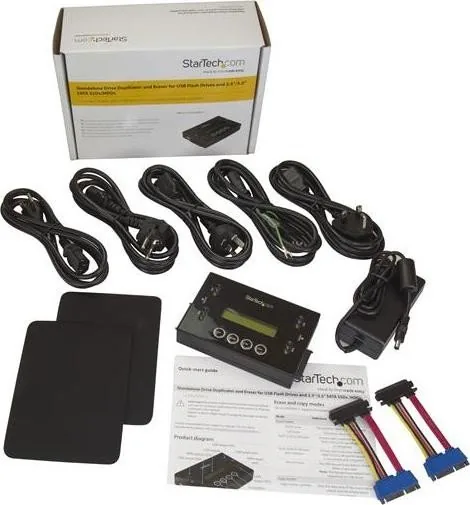
To prevent undue strain on the connectors, avoid plugging SATA drives directly into the unit. Use the included drive-connector cables and place the drives on the provided drive pads.
Is this answer helpful?
StarTech backs the product with a two-year warranty and provides lifetime technical support. You can access online tools, documentation, and downloads through the StarTech support and downloads pages.
Is this answer helpful?
Advantages and Disadvantages
Advantages

- Standalone cloning and erasing without needing a computer
- Multiple copy modes, including system/files, all partitions, full drive, and percentage-based copying
- Five erase modes with DoD 5220.22-M options for strong wipe workflows
- LCD menu and LED indicators for guided setup and error visibility
- Supports flexible source-target combinations across USB and SATA
Disadvantages

- Secure erase mode is not supported on USB drives
- Target drive capacity must be equal or larger or copying may fail
- SATA drives should be connected using the included connector cables to avoid connector strain
- Copy and erase jobs must not be interrupted, or data and drives can be damaged
Product Specification
Type
Copy Station (SATA 2.5/3.5", USB-A)
Usage
portable
Connectivity
N/A
Media
2x SATA 6Gb/s, 2x USB-A 2.0
Copy Function
SATA (1x simultaneous, 396GB/h), USB-A (1x simultaneous Copying)
Print Function
N/A
Dimensions
5.31x1.14x3.54in (WxHxD)
Weight
1.02 lb
Special Features
autonomous operation, Display, Erase function, Metal casing
Manufacturer's Warranty
two years
Product Description
StarTech USB-A and SATA Cloner & Eraser Manual: Standalone Drive Copying and Secure Wiping
If you need a straightforward way to duplicate and securely erase drives without tying up a computer, the StarTech USB-A and SATA Cloner & Eraser is built for the job. This standalone unit lets you clone between USB and SATA storage, making it ideal for backups, migrations, refurbishing, or wiping drives for reuse or disposal.
Flexible copying for common drive setups
The SU2DUPERA11 supports copying across multiple combinations, including SATA to SATA, SATA to USB, USB to USB, and USB to SATA. You can choose how much gets copied, from system data and files to full-drive duplication. It also includes a percentage-based copy option, which is useful when you only need a specific portion of a drive.
For more control, the device offers multiple copy modes:
- Copy system and files (copies only the data area)
- Copy all partitions (includes blank partitions, excludes non-partition space)
- Copy the whole drive (includes empty space)
- Copy a percentage (duplicates a chosen range)
Secure erasing with multiple overwrite options
Erasing is a core strength of this cloner, offering five erase modes that cover both quick workflows and security-focused wiping. Options include quick erase and full erase, plus DoD 5220.22-M methods (erase and erase-and-compare). There is also a Secure Erase mode that uses the drive's ATA Secure Erase feature. Note that Secure Erase is not supported on USB drives.
Simple front-panel operation and clear status feedback
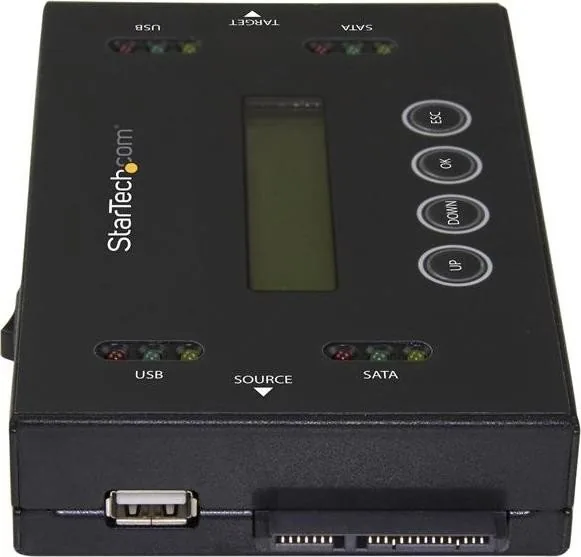
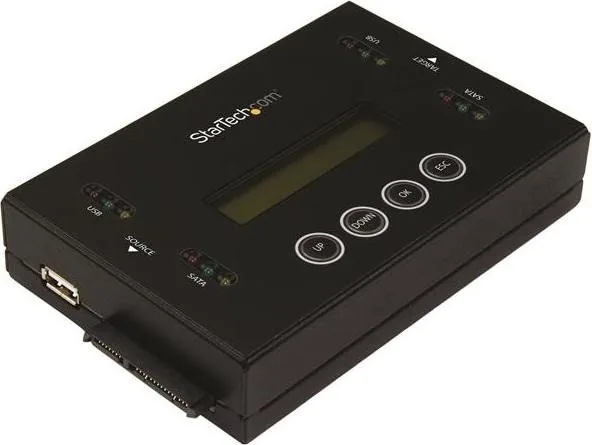
The unit features an LCD display and menu navigation buttons, so you can select copy or erase settings quickly. LED indicators reflect connection status, activity, and errors, helping you troubleshoot without guesswork. With a power switch, power jack, USB-A ports, and SATA ports for both source and target, the workflow stays consistent.
Important handling notes
Before erasing, back up any important data, and do not disconnect either drive after starting a job. Interrupting a copy or erase process can lead to lost data or drive damage. Also ensure the target drive capacity is greater than or equal to the source drive capacity to avoid copy errors.
Key takeaways
- Clone USB and SATA drives with selectable copy modes
- Choose secure erase levels from quick to DoD 5220.22-M
- Use the LCD and LEDs for guided operation and monitoring
- Avoid disconnecting drives mid-process to prevent damage
- Secure Erase applies to ATA Secure Erase (not USB drives)
Quick notes
- Designed for 2.5-inch or 3.5-inch SATA SSDs and HDDs, plus USB flash drives
- Includes universal power adapter and required connector accessories
Search for 67,706 Manuals online


Type-in Brand or Model