
StarTech ST4300USBM Manual
PDF manual · 2 Pages
English



Quick check
Incorrect answer, please try again.
Chat with your StarTech ST4300USBM manual using AI
Get instant AI answers from your StarTech ST4300USBM manual
Ask anything about the StarTech ST4300USBM. Answers come from this manual, with the pages they are based on.
Ask a Question
Do you recommend ST4300USBM?
Yes NoFrequently Asked Questions
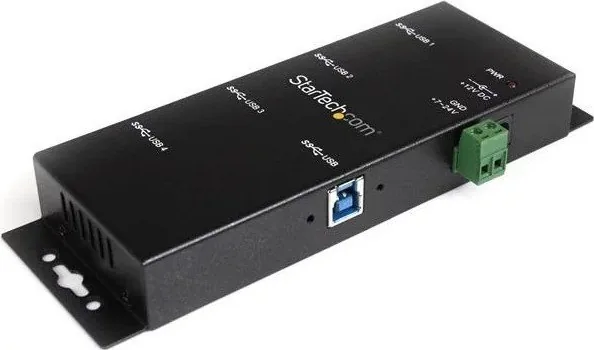
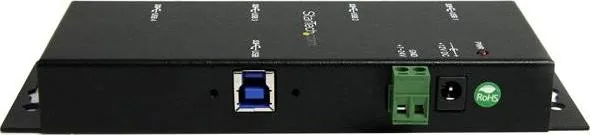
It provides four USB 3.0 Type-A downstream ports, one USB 3.0 Type-B upstream socket, a DC power input, and a terminal block for power connection options.
Is this answer helpful?
External power is optional, but recommended. Connecting the external adapter ensures each USB port can supply sufficient current for high-draw devices and prevents power-related device disconnects.
Is this answer helpful?
Yes. The hub uses USB 3.0 plug-and-play and should be automatically detected by Windows systems listed in the manual. No special drivers are typically required for standard operation.
Is this answer helpful?
Operating temperature range is 0°C to 55°C (32°F to 131°F) with storage from -20°C to 85°C. Humidity tolerance ranges from 5% to 95% relative humidity (non-condensing).
Is this answer helpful?
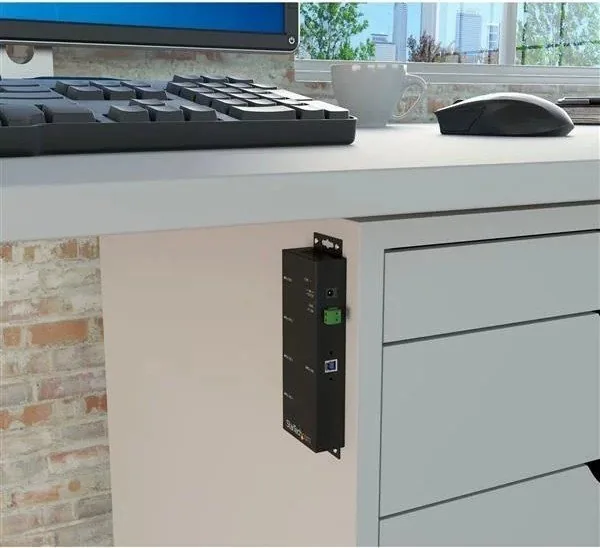
Yes. The metal enclosure and railmount design make it suitable for DIN-rail mounting and installation inside control cabinets, kiosks, and industrial racks.
Is this answer helpful?
StarTech offers lifetime technical support and downloadable drivers/documentation via their support and downloads web pages. Visit the StarTech support portal for the latest resources.
Is this answer helpful?
The product is backed by a two-year warranty covering defects in materials and workmanship. Warranty terms exclude damage from misuse, abuse, alteration, or normal wear.
Is this answer helpful?
Advantages and Disadvantages
Advantages

- High-speed USB 3.0 data transfer up to 5 Gbps suitable for bandwidth-intensive devices.
- Rugged metal enclosure and railmount design for secure installation in industrial environments.
- Four downstream USB-A ports plus a USB-B upstream socket for convenient host connectivity.
- Optional external power with included universal adapter and regional cords for versatile deployments.
- Clear port and power LEDs for quick status checks and troubleshooting.
Disadvantages

- External power is recommended for full performance, adding to installation complexity.
- Limited to four downstream ports; larger setups require additional hubs or expansion.
- Operating temperature limited to 0°C–55°C, unsuitable for extreme cold environments without conditioning.
- Two-year warranty may be shorter than some industrial product lifecycles.
- No native macOS or Linux-specific driver notes in the supplied manual; verify OS compatibility if not using Windows.
Product Specification
Type
USB-Hub
Design
1x external wired (wall mounting, DIN rail via mounting bracket)
Connection
1x USB-B 3.0 (socket, screwable, 5Gb/s), 1x USB-A 3.0 (plug via cable, 5.91ft cable length)
Connectivity
4x USB-A 3.0 (socket, screwable)
Transmission
4x USB-A 3.0 (socket, 5Gb/s, USB BC 1.2, 15kV ESD)
Power supply
Power supply also via connection, screw terminals (7-48V DC), remote power
Chipset
VIA/VLI VL811+ (USB-Hub, USB 3.0)
Dimensions
2.35x0.93x5.98in (WxHxD)
Weight
0.66lb
Housing color
black
Compatibility
universal
Special features
Metal housing, extended operating range (Temperature: 32F to 131F, Humidity: 5% to 95%)
Manufacturer warranty
two years
USB notation
Link
Product Description
StarTech Industrial Railmount USB-Hub, 4x USB-A 3.0, USB-B 3.0 (Socket) Manual
The StarTech Industrial Railmount USB-Hub is a rugged, rail-mountable USB 3.0 hub designed for industrial and professional environments. Featuring four USB-A 3.0 ports and a USB-B 3.0 upstream socket, this hub delivers up to 5 Gbps transfer speeds, metal enclosure durability, and flexible power options to ensure reliable connectivity for peripherals, sensors, and data devices in control cabinets, machine rooms, kiosks, and other harsh settings.
Built around the VLI VL810 chipset with clear status LEDs for each port and power, the hub supports plug-and-play operation across common Windows platforms and should be immediately recognized by host systems. External power is optional but recommended to guarantee each port is fully powered when attaching high-draw devices. The package includes a USB 3.0 cable, universal power adapter, and multiple power cords (NA/UK/EU) for worldwide deployments.
Installation is straightforward: connect the power adapter if needed, plug the USB-B upstream cable into the host, and attach devices to the USB-A ports. The hub’s metal chassis and compact dimensions (152.0 x 59.6 x 23.5 mm) make it suitable for DIN-rail mounting and tight spaces. Operating temperature range from 0°C to 55°C and broad humidity tolerance (5%–95% RH) ensure dependable operation in many industrial climates. StarTech backs the product with a two-year warranty and lifetime technical support resources available online.
Whether you need to expand USB connectivity in an industrial control panel, provide multiple device connections in a production environment, or stabilize peripheral links in commercial installations, this railmount hub balances performance, durability, and ease of deployment. Its compliance with FCC Class B limits and common safety guidelines makes it appropriate for both professional and lab environments.
Notes
- External power is optional but recommended to ensure full power to all ports for high-current devices.
- Includes universal power adapter and three regional cords (NA/UK/EU).
- Check operating temperature and humidity ranges before installation in extreme environments.
- For drivers, support, and latest updates visit StarTech’s support and downloads pages.
Search for 67,706 Manuals online


Type-in Brand or Model
Hans M.
8 months ago
Does it work with Synology? I connected it, but DSM shows no drives at all.
Manual.ly
8 months ago
Synology compatibility depends on the model and interface used. First, make sure the device is powered correctly and connected directly (try another USB/SATA port). Then check DSM in Storage Manager to see whether it appears under Disks, even if it is unformatted. If nothing shows up, verify that your Synology supports the hardware/connection type and that the required drivers are available (some setups need DSM updates). Also test with another PC to confirm the device itself is detected. If the drives still do not appear, tell us your Synology model, DSM version, and the exact connection type so we can confirm compatibility and advise next steps.