
StarTech ST122HDMILE Manual
PDF manual · 2 Pages
English



Quick check
Incorrect answer, please try again.
Chat with your StarTech ST122HDMILE manual using AI
Get instant AI answers from your StarTech ST122HDMILE manual
Ask anything about the StarTech ST122HDMILE. Answers come from this manual, with the pages they are based on.
Ask a Question
Do you recommend ST122HDMILE?
Yes NoFrequently Asked Questions
It takes one HDMI source and duplicates the signal to two displays at the same time. This is useful for mirrored viewing in offices, classrooms, retail spaces, or home entertainment setups.
Is this answer helpful?
No. It is USB powered, so it can run from an available USB port on the source device. This makes installation simpler and keeps the setup more compact.
Is this answer helpful?
It supports up to 1080p video resolution. That makes it a good match for standard HDTVs, monitors, and projectors used in most everyday applications.
Is this answer helpful?
OUT1 is the primary output. The display connected there provides the EDID information, so its capabilities influence the signal sent to the other output.
Is this answer helpful?
Yes, it supports cascade operation with additional HDMI splitters. This can expand the number of outputs, but each added level may reduce signal quality.
Is this answer helpful?
Yes. It supports audio pass-through, HDCP, and DDC, which helps it work with a wide range of HDMI devices and protected video sources.
Is this answer helpful?
It is best for simple two-screen mirroring where the displays are similar and the cable runs are moderate. It is especially useful when you want an easy, low-profile solution.
Is this answer helpful?
Advantages and Disadvantages
Advantages

- Easy dual-display HDMI splitting with minimal setup.
- USB-powered design reduces cable clutter and extra adapters.
- Supports audio, HDCP, and DDC for broad compatibility.
- Compact and lightweight, making it easy to place anywhere.
Disadvantages

- Limited to two outputs unless used in a cascade setup.
- Primary output behavior may affect mixed-display configurations.
- Maximum resolution is 1080p, not ideal for higher-resolution needs.
- Signal quality can drop when multiple splitters are chained.
Product Specification
Video Inputs
1x HDMI In
Video Outputs
2x HDMI Out
Resolutions up to
1920x1080
Product Description
StarTech HDMI Splitter 2-way: A Practical Way to Share One HDMI Source
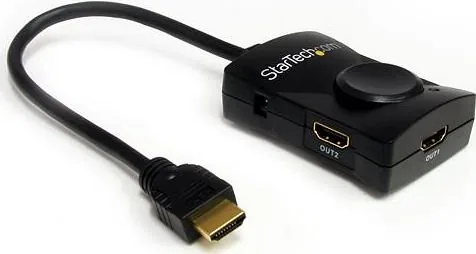
The StarTech HDMI Splitter 2-way is designed for users who need to send one HDMI signal to two displays without adding complexity. Whether you are setting up a monitor and TV, driving a presentation screen, or duplicating video in a small AV environment, this compact splitter keeps the setup straightforward. It supports High Speed HDMI, audio pass-through, HDCP, and DDC, making it a versatile choice for everyday digital video distribution.
One of the biggest advantages of this model is its ease of use. Installation is simple: connect your source, attach your two displays, and power the unit through USB. Because it is USB powered, there is no bulky external adapter to manage, which is helpful for clean desktop or media cabinet installations. The splitter also supports up to 1080p resolution, which is ideal for common HDTVs, projectors, and monitors used in offices, classrooms, and home entertainment systems.
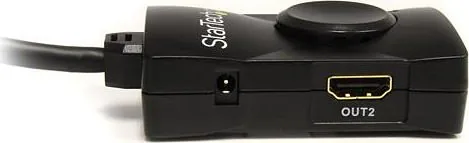
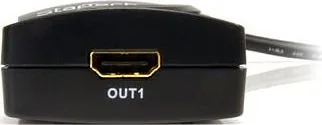
For best results, the first output port acts as the primary EDID source. In practical terms, that means the capabilities of the display connected to OUT1 help determine the signal sent to both screens. This is useful when both displays are similar, but it also means you should avoid pairing it with a display that is significantly weaker than the other one. If you are looking for setup tips, the StarTech HDMI Splitter 2-way Manual emphasizes careful connection order and powering devices on in sequence for reliable detection.
The splitter also supports cascade operation, which can expand distribution to additional displays when needed. That makes it a flexible option for larger setups, although signal quality may decrease as more splitters are added. In other words, it works well for scaling, but it is best used with thoughtful planning and reasonable cable lengths. With a maximum cable distance of 15 meters and a durable, lightweight design, it balances portability and performance.
Why it stands out
This compact splitter is a solid fit for users who want dependable HDMI mirroring without advanced configuration. It is especially appealing for environments where audio support, HDCP compliance, and simple USB power matter. StarTech’s lifetime technical support and one-year warranty add extra peace of mind, while the small plastic enclosure keeps the unit lightweight and easy to place.
Notes
- OUT1 is the primary output and should be treated as the reference display.
- Best suited for 1080p setups with matched or similar displays.
- Cascading is possible, but signal degradation can increase with each added level.
- Ideal for clean, low-profile installations thanks to USB power.
Search for 67,706 Manuals online


Type-in Brand or Model