
StarTech SATSASDUPE11 Manual
PDF manual · 16 Pages
English



Quick check
Incorrect answer, please try again.
Chat with your StarTech SATSASDUPE11 manual using AI
Get instant AI answers from your StarTech SATSASDUPE11 manual
Ask anything about the StarTech SATSASDUPE11. Answers come from this manual, with the pages they are based on.
Ask a Question
Do you recommend SATSASDUPE11?
Yes NoFrequently Asked Questions
No, it is a standalone unit that operates independently without needing external drivers or a host computer installed.
Is this answer helpful?
It supports Quick Erase, Full Erase, 3-Pass DoD, Secure Erase, and 7-Pass DoD standards for various security requirements.
Is this answer helpful?
Yes, the device includes a Copy+Compare mode that verifies the target drive immediately after the copying process finishes.
Is this answer helpful?
The default password for advanced function access is 123456, which should be changed for security.
Is this answer helpful?
Yes, you can configure the device to automatically start functions like erasing or copying immediately upon power on.
Is this answer helpful?
It supports both 2.5 and 3.5 inch SATA and SAS hard drives directly through the provided connector cables.
Is this answer helpful?
Yes, the product is backed by a standard two-year warranty from the manufacturer for coverage.
Is this answer helpful?
Advantages and Disadvantages
Advantages

- Standalone operation requires no PC or software drivers for basic functions.
- Multiple erase modes including DoD standards for compliance.
- LCD screen allows easy navigation and diagnostics without external tools.
- Built-in log manager supports detailed activity reporting.
Disadvantages

- Default password security may need immediate change for safety.
- Only supports 1:1 drive copying per time per unit.
- Serial printer port availability may limit report accessibility.
Product Specification
Type
Cloning station (SATA/SAS 2.5/3.5")
Use
Portable
Connection
N/A
Media
2x SATA/SAS
Copy Function
SATA/SAS (1x simultaneous, 780GB/h)
Print Function
N/A
Dimensions
7.64x1.38x3.15 in (WxHxD)
Weight
1.53 lbs
Features
autonomous operation, display, erasure function, metal enclosure
Manufacturer Warranty
2 years
Product Description
Secure and Efficient Hard Drive Management
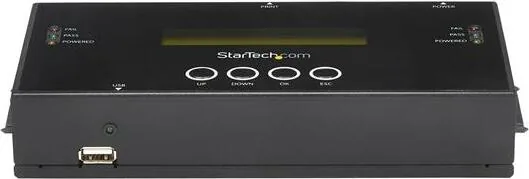
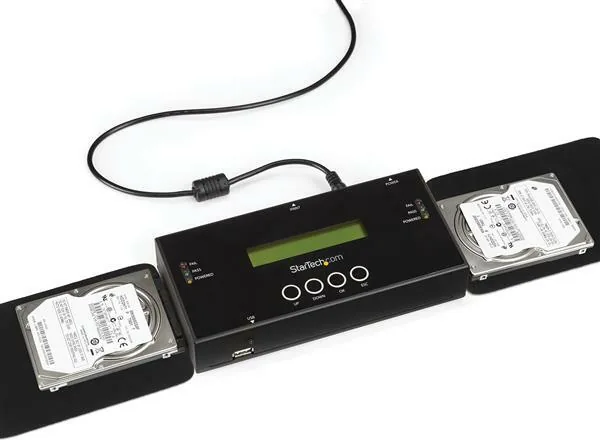
Managing data securely requires reliable tools for duplication and sanitization in modern IT environments. The StarTech SATA/SAS Drive Duplicator & Eraser Standalone offers a robust solution for IT professionals needing to process hard drives without relying on a host computer. This standalone device handles 2.5 and 3.5 inch SATA and SAS drives directly. Users reference the StarTech SATA/SAS Drive Duplicator & Eraser Standalone Manual to ensure proper setup and operation without needing additional software drivers on a PC.
Core Functionality and Copying
The unit features a clear LCD screen and physical navigation buttons for easy configuration without external peripherals. It supports various copy modes including copying system files, all partitions, or the entire hard disk drive including empty space. Data integrity is verified with comparison features that perform bit-by-bit checks immediately after copying completes. This ensures the target drive is an exact replica of the source. For security compliant environments, the device offers multiple erase modes such as Quick Erase, Full Erase, DoD 3 Pass, and Secure Erase. These methods ensure data cannot be recovered after deletion. The system supports a Seven Pass erase standard for sensitive information handling.
Operational Safety and Warnings
Safety measures are critical during hardware handling to protect both the user and the equipment. Power must always be disconnected before wiring terminations to prevent electric shock or short circuit equipment damage. Power and charging cables should be routed carefully to avoid creating tripping hazards or pinching risks during setup. The device complies with FCC Class B standards for radio frequency interference to ensure no disruption. Users should follow guidelines found in the technical specifications for safe operation regarding electrical connections and ventilation for sustained performance.
Utility, Logging, and Network Ports
Administrative tasks are greatly simplified through the built-in Log Manager system. Users can print reports for today, recent activities within the last month, or specific date ranges using available ports. System information and detailed disk details are viewable directly on the screen for quick diagnostics. Factory defaults can be restored easily if configuration errors occur. Advanced functions require password access for security to prevent unauthorized changes. The startup function can be set to automatically initiate copying or erasing upon power on for efficiency. Additionally, a USB-A port is included for potential connectivity needs. This independence makes it ideal for bulk data processing scenarios where computers are unavailable or occupied.
Conclusion and Support
This hardware simplifies drive lifecycle management significantly for professional users. It bridges the gap between legacy storage needs and modern security requirements effectively. StarTech.com provides a two-year warranty and technical support resources online for troubleshooting. The device remains a reliable choice for businesses requiring strict data governance and efficient cloning workflows in secure facilities. Proper usage ensures longevity and consistent performance across various drive types.
Search for 67,706 Manuals online


Type-in Brand or Model