
StarTech SATDUP11 Manual
PDF manual · 21 Pages
English



Quick check
Incorrect answer, please try again.
Chat with your StarTech SATDUP11 manual using AI
Get instant AI answers from your StarTech SATDUP11 manual
Ask anything about the StarTech SATDUP11. Answers come from this manual, with the pages they are based on.
Ask a Question
Do you recommend SATDUP11?
Yes NoFrequently Asked Questions
No, this unit operates standalone without needing a computer or network connection for duplication tasks.
Is this answer helpful?
It has a compare function that checks the target drive bit by bit against the source drive data.
Is this answer helpful?
Yes, the product includes a two year limited warranty covering parts and labor costs.
Is this answer helpful?
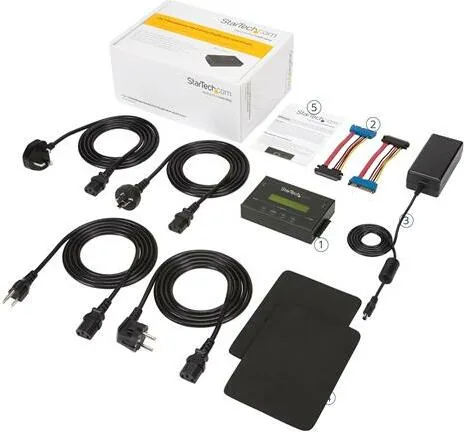
It comes with two SATA cables and three power cords compatible with NA, UK, and EU outlets.
Is this answer helpful?
Yes, you can update the device firmware by formatting a blank hard drive with a FAT32 partition.
Is this answer helpful?
Yes, it supports SATA drives which include Solid State Drives and mechanical hard disk drives.
Is this answer helpful?
Advantages and Disadvantages
Advantages

- Standalone operation requires no computer connection for cloning tasks reducing setup complexity.
- Multiple erase methods include quick overwrite and DoD compliant standards for security.
- Front panel display shows real time progress and validation results for monitoring.
- Includes regional power cords and SATA cables for immediate use out of the box.
- TWO YEAR WARRANTY backing for parts and labor ensures long term reliability for business.
Disadvantages

- Maximum transfer rates must be manually adjusted if stability issues are encountered during copying.
- Firmware updates require creating a specific bootable hard drive partition before installation.
- Source drive must be powered correctly as the erase port defaults to disabled initially.
- Skip error settings require configuration to handle bad sectors effectively during batches.
- Manual setup instructions are dense and require careful reading to avoid data loss.
Product Specification
Type
Duplication Station (SATA 2.5/3.5");
Usage
Portable
Interface
N/A
Media
2x SATA 6Gb/s
Cloning Function
SATA (1x simultaneous, 840GB/h)
Print Function
N/A
Dimensions
5.12x1.18x3.15 in (WxHxD)
Weight
0.79 lbs
Special Features
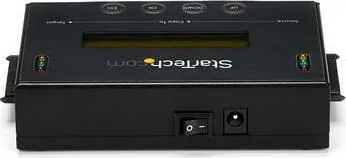
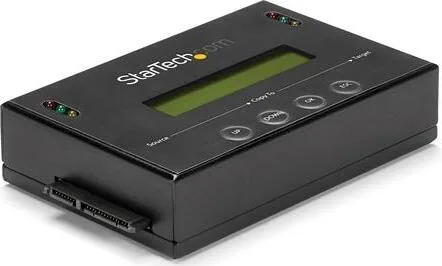
Standalone operation, display, erase function, metal housing
Manufacturer Warranty
2 years
Product Description
Mastering Data Security with StarTech Hardware
Managing storage infrastructure demands reliable duplication solutions for modern IT requirements. The StarTech SATA/SSD Drive Duplicator & Eraser, Standalone Manual introduces a dedicated apparatus designed for high volume cloning without external dependencies. IT professionals often struggle with setting up computer based duplicators that consume resources and space. This hardware solution removes that requirement entirely allowing for a cleaner workspace.
You simply connect the drives to the designated ports and start the process. A front panel display provides real time feedback on the operation progress and errors. Copying data from a source drive to a target drive happens automatically through multiple modes. Users can choose between copying system files or the entire disk volume based on needs. Verification is critical for data integrity in professional environments. It supports various copy areas such as system files or whole disk configurations. The compare function checks bit by bit performance after the copy finishes successfully.
Security is another major feature included for compliance reasons. If you need to dispose of old equipment securely, wiping is mandatory. Options range from quick index deletion to Department of Defense compliant overwrites. This ensures data cannot be recovered by unauthorized parties accessing the media. Hardware setup requires connecting SATA cables to specific input and output ports carefully. Power comes from an included adapter with multiple regional cords for international use. Safety warnings emphasize grounding to prevent static damage while handling drives.
Firmware updates are accessible through an internal utility menu when new fixes appear. Technical support remains available throughout the product lifespan for troubleshooting. This unit streamlines maintenance tasks significantly reducing operational downtime for businesses. Ensure you have backup data before using the erase features for safety. You can also display detailed disc info like temperature and read write speeds directly on the unit. Advanced settings allow you to adjust transfer rates manually for better stability. The product includes a two year warranty backing for parts and labor coverage.
Handling drives requires care as lost data may result from negligence during transport. Always ensure proper anti static measures are followed before installation. The system allows for both copying and erasing tasks in a single standalone unit. This versatility makes it ideal for enterprise data centers. The skip error function manages bad sectors during the duplication process allowing the task to continue despite minor issues. Creating an update hard drive format makes it easy to apply firmware patches quickly without external software. These features ensure continuous operation even with aging hardware components. The utility section displays power on hours and firmware versions for better asset management. Understanding drive health helps prevent failures before they occur during large batch operations.
Search for 67,706 Manuals online


Type-in Brand or Model