
StarTech SAT32MSAT257 Manual
PDF manual · 9 Pages
English



Quick check
Incorrect answer, please try again.
Chat with your StarTech SAT32MSAT257 manual using AI
Get instant AI answers from your StarTech SAT32MSAT257 manual
Ask anything about the StarTech SAT32MSAT257. Answers come from this manual, with the pages they are based on.
Ask a Question
Do you recommend SAT32MSAT257?
Yes NoVideo Manual
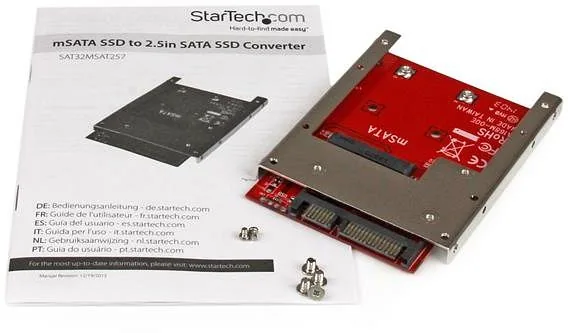
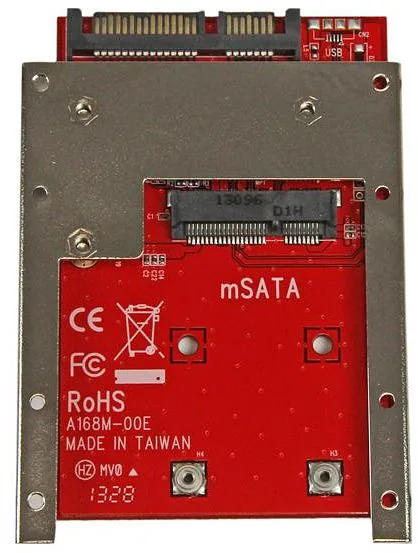
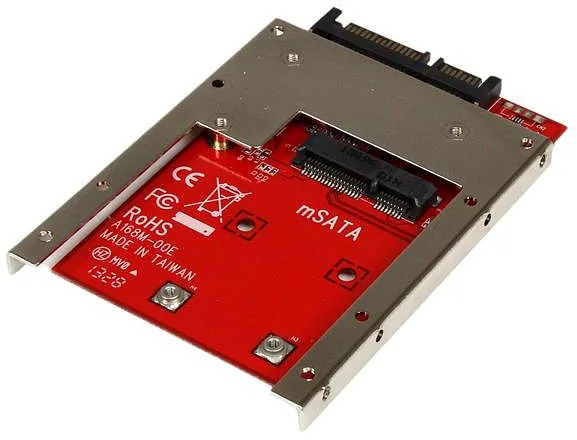
StarTech.com mSATA SSD to 2.5-Inch SATA Adapter Converter with Open Frame Bracket and 7mm Drive
Frequently Asked Questions
It adapts an mSATA SSD to the standard 2.5" SATA form factor, providing a 7+15 pin SATA data and power interface so the mSATA drive can be mounted and used in devices that accept 2.5" SATA drives.
Is this answer helpful?
Yes. The adapter provides a direct mSATA connector and standard SATA interface. After mounting the mSATA SSD to the bracket, connect to your SATA host. New drives may require initialization and partitioning via Windows Disk Management or your OS’s disk utility.
Is this answer helpful?
The product includes a screw kit and requires only a Phillips-head screwdriver to attach the mSATA SSD to the included mounting bracket. Additional mounting hardware may be required depending on your system chassis.
Is this answer helpful?
No. This adapter is designed for mSATA SSDs that use the SATA protocol. NVMe M.2 drives use a different interface and electrical signaling and are not compatible with this converter.
Is this answer helpful?
Use anti-static measures such as an ESD strap or touching a grounded metal surface before handling components. Avoid rough handling to prevent data loss or component damage. Follow manufacturer guidance when installing and initializing drives.
Is this answer helpful?
No significant performance loss should occur because the adapter simply maps the mSATA interface to a SATA connector. The SSD’s performance remains determined by the drive’s specifications and the SATA host’s capabilities.
Is this answer helpful?
StarTech provides lifetime technical support resources online and a two-year warranty covering defects in materials and workmanship. Warranty terms exclude damage from misuse, modification, or normal wear and tear.
Is this answer helpful?
Advantages and Disadvantages
Advantages

- Simple plug-and-play adapter that converts mSATA SSDs to standard 2.5" SATA form factor.
- Includes mounting bracket and screw kit for secure installation in various orientations.
- Preserves SSD performance while enabling use in legacy SATA bays and modern systems.
- Clear installation and initialization guidance for Windows Disk Management.
- Backed by StarTech lifetime technical support and a two-year warranty.
Disadvantages

- Requires careful anti-static handling to avoid damaging sensitive SSD components.
- No active circuitry for NVMe; limited to mSATA (SATA protocol) drives only.
- May need additional screws or mounting adjustments depending on host device.
- GPT initialization may be incompatible with older operating systems.
- Doesn't include a SATA host interface cable—host must provide SATA connection.
Product Specification
Type
Other
Product Description
StarTech mSATA SSD to 2.5" SATA Adapter/Converter Manual
Overview
The StarTech mSATA SSD to 2.5" SATA Adapter/Converter is a compact, easy-to-use solution that lets you adapt an mSATA SSD for use in any standard 2.5" SATA bay. Designed for technicians, system builders, and DIY upgraders, the adapter includes a mounting bracket and screw kit, supporting straightforward installation and integration into laptops, desktops, or external enclosures. It preserves the performance characteristics of your mSATA drive while providing compatibility with legacy and modern SATA hosts.
Key Features and What It Does
This adapter features a direct mSATA connector and a combined 7+15 pin SATA data and power interface, enabling plug-and-play compatibility with most SATA hosts. Side and top mounting holes offer flexible mounting orientations, and a simple installation procedure secures the mSATA drive to the included bracket with two screws. The adapter is ideal for upgrading older laptops or repurposing mSATA modules as conventional 2.5" drives.
Practical Benefits
Using this converter, you can quickly repurpose spare mSATA SSDs without needing a new enclosure or specialized hardware. It’s especially useful for data transfers, testing drives, or breathing new life into devices that accept only 2.5" SATA drives. The adapter keeps installation risk low when static-handling precautions are observed and includes clear guidance for initializing new or blank drives in Windows (Disk Management: initialize as MBR or GPT, create partition, format).
Who Should Consider It
This adapter suits IT professionals, system integrators, and advanced home users who need a reliable bridge between mSATA storage and SATA-based systems. It’s also a practical choice for refurbishers and labs that frequently interchange SSDs across different platforms.
Warranty & Support
StarTech backs this product with lifetime technical support resources and a two-year warranty covering defects in materials and workmanship (terms apply). Documentation, downloads, and support are available at startech.com.
Notes
- Handle SSDs with anti-static precautions to avoid data loss.
- Choose MBR or GPT carefully when initializing; GPT may be incompatible with older OSes.
- Ensure proper drive identification before partitioning to avoid accidental data erasure.
Search for 67,706 Manuals online


Type-in Brand or Model