
StarTech PEXSOUND7CH Manual
PDF manual · 11 Pages
English



Quick check
Incorrect answer, please try again.
Chat with your StarTech PEXSOUND7CH manual using AI
Get instant AI answers from your StarTech PEXSOUND7CH manual
Ask anything about the StarTech PEXSOUND7CH. Answers come from this manual, with the pages they are based on.
Ask a Question
Do you recommend PEXSOUND7CH?
Yes NoFrequently Asked Questions
It combines 7.1-channel surround audio with PCIe compatibility, S/PDIF input/output, and a separate header bracket for expanded analog connections. That makes it useful for richer desktop audio setups.
Is this answer helpful?
Yes, it fits an available PCIe x1 slot and can also operate in larger PCIe slots such as x4, x8, or x16. That gives it good flexibility across many desktop motherboards.
Is this answer helpful?
Yes, the package includes low-profile brackets, so it can be adapted for compact or small-form-factor systems where standard brackets may not fit.
Is this answer helpful?
Often yes. Some systems may detect the card automatically, but StarTech recommends downloading the latest driver package from its website to complete setup and access the Xear Audio Center.
Is this answer helpful?
Yes, the card includes a 9-pin header for Intel HD front panel audio. A separate cable is required, so you may need to source that if your case supports it.
Is this answer helpful?
It supports multiple analog outputs through the header bracket, including front, side surround, center/subwoofer, and rear surround channels. It also includes S/PDIF input and output for digital audio devices.
Is this answer helpful?
Yes, it includes internal headers for analog CD audio input, which can help connect older drives that still use analog audio signaling.
Is this answer helpful?
Advantages and Disadvantages
Advantages

- Supports 7.1-channel audio with 24-bit / 192 kHz playback for detailed sound.
- Works in PCIe x1 slots and larger lanes, making it broadly compatible with desktops.
- Includes a header bracket, low-profile brackets, and a 10-pin cable for flexible installs.
- Offers analog and S/PDIF connections plus support for front panel audio integration.
Disadvantages

- Driver/software setup may require manual download and installation for full functionality.
- Some features depend on extra case headers or optional cables that are not included.
- Windows-focused support limits usefulness for users on non-Windows platforms.
- Older legacy connections like CD/DVD audio are useful, but mainly for specialized builds.
Product Specification
Chipset
CM8828
Channels
8 (7.1)
Resolution
24 bit
Sample Rate
192 kHz
SNR
92 dB
Inputs (analog)
N/A
Outputs (analog)
6x Jack (0.14 in)
Outputs (digital)
S/PDIF
Product Description
StarTech 7.1 Channel Sound Card, PCIe Manual: A Smart Audio Upgrade
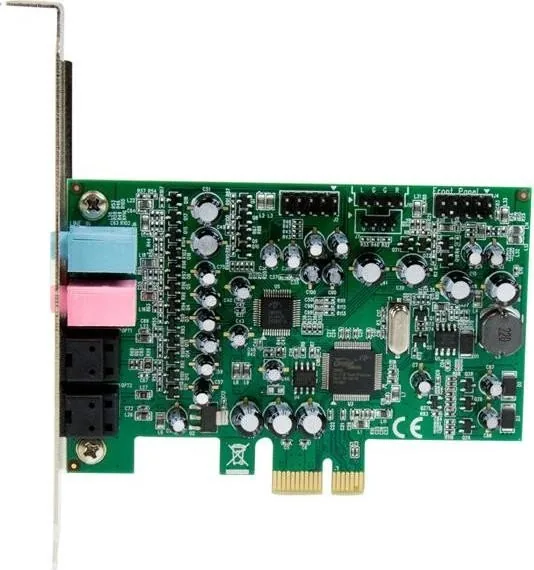
The StarTech 7.1 Channel Sound Card, PCIe is built for users who want fuller, cleaner desktop audio without replacing their entire system. Designed for PCI Express x1 slots and compatible with larger x4, x8, and x16 slots, it adds a flexible surround-sound solution to a wide range of PCs. With support for 24-bit / 192 kHz audio, it is aimed at richer playback, clearer voice input, and more detailed output for music, movies, and games.
Surround Sound with Flexible Connections
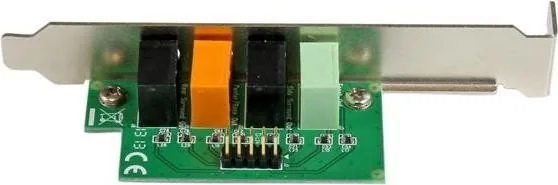
This card offers both analog and digital options, including S/PDIF input and output for connection to digital amplifiers or decoders. The included header bracket expands the available outputs, giving users access to front left/right, side surround, center/subwoofer, and rear surround channels. That makes it a strong choice for anyone building a more complete 7.1 audio setup at home or in a small studio environment.
Practical Design for Real-World Builds
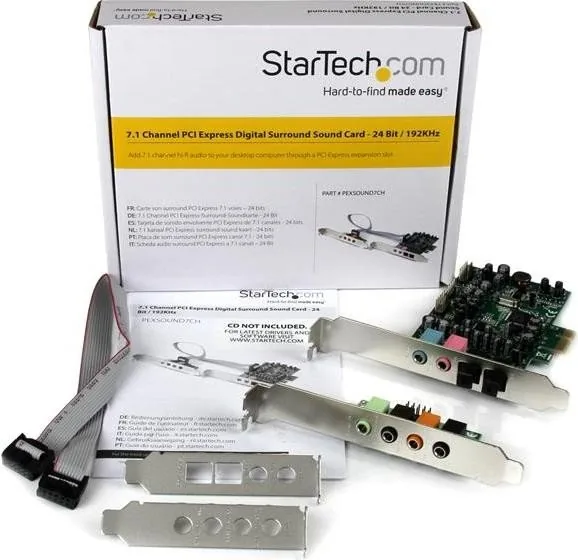
The package includes a main PCIe card, a header bracket, a 10-pin cable, and low-profile brackets for compact systems. It also supports Intel HD front panel audio through an internal header, adding convenience for cases with front audio ports. For older PC builds, there are internal headers for analog CD/DVD drive audio signals, which can help integrate legacy hardware into a modern setup.
Software, Setup, and Everyday Use
Installation is straightforward, though the manual recommends downloading the latest drivers from StarTech for the best experience. Once installed, the Xear Audio Center provides access to audio controls and configuration tools. That makes the card more than just a hardware add-on; it becomes a tunable audio platform for users who want to fine-tune output and input behavior.
Notes
- Best suited for Windows-based systems with available PCIe expansion.
- Low-profile brackets make it more adaptable in smaller cases.
- S/PDIF support adds value for digital audio setups.
- Warranty coverage and lifetime technical support improve long-term confidence.
Search for 67,706 Manuals online


Type-in Brand or Model