
StarTech PEX1PLP Manual
PDF manual · 10 Pages
English



Quick check
Incorrect answer, please try again.
Chat with your StarTech PEX1PLP manual using AI
Get instant AI answers from your StarTech PEX1PLP manual
Ask anything about the StarTech PEX1PLP. Answers come from this manual, with the pages they are based on.
Ask a Question
Do you recommend PEX1PLP?
Yes NoFrequently Asked Questions
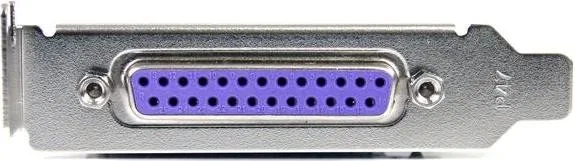
It adds one parallel DB25 port to a PCIe-enabled computer, allowing the system to connect with older parallel devices such as printers, scanners, and other Centronics-compatible equipment.
Is this answer helpful?
The card supports SPP, EPP, and ECP modes. That makes it useful for a range of legacy peripherals that rely on different parallel communication methods.
Is this answer helpful?
Yes. The PEX1PLP version is low-profile compatible, so it can fit small-form-factor systems. It also includes bracket options to help match different case sizes.
Is this answer helpful?
Supported systems include Windows 2000, XP, Server 2003, Vista, Server 2008 R2, Windows 7, DOS, and Linux. It is aimed mainly at older environments and legacy support needs.
Is this answer helpful?
The maximum data transfer rate is up to 1.5 Mbps. That is sufficient for many older peripherals, but it is not designed for modern high-speed data tasks.
Is this answer helpful?
After setup, open Device Manager and check under Ports (COM & LPT). A PCI Express Parallel Port should appear there, showing that the card has been detected correctly.
Is this answer helpful?
Advantages and Disadvantages
Advantages

- Adds one DB25 parallel port to PCIe x1 systems for legacy device support.
- Supports SPP, EPP, and ECP modes for broad peripheral compatibility.
- Low-profile design fits compact builds and small-form-factor PCs.
- Includes drivers, brackets, and a two-year warranty with lifetime support.
Disadvantages

- Maximum data rate is limited to 1.5 Mbps, so it is not a high-speed solution.
- Support focuses on older operating systems rather than modern platforms.
- Setup may require manual driver installation from the included CD.
- Only one parallel port is provided, which may be limiting for larger setups.
Product Specification
External
1x parallel
Internal
N/A
Interface
PCIe x1
Chipset
PLX/Oxford - OXPCIe952
Special features
low profile PCB
USB designation
Link
Product Description
StarTech PEX1PLP: Simple Parallel Port Expansion for PCIe PCs
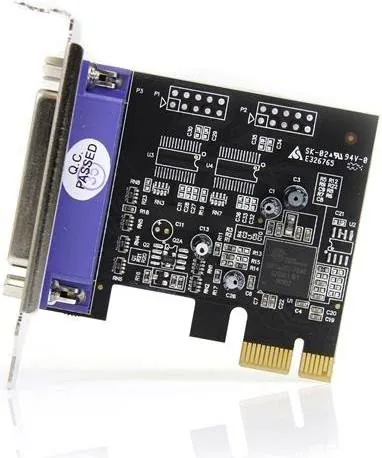
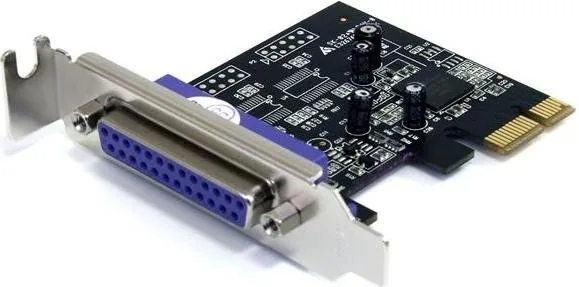
The StarTech PEX1PLP, 1x Parallel, PCIe x1 adapter card is a practical way to bring a classic DB25 parallel connection back to modern desktop systems. Designed for PCI Express x1 slots, it gives newer PCs the ability to communicate with parallel printers, scanners, and other Centronics-style peripherals that still play an important role in offices, labs, and industrial setups. For anyone looking through the StarTech PEX1PLP, 1x Parallel, PCIe x1 Manual, the core idea is straightforward: add dependable legacy connectivity without complicating the system.
What makes this card appealing is its focus on compatibility and simplicity. It supports SPP, EPP, and ECP modes, so it can work with a wide range of parallel devices rather than being limited to a single older standard. The single-chip PCIe design is intended to keep performance stable while reducing the chance of unnecessary overhead. With a maximum data transfer rate of up to 1.5 Mbps, it is not built for speed-first workloads, but it is a strong fit for equipment that values reliability over raw throughput.
The PEX1PLP version also stands out for its low-profile support, making it a good option for compact PCs and slim server-style cases. If the card is being installed in a full-height system, the included bracket options help it fit the chassis properly. That flexibility makes it easier to deploy in mixed environments where hardware size varies from one machine to another.
Installation is meant to be accessible for users with basic PC maintenance experience. After the card is seated in an open PCIe slot, the included drivers guide the operating system through setup on supported Windows versions, DOS, and Linux. Once installed, the parallel port appears in Device Manager, confirming that the system is ready for connected devices. This is especially useful for organizations that need to preserve older workflows without replacing perfectly functional equipment.
StarTech backs the adapter with a two-year warranty, lifetime technical support, and a design approach that favors long-term practicality. In a world where many systems have dropped parallel ports entirely, the PEX1PLP offers a clean bridge between legacy hardware and PCIe-based computers.
Notes
- Best suited for older printers and specialized parallel devices.
- Works well when legacy support matters more than speed.
- Check case profile and slot availability before installing.
Search for 67,706 Manuals online


Type-in Brand or Model