
StarTech PEX1PCI1 Manual
PDF manual · 2 Pages
English



Quick check
Incorrect answer, please try again.
Chat with your StarTech PEX1PCI1 manual using AI
Get instant AI answers from your StarTech PEX1PCI1 manual
Ask anything about the StarTech PEX1PCI1. Answers come from this manual, with the pages they are based on.
Ask a Question
Do you recommend PEX1PCI1?
Yes No
Thomas Klein
7 months ago
Will this adapter work with an EMU 1212M sound card? I am worried about stability and whether the card stays secure with the full size bracket. Some reviews mention the power connector looks bad. Can I trust this for old hardware?

Manual.ly
7 months ago
Thank you for your inquiry. Based on verified user reports, this adapter functions flawlessly with legacy hardware such as the EMU 1212M sound card and DVB-S2 cards. Drivers are installed automatically with no performance loss compared to standard PCI slots. Please be aware that low profile cards may require height adjustments using the included bracket to prevent slipping. Ensure your chassis has sufficient depth for the power supply connector to maintain a tidy interior.
Frequently Asked Questions
No drivers are needed to install the adapter card. It only acts as a bridge adapter for the PCI card and functions plug and play upon system startup.
Is this answer helpful?
The adapter supports Microsoft Windows versions 2000, XP, Vista, and 7 on a PCI Express enabled computer system.
Is this answer helpful?
This product is backed by a two year warranty covering defects in materials and workmanship from the initial date of purchase.
Is this answer helpful?
Yes, you must connect the 4 pin power connector to the computer power supply for proper operation and stability.
Is this answer helpful?
Yes. PCIe slots are backwards compatible with smaller PCIe cards, so a x4 or greater slot can be used if necessary.
Is this answer helpful?
Try to correct interference by reorienting the receiving antenna, increasing separation, or connecting to a different electrical circuit.
Is this answer helpful?
StarTech.com offers lifetime technical support. Users can visit their website for documentation and troubleshooting assistance.
Is this answer helpful?
Advantages and Disadvantages
Advantages

- No drivers needed as it acts as a hardware bridge
- Includes a spare full profile bracket for flexibility
- Backed by a two year limited warranty for peace of mind
- Compatible with Windows 2000, XP, Vista, and 7
- Reliable Pericom PI7C9X111SL chipset ensures stability
Disadvantages

- Requires a 4-Pin LP4 Molex power connection
- Full profile PCI cards may not fit in all chassis
- Limited to older Windows operating systems for support
- PCI Express x1 slot is preferred for installation
- Warranty excludes damages from misuse or normal wear
Product Specification
Internal
PCI
Interface
PCIe x1
Chipset
Pericom PI7C9X110BNBE
Features
low profile PCB
USB Designation
Link
Product Description
Unlocking Legacy Hardware Potential with StarTech PEX1PCI1
The Challenge of Modern Motherboards
Many users face a common dilemma when upgrading or repairing computer towers. Modern motherboards have moved away from legacy PCI slots in favor of PCI Express technology. This shift renders older expansion cards unusable without a bridging solution. The StarTech PEX1PCI1 PCIe x1 to PCI Adapter addresses this gap effectively. It serves as a critical bridge adapter for legacy PCI cards, enabling them to function within PCIe x1 slots found on newer systems. This device is essential for maintaining older specialized hardware in current environments.
Installation and Configuration Steps
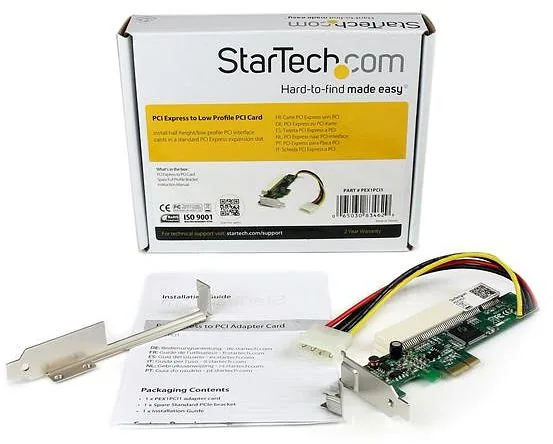
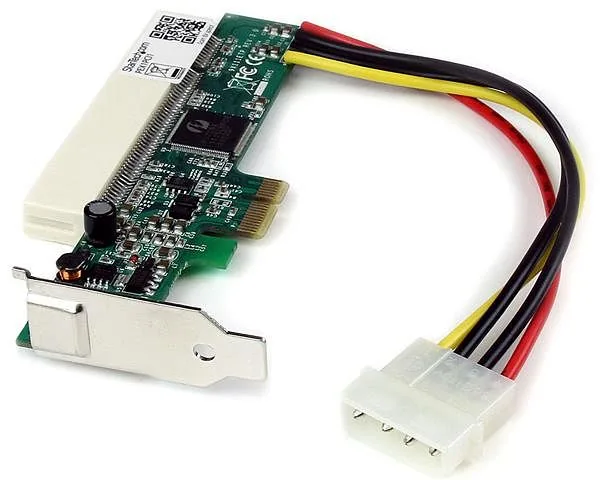
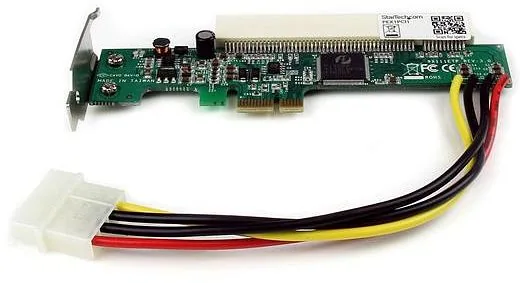
The installation process is designed for simplicity and user safety. First, insert the low profile PCI card into the white PCI Slot connector located on the top of the adapter card. It is important to note if the spare PCIe bracket is used, the bracket on the PCI card must then be removed. Full profile PCI cards may not fit in the system chassis properly. Next, install the adapter card firmly into the motherboard PCIe x1 slot. Although PCIe slots are backwards compatible with smaller PCIe cards, a x4 or greater slot can be used if necessary. Connect the 4 pin power connector to the computer power supply to ensure stable voltage delivery. Power on the computer and load the operating system to complete the setup. Users should know that no drivers are needed to install the adapter card. It acts strictly as a bridge to pass signals.
Technical Specifications and Requirements
This adapter requires a PCI Express enabled computer system to function correctly. Software support is limited to Microsoft Windows versions 2000, XP, Vista, and 7. The internal chipset identified is Pericom PI7C9X111SL, which manages the bus communication efficiently. The PCI card bus operates at 32-Bit and 33 MHz frequency. Power requirements include a standard 4-Pin LP4 Molex connector. The operating temperature range is from zero to 85 degrees Celsius. Packaging contains the PCI Express to PCI Card, a spare Full Profile Bracket, and printed instructions. Ensure the power supply unit provides adequate wattage for the bridge card to function without electrical noise.
Reliability and Support
StarTech.com provides industry leading support for this product. Users can access lifetime technical support through their official portal. For the latest drivers or software, the downloads section is available online. The product carries a two year warranty from the initial date of purchase. This warranty covers parts and labor costs only and excludes defects arising from misuse or normal wear and tear. FCC compliance ensures reasonable protection against harmful interference in residential installations. If interference occurs, reorient antennas or move receivers to correct the issue. StarTech Ltd does not warrant damages arising from misuse or alteration of the product.
Final Thoughts
This adapter is a practical investment for hardware enthusiasts keeping old systems alive. It simplifies the transition from legacy bus standards to modern PCIe interfaces without software overhead. While limited to older operating systems and requiring specific power connections, it remains a reliable tool for hardware compatibility challenges. It ensures that legacy infrastructure investments are not wasted due to hardware obsolescence.
Search for 67,706 Manuals online


Type-in Brand or Model
Hans Klein
8 months ago
Does this adapter work reliably with PCI sound cards like the EMU 1212M or TV cards, and are there any stability concerns?
Manual.ly
8 months ago
Yes, this adapter works well with various PCI cards including the EMU 1212M and Technisat DVB-S2. It is designed for Low Profile cards. For better stability, some users recommend desoldering the SPDIF IN port to utilize the full-size slot bracket for securing the card. Build quality is good with automatic driver installation, though the power connector design is criticized for cable management.