
StarTech PEX1P Manual
PDF manual · 9 Pages
English



Quick check
Incorrect answer, please try again.
Chat with your StarTech PEX1P manual using AI
Get instant AI answers from your StarTech PEX1P manual
Ask anything about the StarTech PEX1P. Answers come from this manual, with the pages they are based on.
Ask a Question
Do you recommend PEX1P?
Yes NoFrequently Asked Questions
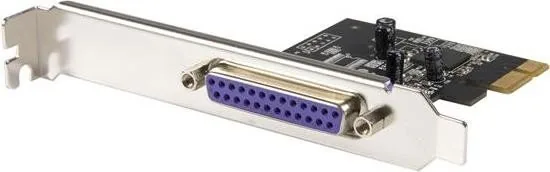
It adds a parallel DB25 port to a computer with a PCI Express slot. This is useful for older printers, scanners, and other devices that still depend on parallel communication.
Is this answer helpful?
The card supports Windows 2000, XP, Vista, and Server 2003 in both 32-bit and 64-bit editions, as listed in the product information.
Is this answer helpful?
The card supports data transfer rates up to 1.5 Mbps. That is suitable for legacy peripherals, though it is not intended for modern high-speed devices.
Is this answer helpful?
No, it is fairly direct. You install the card into an available PCI Express slot, connect the system, and then install the driver from the included CD using the Windows hardware wizard.
Is this answer helpful?
You can check Device Manager in Windows. If installed properly, the system should show a PCI Express ECP Parallel Port under Ports (COM & LPT).
Is this answer helpful?
StarTech offers lifetime technical support for help with setup and troubleshooting. The product also includes a one-year warranty against defects in materials and workmanship.
Is this answer helpful?
Advantages and Disadvantages
Advantages

- Adds one parallel DB25 port through a PCIe x1 slot for legacy device support.
- Supports SPP, EPP, and ECP modes for broad parallel peripheral compatibility.
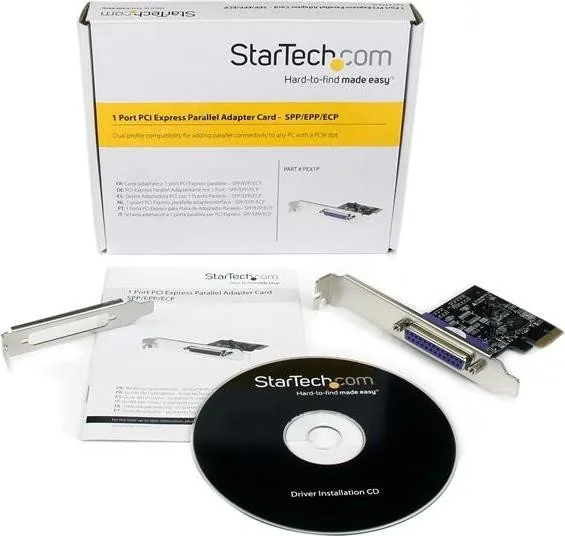
- Includes driver media and step-by-step installation guidance for Windows.
- Backed by lifetime technical support and a one-year warranty.
Disadvantages

- Maximum transfer speed is only up to 1.5 Mbps, so it is not meant for fast data tasks.
- Windows support is limited to older versions like 2000, XP, Vista, and Server 2003.
- Designed mainly for legacy hardware, so it has little value for modern USB devices.
- Requires a free PCI Express slot and physical installation inside the computer.
Product Specification
External
1x parallel
Internal
N/A
Interface
PCIe x1
Chipset
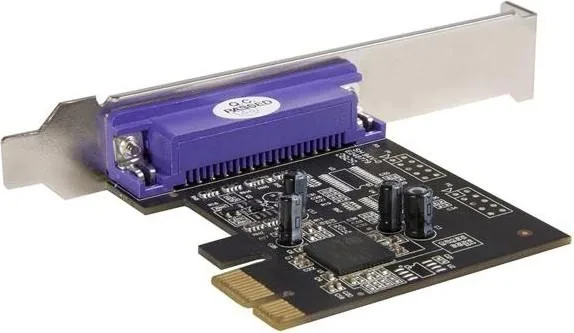
PLX/Oxford - OXPCIe952
USB Type
Link
Product Description
StarTech PEX1P PCIe Parallel Card: A Simple Bridge for Legacy Peripherals
The StarTech PEX1P, 1x Parallel, PCIe x1 Manual highlights a practical solution for anyone who still relies on parallel-port hardware in a modern PC. Built for systems with an available PCI Express slot, this expansion card adds a DB25 parallel connection without demanding a complicated setup. It is a straightforward way to keep older printers, scanners, and industrial devices working in a newer desktop environment.
What makes this card appealing is its focus on compatibility and ease of use. It supports standard parallel communication modes including SPP, EPP, and ECP, helping it work with a wide range of Centronics-based devices. With a maximum data transfer rate of up to 1.5 Mbps, it is not designed for high-speed modern peripherals, but it delivers the dependable behavior that many legacy tools require. For offices, labs, and repair environments, that reliability can matter more than raw speed.
Installation is designed to be manageable for most users. The card fits into a PCI Express x1 slot and comes with a driver CD for supported versions of Windows. The manual walks through hardware installation carefully, including grounding and anti-static precautions, which is especially important when handling expansion cards. Once installed, the device can be verified through Windows Device Manager, making troubleshooting simpler for users who want confirmation that the port is ready.
Another strong point is the balance between hardware utility and support. StarTech includes lifetime technical support, which adds value for users maintaining older equipment over time. The product is also backed by a one-year warranty, giving buyers a measure of confidence in the build and workmanship. For organizations that cannot easily replace parallel devices, this kind of support can help extend the useful life of existing equipment.
Although the PEX1P is specialized, that is also its strength. It solves a specific compatibility problem with minimal fuss and a compact form factor. The card is best viewed as a bridge between older peripherals and today’s PCI Express-based computers. If your workflow still depends on a parallel connection, this adapter offers a practical, stable path forward.
Notes
- Best suited for legacy printers and devices that still depend on DB25 parallel communication.
- Windows support is focused on older editions, so compatibility should be checked before purchase.
- A good fit for environments that value continuity over cutting-edge speed.
Search for 67,706 Manuals online


Type-in Brand or Model