

StarTech PEX100S Manual
PDF manual · 10 Pages
English



Quick check
Incorrect answer, please try again.
Chat with your StarTech PEX100S manual using AI
Get instant AI answers from your StarTech PEX100S manual
Ask anything about the StarTech PEX100S. Answers come from this manual, with the pages they are based on.
Ask a Question
Do you recommend PEX100S?
Yes NoFrequently Asked Questions
The device supports a network speed of up to 100 Mbps. It is an Ethernet 10/100 Fast Ethernet card compliant with IEEE 802.3u specifications.
Is this answer helpful?
Supported operating systems include Windows 2000, Windows ME, Windows XP, and Windows Vista. The Windows Vista system may automatically detect installation steps.
Is this answer helpful?
Insert the included driver CD into the computer drive. Run the setup exe file from the disc following the on-screen instructions. Restart the computer after installation completes to finalize the process.
Is this answer helpful?
Yes. StarTech provides a two-year warranty against material and manufacturing defects from the date of purchase. This covers parts and labor for repair or replacement.
Is this answer helpful?
The adapter uses a standard RJ45 connector. It supports standard twisted pair cabling for 10 and 100 Mbps connections.
Is this answer helpful?
Open the Computer Management menu and select Device Manager. Check under Network Adapters to confirm the Realtek NIC is listed without error codes.
Is this answer helpful?
Advantages and Disadvantages
Advantages

- Single-lane PCI-Express offers high bus throughput up to 2.5 Gbps
- Wake-On-LAN support allows remote power management and connectivity
- Auto-MDI/MDIX eliminates the need for cable type selection
- Includes low-profile bracket for compact chassis installations
- Two-year warranty covers material and manufacturing defects
Disadvantages

- Maximum network speed is limited to 100 Mbps rather than Gigabit
- Operating system support is limited to older Windows versions
- Requires opening the computer case for physical installation
- FCC Class A compliance may require mitigation in residential areas
Product Specification
Type
LAN adapter
Form Factor
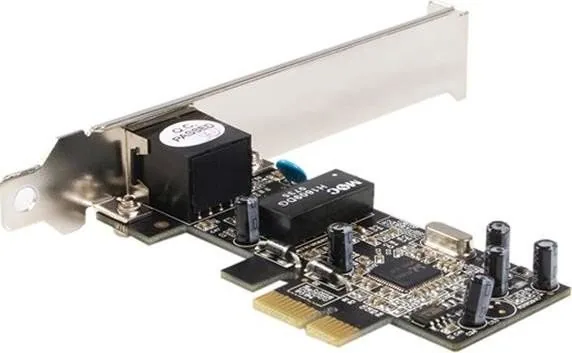
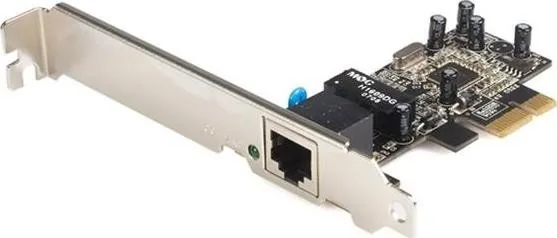
1x PCIe card (interchangeable bracket: full height and low profile bracket included)
Bus Interface
1x PCIe x1
Port
1x RJ-45
Transmission
1x RJ-45 (10/100Base-T)
Power Supply
Power supply only via connection
Chipset
Realtek RTL8101E (LAN adapter, RJ-45)
Dimensions
3.66x4.72x0.83in (WxHxD)
Weight
1.59 oz
Compatibility
universal
Features
Wake on LAN
Manufacturer Warranty
2 years
Product Description
Upgrade Your System Connectivity
In the modern digital landscape, reliable network access is essential for maintaining high productivity levels. The StarTech LAN adapter, RJ-45, PCIe x1 Manual provides a clear guide for users looking to expand their networking capabilities without upgrading their entire machine. This Ethernet card allows you to add high-speed connectivity to older systems or add extra ports where needed. It supports both 10 and 100 Mbps data rates, ensuring smooth transfers for standard office tasks. Many professional environments require stable connections that do not rely on Wi-Fi instability.
Key Features Overview
This hardware solution is designed for stability and ease of use in various computing environments. It utilizes a single-lane PCI-Express interface which delivers efficient data throughput up to 2.5 Gbps on the bus itself. Users benefit from Wake-On-LAN support, allowing the system to stay connected even in low power states. The adapter features auto-MDIX configuration, meaning you can plug in any cable type without manual intervention. LEDs indicate link status and activity, giving immediate visual feedback on network performance and connection speed. Full and half-duplex operation ensures flexibility in diverse network configurations.
Installation Process
Installing this component requires standard hardware familiarity and care during the procedure. You must power off the PC and open the case to access the PCIe slot securely. Once the card is secured into the vacant slot, drivers are loaded using the included disc. The software setup guides users through installing necessary network drivers on supported operating systems like Windows XP or Vista. This ensures the operating system communicates correctly with the new hardware device. Proper cable management helps maintain airflow inside the chassis while protecting wires from damage. Always verify the installation through the device manager to confirm driver recognition.
Support and Reliability
StarTech stands behind their products with robust support channels available to customers globally. The company offers a two-year warranty to cover material and manufacturing defects for peace of mind. Customers can access online resources for troubleshooting and driver updates regularly via their website. This commitment ensures long-term reliability for your business or home network infrastructure solutions. Whether you need a backup connection or a primary add-on, this hardware meets demanding standards for consistent data transmission. FCC compliance ensures the device meets regulatory standards for electromagnetic interference. Professional technicians recommend this card for its durability in continuous operation.
Search for 67,706 Manuals online


Type-in Brand or Model