
StarTech PCI1P_LP Manual
PDF manual · 12 Pages
English



Quick check
Incorrect answer, please try again.
Chat with your StarTech PCI1P_LP manual using AI
Get instant AI answers from your StarTech PCI1P_LP manual
Ask anything about the StarTech PCI1P_LP. Answers come from this manual, with the pages they are based on.
Ask a Question
Do you recommend PCI1P_LP?
Yes NoFrequently Asked Questions
The card historically supports Windows 95/98SE/ME/NT/2000/XP/2003, DOS and Linux with documented configuration steps. Modern Windows versions may require driver downloads from StarTech.com; it is not Mac compatible.
Is this answer helpful?
Power down and ground yourself, remove the computer case, locate an available low-profile PCI slot, remove the rear bracket plate, carefully seat the card, secure it with the retained screw, and reinstall the case. Follow anti-static precautions throughout.
Is this answer helpful?
Manually create the LPT port using the Add Printer Wizard: choose Local Printer, uncheck automatic detection, create a Local Port named LPTx matching the Device Manager assignment, then complete printer installation.
Is this answer helpful?
Possibly not. PCI plug-and-play ports receive virtual resources from the OS; devices requiring specific legacy addresses/IRQs (e.g., LPT1 at 0x378 IRQ7) may not function. For those cases, use an ISA hard-configurable parallel card.
Is this answer helpful?
List PCI resources with more /proc/pci, unload paraport modules (rmmod parport_pc.o), then reload parport_pc with insmod parport_pc.o io=... irq=... using the discovered I/O addresses and IRQs. The first loaded port maps to /dev/lp0, the next to /dev/lp1.
Is this answer helpful?
Uninstall the NetMos Parallel Port entry in Device Manager, power down, move the card to a different PCI slot, and reinstall. Windows will reassign resources and should then assign an LPT number.
Is this answer helpful?
Visit StarTech.com and navigate to the product’s Downloads/Support page for drivers and documentation. StarTech provides lifetime technical support and lists compatible accessory cables and adapters on their website.
Is this answer helpful?
Advantages and Disadvantages
Advantages

- Compact low-profile form factor suitable for small desktop cases.
- Supports IEEE-1284 modes (SPP, BPP, EPP, ECP) for broad device compatibility.
- Often faster than many built-in parallel ports for improved device performance.
- Plug and Play support on Windows with available drivers and downloadable updates.
- Backed by StarTech lifetime technical support and warranty.
Disadvantages

- Not compatible with Mac systems — Intel/PC only.
- May not work with legacy apps requiring fixed LPT I/O addresses/IRQ settings.
- Requires manual driver/module configuration for some DOS/Linux setups.
- Maximum data transfer speed (~1.5 Mbits/sec) limited by parallel mode characteristics.
- Two-port models require additional bracket/cable installation steps.
Product Specification
External
1x parallel
Internal
N/A
Interface
PCI
Chipset
NM9805
Special features
low profile PCB
USB designation
Link
Product Description
StarTech PCI1P_LP — 1x Parallel PCI Manual Overview
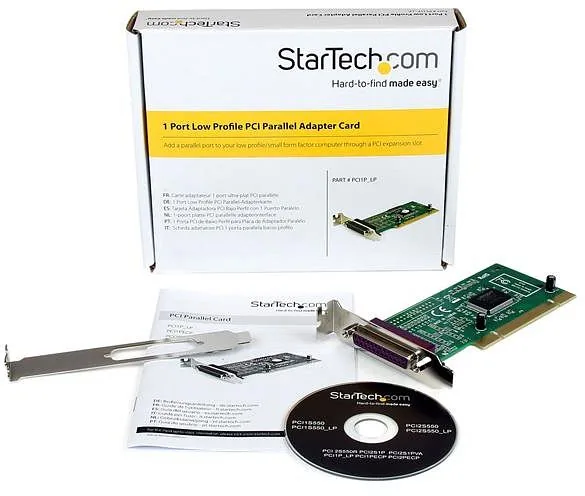
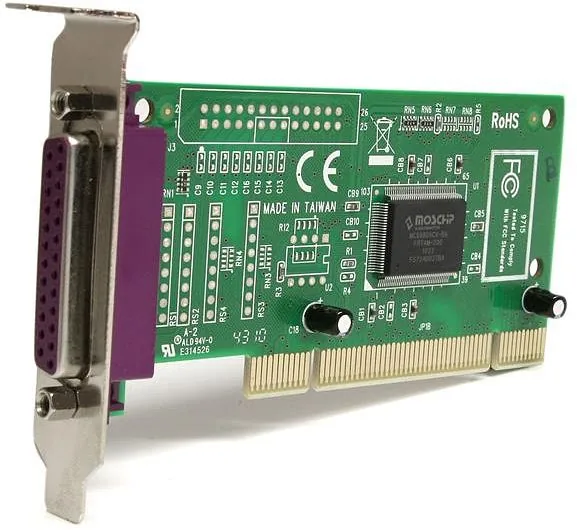
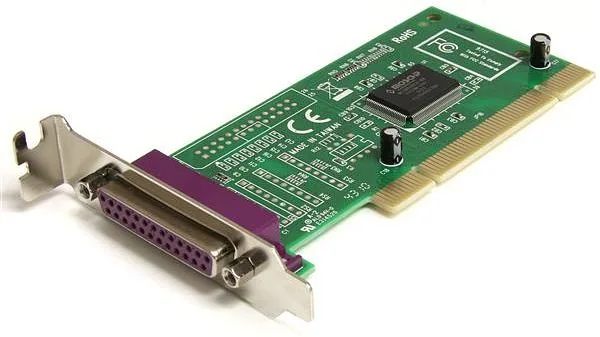
The StarTech PCI1P_LP is a low-profile PCI parallel expansion card that adds a single 25-pin IEEE-1284-compatible parallel port to Intel-compatible desktop systems. Built around the NetMOS Nm9805CV chipset, this card supports legacy and modern parallel communication modes (SPP, BPP, EPP, ECP), offering higher throughput than many onboard ports and reliable support for printers, scanners, dongles, and other parallel devices. It’s designed for systems with a low-profile PCI slot and provides a simple Plug and Play installation experience on Windows, with documented DOS and Linux configuration steps for advanced users.
What it does and who it’s for
Compact and practical, the PCI1P_LP is aimed at users who need to preserve compatibility with parallel devices when upgrading systems or when a motherboard lacks a native parallel connector. Small offices, point-of-sale installations, labs, and technicians who maintain legacy hardware will find it useful. While it supports common operating systems (Windows 95 through Windows Server 2003 series historically, DOS, and Linux), it is not Mac-compatible and is intended for Intel-compatible PCs.
Key features and installation notes
The card fully complies with IEEE-1284 and supports SPP, BPP, EPP, and ECP transfer modes for flexible device compatibility and improved transfer speeds. Installation involves seating the low-profile PCI card into an available PCI slot, securing the bracket, and installing drivers from the included CD or StarTech’s website. On Windows platforms the Add New Hardware wizard typically auto-detects the card; for Linux, parport modules may need to be reloaded with specific io and irq parameters. The manual emphasizes proper ESD precautions and recommends grounding or using an anti-static strap when handling the card.
Performance and limitations
Measured at up to 1.5 Mbits/sec maximum transfer speed (typical for parallel modes used), the PCI1P_LP frequently outperforms many built-in parallel ports. However, certain legacy applications and hardware that require fixed, legacy LPT resources (specific I/O addresses and IRQs) may not operate correctly with a Plug and Play PCI parallel port. In such cases, ISA-based hard-configurable cards are recommended. Troubleshooting guidance covers printer port assignment, Device Manager checks, and resolution steps when LPT numbers are missing or drivers are unsigned.
Warranty and support
StarTech backs the product with lifetime technical support and a lifetime warranty on materials and workmanship under specified conditions. Regulatory certifications include FCC Class B, CE, and UL. For drivers, downloads, and support resources, StarTech’s website offers documentation and tools.
Notes
- The PCI1P_LP is low-profile and requires a low-profile PCI slot.
- Not Mac-compatible — designed for Intel-compatible PCs only.
- Some legacy hardware may still require ISA-based solutions if fixed LPT resources are mandatory.
Search for 67,706 Manuals online


Type-in Brand or Model