
StarTech NOTECONS01 Manual
PDF manual · 18 Pages
English



Quick check
Incorrect answer, please try again.
Chat with your StarTech NOTECONS01 manual using AI
Get instant AI answers from your StarTech NOTECONS01 manual
Ask anything about the StarTech NOTECONS01. Answers come from this manual, with the pages they are based on.
Ask a Question
Do you recommend NOTECONS01?
Yes NoFrequently Asked Questions
It lets a laptop act as a temporary console for a server or computer. You can view video output, use keyboard and mouse control, and troubleshoot systems without a dedicated monitor or KVM station.
Is this answer helpful?
The adapter supports common notebook systems such as Windows XP, Vista, 7, Server 2008 R2, Mac OS X, and certain Linux distributions. Compatibility depends on the host computer and software installation.
Is this answer helpful?
Yes. The software includes a special keys menu for commands like Ctrl-Alt-Del, Alt-F4, and other key sequences that may be difficult to enter directly from the laptop keyboard.
Is this answer helpful?
Yes. A USB-to-PS/2 adapter is included for systems that need PS/2 keyboard support. Mouse behavior may be limited in that mode, depending on the target system.
Is this answer helpful?
The software provides picture positioning and auto fine-tuning tools. These can help correct black bars, shift the image, and improve sharpness for a cleaner display.
Is this answer helpful?
Yes, but some setups may need mouse emulation disabled or relative mouse mode enabled. This reduces compatibility issues with KVM switches that do not fully support advanced USB mouse features.
Is this answer helpful?
Advantages and Disadvantages
Advantages

- Portable crash cart design makes server access easier in the field.
- Supports multiple operating systems, including Windows, Mac, and Linux.
- Includes tools for zooming, snapshots, and special key commands.
- LED indicators help quickly verify power, video, and input status.
Disadvantages

- Requires software setup before full use, which adds initial steps.
- Maximum display and mouse behavior can vary by server and video mode.
- Some features need adjustment for PS/2, KVM switches, or older systems.
- Not all zoom levels are possible on smaller laptop screens.
Product Specification
Monitor
VGA
Keyboard/Mouse
PS/2 & USB
Audio
N/A
LAN
N/A
Resolution
1920x1200
Product Description
StarTech KVM Console to USB 2.0 Portable Laptop Crash Cart Adapter
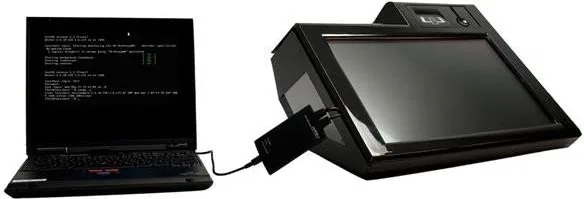
The StarTech KVM Console to USB 2.0 Portable Laptop Crash Cart Adapter Manual highlights a practical tool built for system admins who need fast access to a server without carrying a full desktop KVM setup. This portable crash cart adapter turns a laptop into a temporary console, letting you view video, send keyboard commands, and control a connected machine through a single compact device.
Designed for field service, data center troubleshooting, and emergency recovery work, the adapter combines VGA video capture with USB keyboard and mouse emulation. That means you can plug into a server, open the companion software, and get a live view of the remote system on your notebook. It supports common Windows, Mac, and Linux environments, making it flexible for mixed IT workflows.
One of the strongest points of this adapter is its attention to usability. The software includes zoom controls, full-screen mode, video fine-tuning, snapshot capture, and special key tools for actions like Ctrl-Alt-Del. For technicians, that can save valuable time when dealing with BIOS screens, login prompts, or systems that refuse to cooperate with standard remote tools. The manual also explains how to manage mouse modes, toolbar placement, and keyboard hotplug resets for more difficult connections.
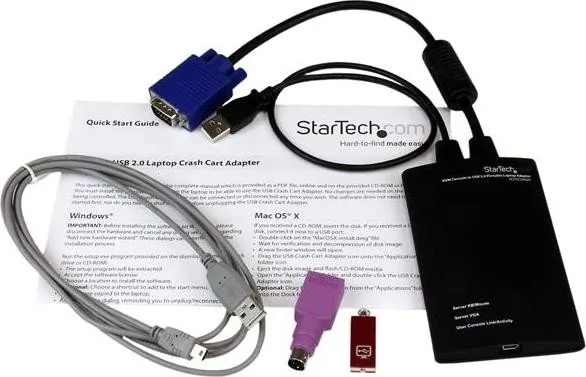
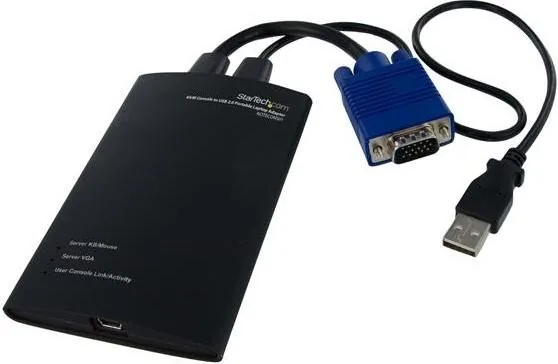
The hardware itself is compact and straightforward. With integrated VGA and USB cables, plus a USB-to-PS/2 adapter included, it is ready for a variety of legacy and modern server setups. LED indicators help confirm power, video, and keyboard/mouse status, while troubleshooting guidance makes it easier to identify connection issues quickly.
For professionals who need a reliable local access solution, this adapter offers a practical bridge between a laptop and a server. It is especially useful when remote access is unavailable, the operating system is unstable, or direct console control is required during maintenance.
Notes
- Best suited for IT support, server recovery, and on-site diagnostics.
- Supports video scaling, snapshots, and special keyboard commands.
- Useful for both modern USB setups and some legacy PS/2 environments.
- Works as a portable emergency console when quick access matters most.
Search for 67,706 Manuals online


Type-in Brand or Model