
StarTech MSTMDP12 Manual
PDF manual · 1 Pages
English


Quick check
Incorrect answer, please try again.
Chat with your StarTech MSTMDP12 manual using AI
Get instant AI answers from your StarTech MSTMDP12 manual
Ask anything about the StarTech MSTMDP12. Answers come from this manual, with the pages they are based on.
Ask a Question
Do you recommend MSTMDP12?
Yes NoFrequently Asked Questions
It splits one Mini DisplayPort 1.2 connection into two DisplayPort outputs, allowing a computer to run two monitors from a single video port.
Is this answer helpful?
It is designed for computers with Mini DisplayPort 1.2 support. The system must also support MST to use dual displays properly.
Is this answer helpful?
Yes. The hub includes an integrated USB power cable that must be connected to an available USB power source for normal operation.
Is this answer helpful?
No. The hub can work with HDMI, DVI, or VGA displays through compatible DisplayPort adapters, but those adapters are sold separately.
Is this answer helpful?
The package includes one 2-port Mini DisplayPort to DisplayPort MST hub and one quick install guide.
Is this answer helpful?
Connect the Mini DisplayPort cable to the computer, attach monitors to the output ports, plug in USB power, then power on the displays and system.
Is this answer helpful?
StarTech provides lifetime technical support and a two-year warranty, covering defects in materials and workmanship under normal use.
Is this answer helpful?
Advantages and Disadvantages
Advantages

- Expands one Mini DisplayPort 1.2 output into two independent DisplayPort displays.
- Easy plug-and-play style installation with a simple power and cable setup.
- Supports DisplayPort adapters for HDMI, DVI, and VGA displays when needed.
- Includes USB power input, helping the hub run reliably with connected monitors.
- Backed by lifetime technical support and a two-year warranty.
Disadvantages

- Works only with systems that support Mini DisplayPort 1.2 and MST.
- Adapters for HDMI, DVI, and VGA are not included in the box.
- Limited to two displays, so it is not ideal for larger multi-monitor setups.
- Requires an available USB power source to operate.
- System and monitors should be powered off during initial connection.
Product Specification
Video Inputs
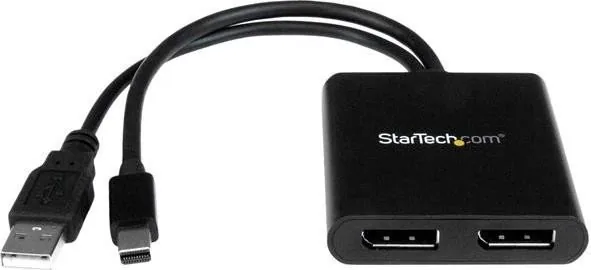
1x Mini DisplayPort In
Video Outputs
2x DisplayPort Out
Resolutions up to
1920x1080
Product Description
StarTech MST Hub Mini DisplayPort to 2x DisplayPort Manual
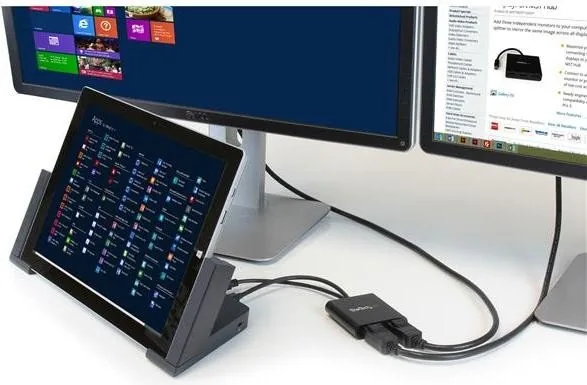
The StarTech MST Hub Mini DisplayPort to 2x DisplayPort Manual highlights a compact way to expand one Mini DisplayPort connection into a dual-monitor workspace. Built for systems with Mini DisplayPort 1.2, this MST hub lets a single computer drive two DisplayPort displays at once, making it a practical choice for productivity, multitasking, and cleaner desktop setups.
At the core of the device is Multi-Stream Transport (MST), a feature that allows video output to be split across multiple screens. Instead of relying on separate graphics outputs, the hub takes the signal from one Mini DisplayPort port and sends it to two monitors. That makes it especially useful for laptops or desktops with limited video connections but a need for more screen space.
The setup process is straightforward. You connect the integrated Mini DisplayPort cable to the computer, attach your monitors to the DisplayPort output ports, and plug in the integrated USB power cable. Once the system and displays are powered on, the operating system should detect the hub and add both monitors to the display settings. The process is designed to feel nearly as simple as connecting displays directly to a native video card.
Compatibility is another strong point. The hub works with two DisplayPort monitors, and it can also support other display types such as HDMI, DVI, or VGA when compatible DisplayPort adapters are used. That flexibility makes it easier to integrate with mixed office hardware, though adapters are not included in the package.
The package itself is minimal and practical, including the 2-port MST hub and a quick install guide. StarTech also backs the product with lifetime technical support and a two-year warranty, adding confidence for users who want dependable multi-display expansion.
Notes
- Requires a Mini DisplayPort 1.2-enabled system.
- Up to two monitors can be connected.
- DisplayPort adapters are supported but sold separately.
- A USB power source is needed for operation.
Search for 67,706 Manuals online


Type-in Brand or Model