
StarTech MSTCDP123HD Manual
PDF manual · 2 Pages
English



Quick check
Incorrect answer, please try again.
Chat with your StarTech MSTCDP123HD manual using AI
Get instant AI answers from your StarTech MSTCDP123HD manual
Ask anything about the StarTech MSTCDP123HD. Answers come from this manual, with the pages they are based on.
Ask a Question
Do you recommend MSTCDP123HD?
Yes NoVideo Manual
Adaptateur Thunderbolt 3 vers double HDMI TB32HD2 | StarTech.com
Frequently Asked Questions
The computer must have a USB-C port that supports DisplayPort over USB-C (DP Alt Mode) and run a supported Windows OS (Windows 7, 8/8.1, or 10, 32- or 64-bit). Verify MST support with your system manufacturer for reliable operation.
Is this answer helpful?
The hub outputs to three external DisplayPort monitors and shares 21.6 Gbps of DisplayPort bandwidth across them. Configure resolutions and refresh rates so the combined bandwidth does not exceed 100% (StarTech provides example allocations).
Is this answer helpful?
Currently MST functionality is certified for Windows only. macOS and Chrome OS do not broadly support MST with this hub today; check with your OS vendor for any future support changes.
Is this answer helpful?
On supported Windows systems the device is natively supported and typically works as plug-and-play. You may need to arrange or enable additional displays from Windows Display Settings after connection. Visit StarTech downloads for any drivers or firmware updates.
Is this answer helpful?
StarTech provides examples: three 1920x1200@60Hz monitors use ~90% bandwidth and work well; combinations that exceed 100% total bandwidth (for example multiple 2560x1600 or several 4K@30Hz simultaneously) will prevent some monitors from powering on.
Is this answer helpful?
Yes. Certain graphics adapters limit total outputs across all displays, so built-in laptop screens or touchscreens may reduce the number of external monitors that can be active simultaneously.
Is this answer helpful?
The product is covered by a three-year warranty against defects in materials and workmanship, and StarTech offers lifetime technical support and online resources at their support and downloads pages.
Is this answer helpful?
Advantages and Disadvantages
Advantages

- Enables three independent external displays from a single USB-C DP Alt Mode port
- Plug-and-play on supported Windows versions with native MST support
- Bandwidth guidance helps configure optimal multi-monitor resolutions
- Backed by StarTech three-year warranty and lifetime technical support
- Supports HDMI cabling up to 15 ft for flexible monitor placement
Disadvantages

- Requires host USB-C port with DisplayPort Alt Mode — not universally available
- MST support limited to Windows 7/8/8.1/10; macOS and Chrome OS not supported
- 21.6 Gbps shared bandwidth can restrict high-resolution multi-monitor setups
- Some graphics adapters cap total outputs, disabling extra screens
- Potential need to configure displays manually in Windows Display Settings
Product Specification
Input
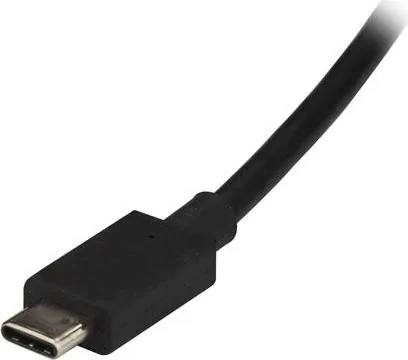
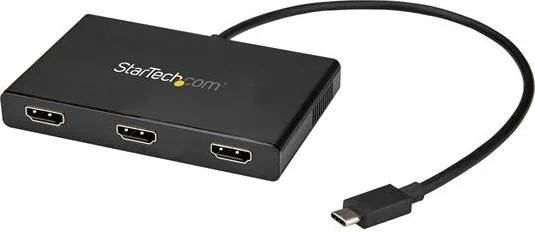
USB-C 3.0
Output
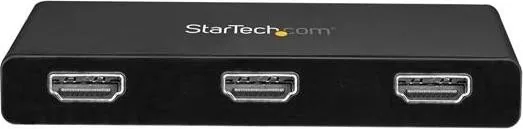
3x HDMI 1.4b
Resolution
max. 3840x2160@30Hz
Manufacturer Warranty
three years
Product Description
StarTech USB-C to HDMI MST Hub Manual — Overview
The StarTech USB-C to HDMI MST Hub is a multi-stream transport adapter that expands a single DisplayPort-over-USB-C (DP Alt Mode) output into three independent DisplayPort outputs, enabling multi-monitor setups on compatible Windows systems. Designed for productivity and extended desktop workflows, the hub is plug-and-play on supported Windows versions and offers flexible display arrangements for office, trading, development, and creative environments.
Product highlights and usage
This MST hub connects to a computer USB-C port that supports DP Alt Mode and delivers three DisplayPort outputs for external monitors. It targets Windows 7, 8/8.1 and Windows 10 (32- and 64-bit) systems where MST is supported. The hub shares a total of 21.6 Gbps of DisplayPort bandwidth across all attached displays, so arranging resolutions and refresh rates to stay within bandwidth limits is essential for reliable multi-display performance.
The device supports HDMI cabling up to 15 ft and is natively plug-and-play on compatible Windows machines. After connection, users may need to enable or arrange additional displays through Windows Display Settings. Some GPUs and systems limit total display outputs (including built-in laptop screens), so verify your system’s MST and multi-monitor capabilities before configuring more than three displays.
Performance and resolution guidance
StarTech provides bandwidth allocation guidance for common resolutions: 1080p@60Hz uses roughly 22% of the hub’s bandwidth, while 4K@30Hz consumes about 38%. Example configurations show feasible combinations (e.g., three 1920x1200@60Hz at 90%) and highlight unsupported combinations that exceed 100% total bandwidth. Balancing resolution and refresh rate across monitors ensures all screens remain active.
Support, warranty, and compatibility notes
The hub is backed by StarTech’s three-year warranty and lifetime technical support resources. It is not broadly supported on macOS or Chrome OS currently; future OS support may change. For the latest drivers, compatibility updates and documentation, refer to StarTech’s support and downloads resources.
Notes
- Requires a host with DisplayPort over USB-C (DP Alt Mode).
- Works best on Windows systems with MST support.
- Monitor resolutions and refresh rates must be planned to stay within 21.6 Gbps total bandwidth.
- Some graphics adapters may limit total outputs regardless of hub capability.
Search for 67,706 Manuals online


Type-in Brand or Model