
StarTech MSTCDP122DP Manual
PDF manual · 2 Pages
English



Quick check
Incorrect answer, please try again.
Chat with your StarTech MSTCDP122DP manual using AI
Get instant AI answers from your StarTech MSTCDP122DP manual
Ask anything about the StarTech MSTCDP122DP. Answers come from this manual, with the pages they are based on.
Ask a Question
Do you recommend MSTCDP122DP?
Yes NoFrequently Asked Questions
It expands one USB-C port with DisplayPort Alt Mode into two DisplayPort video outputs, allowing you to connect two monitors from a compatible Windows device.
Is this answer helpful?
It is designed for computers with USB-C ports that support DisplayPort Alt Mode. The text confirms support for Windows 10, 8/8.1, and 7 systems.
Is this answer helpful?
No. The product notes state that MST is currently not supported on macOS or Chrome OS, so it is intended mainly for Windows users.
Is this answer helpful?
In some cases, yes. After connecting the hub, you may need to open Windows Display Settings and enable the additional monitors manually.
Is this answer helpful?
Direct DisplayPort cables are recommended whenever possible. If you need HDMI, DVI, or VGA, you can use compatible DisplayPort adapters sold separately.
Is this answer helpful?
Yes. StarTech.com offers lifetime technical support and a two-year warranty covering defects in materials and workmanship under normal use.
Is this answer helpful?
Advantages and Disadvantages
Advantages

- Adds two DisplayPort monitors from a single USB-C port with DP Alt Mode support.
- Compact MST hub design helps reduce cable clutter and avoids a full-size dock.
- Works with Windows 10, 8/8.1, and 7 for flexible office and home setups.
- Backed by a two-year warranty and lifetime technical support from StarTech.com.
Disadvantages

- Not compatible with macOS or Chrome OS, so platform support is limited.
- Requires a USB-C port that supports DisplayPort Alt Mode to function.
- Some setups may need additional display activation in Windows settings.
- Best results come from direct DisplayPort connections; extra adapters may be needed for other display types.
Product Specification
Input
USB-C
Output
2x DisplayPort 1.2
Resolution
3840x2160@30Hz
Manufacturer Warranty
two years
Product Description
StarTech USB-C to 2x DisplayPort Adapter Manual: A Simple Way to Build a Dual-Display Workspace
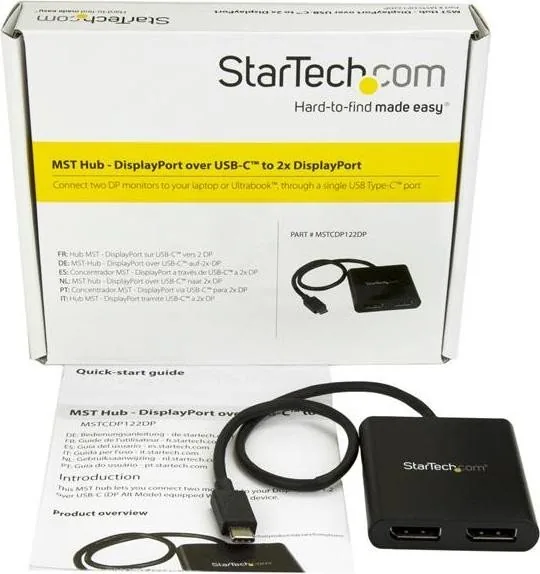
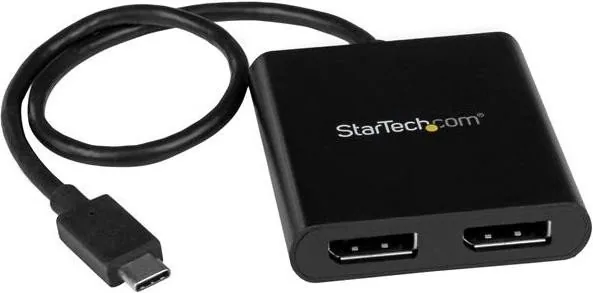
The StarTech USB-C to 2x DisplayPort Adapter is designed for people who want a cleaner, more productive setup without adding a bulky dock. Built as an MST hub, it turns one USB-C connection with DisplayPort Alt Mode into two DisplayPort outputs, making it a practical choice for Windows users who need extra screen space for work, research, editing, or multitasking.
Why it stands out
This adapter is all about convenience and flexibility. Instead of relying on a full docking station, it gives you a focused solution for dual-monitor expansion. The integrated USB-C input cable keeps the setup streamlined, while the dual DisplayPort outputs support a straightforward connection to compatible displays. For users who prefer multi-monitor workflows, it can be a valuable tool for reducing window switching and improving overall efficiency.
The product is especially useful in office environments, home workstations, and shared desks where a compact, reliable display solution matters. It supports Windows 10, 8/8.1, and 7, and the setup process is generally simple: connect the adapter, attach your monitors, and enable the additional display in Windows settings if needed. If you are looking for the StarTech USB-C to 2x DisplayPort Adapter Manual, the main takeaway is that the adapter is intended for systems with USB-C ports that support DisplayPort Alt Mode.
Compatibility and practical use
One of the most important things to note is operating system support. The adapter is certified for Windows platforms, but it is not supported on macOS or Chrome OS. That makes it a focused solution rather than a universal one. It also works best when paired with DisplayPort cables, although other display types can be used with the right DisplayPort adapters sold separately.
For users who value dependable expansion and want to keep their desk uncluttered, this adapter offers a smart balance of performance and simplicity. Its two-year warranty and lifetime technical support add extra reassurance, especially for business users who need long-term reliability.
Notes
- Requires USB-C with DisplayPort Alt Mode
- Best suited for Windows systems
- Dual DisplayPort outputs for multi-monitor productivity
- Additional displays may need to be enabled in Windows settings
Search for 67,706 Manuals online


Type-in Brand or Model