
StarTech Mini DisplayPort to HDMI/DVI/VGA Manual
PDF manual · 2 Pages
English



Quick check
Incorrect answer, please try again.
Chat with your StarTech Mini DisplayPort to HDMI/DVI/VGA manual using AI
Get instant AI answers from your StarTech Mini DisplayPort to HDMI/DVI/VGA manual
Ask anything about the StarTech Mini DisplayPort to HDMI/DVI/VGA. Answers come from this manual, with the pages they are based on.
Ask a Question
Do you recommend Mini DisplayPort to HDMI/DVI/VGA?
Yes NoFrequently Asked Questions
It connects a Mini DisplayPort-enabled computer to an HDMI, VGA, or DVI display. This makes it useful for presentations, monitors, projectors, and televisions when you need a simple video connection.
Is this answer helpful?
No. The adapter supports only one active video output at a time. If more than one display connection is attached, only one will function, so you need to choose the correct port before use.
Is this answer helpful?
Yes. The adapter needs an M/M video cable for the output you choose, such as HDMI, VGA, or DVI. Those cables are not included, so you will need to provide the correct one separately.
Is this answer helpful?
You can connect it to displays that accept HDMI, VGA, or DVI input, including many monitors, televisions, and projectors. Your computer must have a Mini DisplayPort video output.
Is this answer helpful?
The setup is very straightforward. Connect the adapter to the computer, attach the correct display cable, and then power on the display before turning on the computer. No complex configuration is mentioned.
Is this answer helpful?
StarTech provides lifetime technical support, which can help with troubleshooting and product questions. The adapter is also covered by a one-year warranty against defects in materials and workmanship.
Is this answer helpful?
Advantages and Disadvantages
Advantages

- Supports HDMI, VGA, and DVI connections through one compact adapter.
- Simple installation makes setup quick for home, office, or classroom use.
- Works with a variety of displays, including monitors, projectors, and TVs.
- Backed by lifetime technical support and a one-year warranty.
Disadvantages

- Only one video output can be used at a time, not all three together.
- A compatible video cable is required and is not included.
- Needs a Mini DisplayPort source device to work.
- No audio features are mentioned, so it is mainly focused on video output.
Product Specification
Type
Adapter
Connector
Mini DisplayPort 1.1
Port
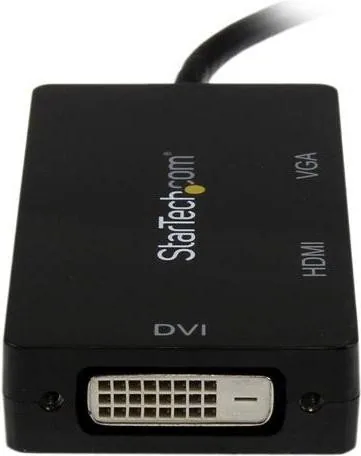
DVI-D, HDMI, VGA
Product Description
StarTech Mini DisplayPort to HDMI/DVI/VGA Adapter Manual: Flexible Connectivity for Modern Workspaces
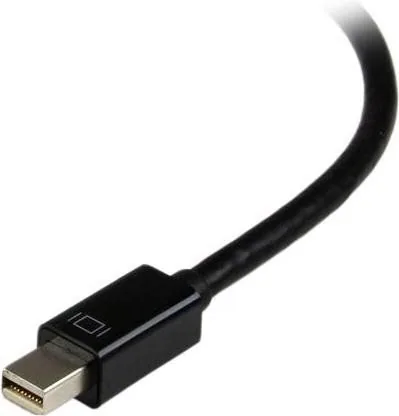
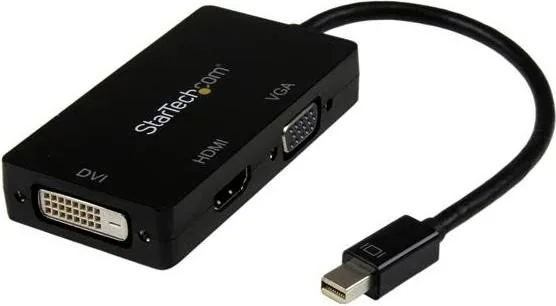
The StarTech Mini DisplayPort to HDMI/DVI/VGA Adapter is a practical solution for anyone who needs to connect a Mini DisplayPort-equipped computer to a wide range of displays. Whether you are presenting in a conference room, setting up a monitor at home, or connecting to a projector for a classroom session, this adapter simplifies the process by offering HDMI, VGA, and DVI support in one compact device. The StarTech Mini DisplayPort to HDMI/DVI/VGA Adapter Manual highlights a straightforward setup that focuses on convenience, compatibility, and dependable performance.
One of the biggest strengths of this adapter is its versatility. Instead of buying separate converters for different display types, users can rely on a single accessory to match the available input on a television, monitor, or projector. That makes it especially useful for people who move between office spaces, meeting rooms, and personal workstations. The adapter is designed for systems with Mini DisplayPort video output, and it works with an external display through the appropriate cable connection.
Installation is refreshingly simple. Connect the adapter to the computer, attach the matching video cable to the display, and power everything on in the correct order. The process does not require complicated configuration, which makes it approachable for both casual users and IT teams. A useful detail worth noting is that only one video output can be active at a time, so users should choose the correct port before starting.
Beyond connectivity, the product reflects StarTech’s focus on support and reliability. Lifetime technical support adds reassurance for users who may need help with setup or troubleshooting, while the one-year warranty provides additional peace of mind. The included compliance and liability statements also show that the adapter is designed with standard use in mind, making it a practical choice for everyday environments.
Notes
- Use the correct cable for HDMI, VGA, or DVI.
- Only one output works at once.
- Check that your display supports the selected input.
- Keep the installation guide handy for quick reference.
This adapter is a smart pick for anyone who values flexibility without adding clutter. It turns a single Mini DisplayPort connection into a convenient bridge for multiple display setups, making it a reliable companion for work, study, and presentations.
Search for 67,706 Manuals online


Type-in Brand or Model