
StarTech ICUSB232DB25 Manual
PDF manual · 7 Pages
English



Quick check
Incorrect answer, please try again.
Chat with your StarTech ICUSB232DB25 manual using AI
Get instant AI answers from your StarTech ICUSB232DB25 manual
Ask anything about the StarTech ICUSB232DB25. Answers come from this manual, with the pages they are based on.
Ask a Question
Do you recommend ICUSB232DB25?
Yes NoFrequently Asked Questions
This adapter supports Microsoft Windows XP through 7 including 32 and 64-bit versions, Mac OS 10.1 or newer, and various Linux distributions. It ensures broad compatibility for most users needing a serial connection.
Is this answer helpful?
The integrated cable length is 90 centimeters or approximately 3 feet. This provides enough distance to reach different ports on your computer setup comfortably.
Is this answer helpful?
Yes, the product comes with a two-year warranty covering material and manufacturing defects from the date of purchase. Technical support is available for life to help with setup.
Is this answer helpful?
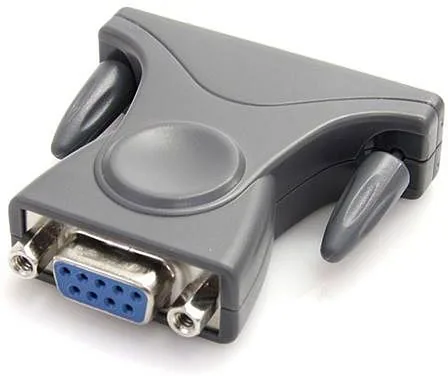
Yes, the package includes a DB9 to DB25 adapter allowing you to connect 25-pin serial devices to the 9-pin connector on the cable effectively.
Is this answer helpful?
The maximum data transfer rate is 230 Kbps using the Prolific PL2302HXD chipset. This is standard for legacy serial communication requirements.
Is this answer helpful?
Go to Device Manager in Windows, look under Ports COM and LPT, and verify the new COM port appears after installation and connection.
Is this answer helpful?
It is a Class A device suitable for commercial use. In residential areas, it might cause interference and may require corrective actions to resolve signal issues.
Is this answer helpful?
Advantages and Disadvantages
Advantages

- Two-year warranty coverage
- Supports Mac Linux Windows
- Includes DB25 adapter
- Lifetime technical support
- 90cm cable length flexibility
Disadvantages

- Requires manual driver installation
- 230 Kbps speed limit
- Interference risk in homes
- Class A device restrictions
- Older chipset technology
Product Specification
Type
Adapter Cable
Connector
USB 2.0
Port
RS-232/DB9/DB25
Cable Length
35.43 in
USB Orientation
Left
Product Description
Connecting Legacy Devices to Modern Systems
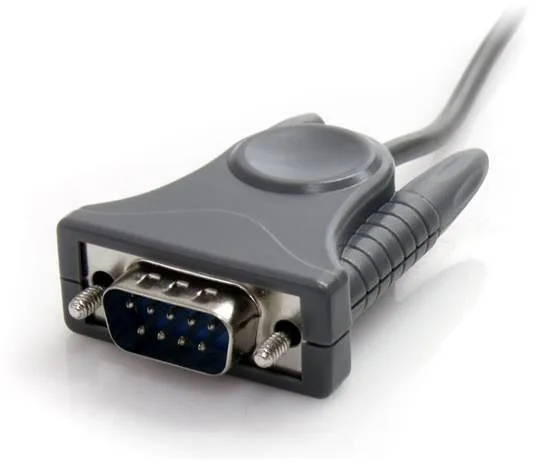
In modern computing environments, the absence of native serial ports presents a significant challenge for users running older industrial hardware and legacy equipment daily. The StarTech USB 2.0 to Serial Adapter Cable Manual provides detailed instructions on overcoming this connectivity hurdle effectively for professional users. This versatile adapter cable enables users to add a functional serial RS232 interface directly via USB connectivity to their current desktop or notebook computer system. It serves as a cost-effective bridge between contemporary USB systems and traditional serial peripherals requiring COM port access.
Compatibility and Drivers
Operating system support is extensive covering Microsoft Windows ranging from XP through Windows 7 on both 32 and 64-bit systems without issue. Apple Mac OS 10.1 or newer and Linux distributions are also fully supported according to the specific technical documentation provided. Drivers must be manually installed before plugging in the hardware to ensure proper system recognition occurs immediately. The included CD simplifies this initial setup process significantly for less experienced computer users needing quick installation. Once drivers load, the system automatically identifies the new COM port available for application use.
Specs Details
The cable measures 90 centimeters long which provides flexibility for various desk setups and workspace layouts. Technical specifications highlight the use of the proven Prolific PL2302HXD chipset to manage data flow efficiently. Max data transfer rates reach 230 Kbps which is standard for most legacy serial devices. The unit comes with an integrated FIFO buffer of 512 bytes ensuring smooth data handling.
Included Accessories
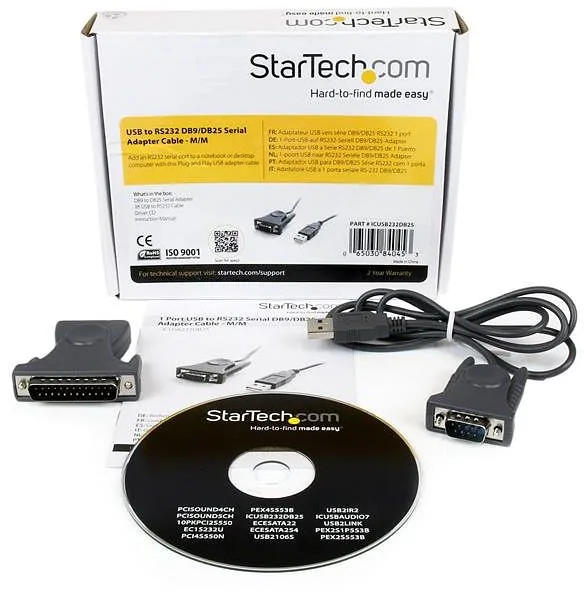
Packaging contains the primary USB to serial adapter cable alongside a convenient DB9 to DB25 adapter included for versatility. This allows connection to both 9-pin and 25-pin serial connectors depending on the specific equipment requirements you have. This flexibility makes it an ideal choice for connecting industrial modems, barcode scanners, or specialized networking gear securely in place. StarTech backs this item with a comprehensive two-year warranty against material defects and manufacturing errors clearly defined. Their dedicated technical support team remains available for life to assist with configuration or troubleshooting needs effectively.
Important Warnings
This device falls under strict Class A regulations regarding digital interference standards established by law. In residential areas it might cause radio frequency interference if not installed correctly or grounded properly. Users may need to adjust antenna positions or relocate the device to resolve signal issues effectively. Operating temperatures range from 0 to 60 degrees Celsius for safe usage during long periods. High humidity up to 90% relative humidity is tolerated during operation levels without damage occurring.
Notes
- Always install drivers before connecting the device to the motherboard.
- Do not expose the unit to extreme temperatures or moisture for extended periods.
Search for 67,706 Manuals online


Type-in Brand or Model