
StarTech ICUSB2322I Manual
PDF manual · 12 Pages
English



Quick check
Incorrect answer, please try again.
Chat with your StarTech ICUSB2322I manual using AI
Get instant AI answers from your StarTech ICUSB2322I manual
Ask anything about the StarTech ICUSB2322I. Answers come from this manual, with the pages they are based on.
Ask a Question
Do you recommend ICUSB2322I?
Yes NoFrequently Asked Questions
The hub supports Windows 2000/XP/Server 2003/Vista/Server 2008 R2/7/8 (32/64-bit), Windows CE 4.2/5.0/6.0, macOS, and Linux kernels 2.4.x/2.6.x. For newer OS versions, download updated drivers from StarTech.com/downloads.
Is this answer helpful?
Connect the USB cable, insert the driver CD (or download drivers), and follow the Found New Hardware prompts. If automatic install fails, choose advanced/browse and point to the USB_to_IO/FTDI folder on the CD or download location, then allow installation when Windows security prompts.
Is this answer helpful?
Yes. The device retains assigned COM port values so the same COM numbers are automatically reassigned when reconnected, helping maintain stable mappings for monitoring and control applications.
Is this answer helpful?
The hub includes wall/surface mounting brackets and DIN-rail (Top-Hat) clips, providing flexible mounting for industrial racks, panels, or desktop installations. The metal enclosure is designed for durable use in harsher environments.
Is this answer helpful?
The hub supports RS-232 protocol with a maximum data transfer rate of 921.6 Kbps. It accommodates data bits of 7 or 8, multiple parity options (Odd, Even, Mark, Space, None), and 1 or 2 stop bits, with 4096-byte transmit and receive buffers.
Is this answer helpful?
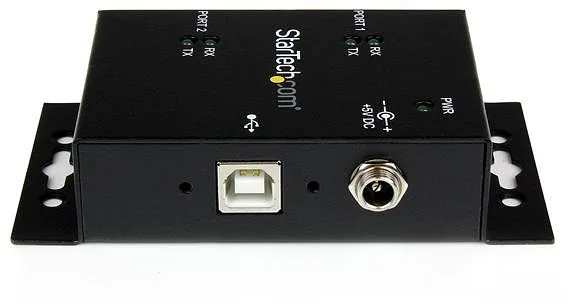
No. The hub is USB powered for most applications, but it includes an optional DC power connector for setups where USB power is insufficient or when powering additional serial devices is necessary.
Is this answer helpful?
StarTech offers a two-year limited warranty covering defects in materials and workmanship and provides lifetime technical support via www.startech.com/support. Warranty excludes damage from misuse, alteration, or normal wear.
Is this answer helpful?
Advantages and Disadvantages
Advantages

- Rugged metal enclosure with wall and DIN-rail mounting for industrial use.
- Retains assigned COM port values for consistent device mapping.
- Supports high-speed RS-232 up to 921.6 Kbps and FTDI chipset reliability.
- Broad OS compatibility: Windows (legacy and modern), macOS, Linux, Windows CE.
- Includes cable, driver CD, and DIN-rail kit; lifetime technical support available.
Disadvantages

- Driver installation may require manual browsing to CD driver folder on older Windows.
- USB power may be insufficient in some setups, requiring optional DC input.
- Limited to RS-232; not suitable for other serial standards without adapters.
- Physical size and metal enclosure add weight compared to consumer dongles.
- Official driver support listed up to Windows 8; newer OSs may need driver updates online.
Product Description
StarTech Industrial USB 2.0 to 2-Port Serial Hub Manual
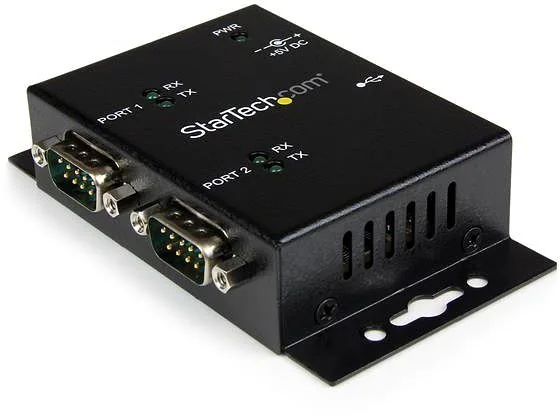
The StarTech Industrial USB 2.0 to 2-Port Serial Hub is a rugged, wall-mountable adapter that converts a single USB port into two RS-232 serial ports. Designed for industrial and desktop environments, it features a metal enclosure, DIN-rail clips, and optional DC power for flexible installation. The hub retains assigned COM port values so connected devices keep consistent COM assignments across reconnects, simplifying device management in control, monitoring, and legacy-device integration scenarios.
Built around the reliable FTDI FT2232H chipset, the hub supports high-speed RS-232 communication up to 921.6 Kbps with configurable data bits, parity, and stop bits. Two DB9 male connectors provide serial connectivity while LED indicators show power and transmit/receive activity for quick status checks. The product supports major operating systems including Windows (2000 through Windows 8 and Server variants), Windows CE, macOS, and Linux kernels 2.4/2.6, with drivers provided on CD and downloadable updates available online.
Installation is straightforward: connect the USB cable, install the FTDI drivers via the included CD (or download), and verify the new COM ports through Device Manager. The manual details step-by-step setup for legacy Windows versions and later releases, including how to browse the CD’s USB_to_IO/FTDI driver folder if automatic detection fails. Pinouts are documented for integration with serial devices, and the hub’s 4 KB transmit/receive buffer helps manage steady data streams.
Physical design emphasizes durability and mounting versatility: wall/surface brackets, DIN Rail Top-Hat clips, and a compact metal enclosure fit tight industrial spaces. Operating temperature ranges from 0°C to 55°C and storage ranges from -20°C to 85°C, with humidity tolerance up to 95% RH. StarTech backs the product with lifetime technical support resources online and a two-year limited warranty covering defects in materials and workmanship.
Notes:
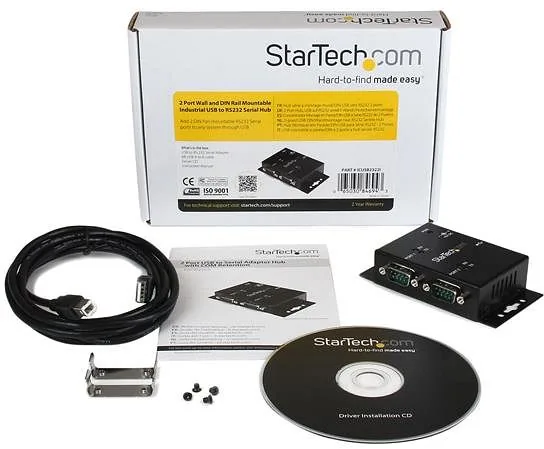
- Includes USB A-to-B cable, driver CD, DIN rail kit, and mounting hardware.
- Optional external DC power connector for environments where USB power is insufficient.
- COM port retention ensures consistent device mapping across reconnections.
Search for 67,706 Manuals online


Type-in Brand or Model