

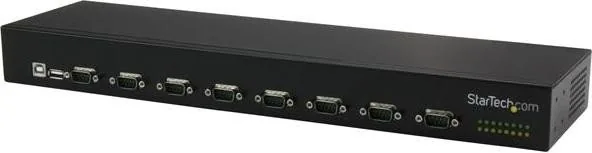

StarTech ICUSB23208FD Manual
PDF manual · 11 Pages
English



Quick check
Incorrect answer, please try again.
Chat with your StarTech ICUSB23208FD manual using AI
Get instant AI answers from your StarTech ICUSB23208FD manual
Ask anything about the StarTech ICUSB23208FD. Answers come from this manual, with the pages they are based on.
Ask a Question
Do you recommend ICUSB23208FD?
Yes NoFrequently Asked Questions
It converts one USB connection into eight RS232 serial ports, letting a computer communicate with multiple serial devices through a single USB port.
Is this answer helpful?
Yes. The daisy-chain feature allows multiple hubs to be linked, expanding the total number of available serial ports for larger setups.
Is this answer helpful?
It can be powered by the included adapter or by a 9–36V DC terminal block input. Both can be used for redundant power support.
Is this answer helpful?
Yes. It includes mounting hardware for standard server racks and DIN rails, making it easy to integrate into structured environments.
Is this answer helpful?
On Windows, confirm the added COM ports in Device Manager. On Mac, check the USB device tree in System Information or System Profiler.
Is this answer helpful?
It is best for RS232 devices such as industrial controllers, serial instruments, POS hardware, and other equipment that still relies on serial communication.
Is this answer helpful?
Advantages and Disadvantages
Advantages

- Adds eight RS232 serial ports from one USB-A 2.0 connection, reducing clutter and simplifying device expansion.
- Supports daisy chaining, allowing up to three hubs and 24 total ports for larger serial deployments.
- Offers flexible power options with adapter or 9–36V DC terminal block input, plus redundant power support.
- Includes rack-mount and DIN-rail mounting hardware, making it suitable for server rooms and industrial setups.
Disadvantages

- Requires driver installation before connecting devices, which adds an extra step to setup.
- Focused on RS232 legacy equipment, so it is not a universal solution for newer USB-only devices.
- Port mapping may require a loopback test and manual verification, which can take time in large installations.
Product Description
StarTech USB-A 2.0 to 8-Port Serial Hub: Scalable RS232 Expansion
The StarTech USB-A 2.0 to 8-Port Serial Hub Manual highlights a practical solution for anyone who needs to connect multiple RS232 devices from a single USB port. Instead of juggling separate adapters or limited serial cards, this hub turns one USB connection into eight serial ports, making it a smart fit for legacy equipment, industrial controls, point-of-sale systems, lab tools, and other serial-based setups.
Built for expansion and flexibility
One of the biggest advantages of this hub is how easily it grows with your environment. It supports daisy chaining, so multiple hubs can be linked together to create a much larger serial network. With up to three devices in a chain, users can expand to 24 ports total, which is ideal for racks, server rooms, and technical workspaces where many serial devices need to stay online.
Designed for demanding installations
This model is more than a simple USB accessory. Its metal chassis, rack-mount compatibility, and DIN-rail mounting options make it suitable for structured installations where durability matters. The wide operating temperature range also suggests confidence in harsher environments, giving it extra appeal for industrial and commercial users who need stable performance over time.
Power, visibility, and setup
The hub offers two power methods: a standard power adapter or a 9–36V DC terminal block input. That flexibility is especially useful when building reliable systems, and redundant power support adds another layer of protection if one source fails. LED indicators for transmit and receive activity on each port also help users monitor communication at a glance.
Installation is straightforward for a serial-focused device. After driver setup, the hub can be connected and confirmed through system tools on Windows or Mac. A loopback test can help identify ports and verify that each connection is working as expected, which is helpful when managing multiple devices.
Notes
- Ideal for RS232 devices that need centralized USB control
- Daisy chaining makes larger deployments more cost-effective
- Best results come from careful driver installation and port verification
- Redundant power is a valuable feature for mission-critical setups
Search for 67,706 Manuals online


Type-in Brand or Model