
StarTech HSB220SAT25B Manual
PDF manual · 11 Pages
English



Quick check
Incorrect answer, please try again.
Chat with your StarTech HSB220SAT25B manual using AI
Get instant AI answers from your StarTech HSB220SAT25B manual
Ask anything about the StarTech HSB220SAT25B. Answers come from this manual, with the pages they are based on.
Ask a Question
Do you recommend HSB220SAT25B?
Yes NoFrequently Asked Questions
Yes, provided your case has an available 3.5-inch expansion slot, typically originally intended for floppy drives. If your case lacks such slots, you may need to use a blanking plate adapter or modify the chassis.
Is this answer helpful?
The adapter supports SATA II speeds of up to 3.0 Gbps and is also backward compatible with SATA I drives operating at 1.5 Gbps.
Is this answer helpful?
No, the device supports hot-swapping, allowing you to insert or remove drives while the system is running, though shutting down is recommended for safety.
Is this answer helpful?
Not at all. The design features a tool-free mechanism where you simply slide the drives in and click the latches into place without needing any screws.
Is this answer helpful?
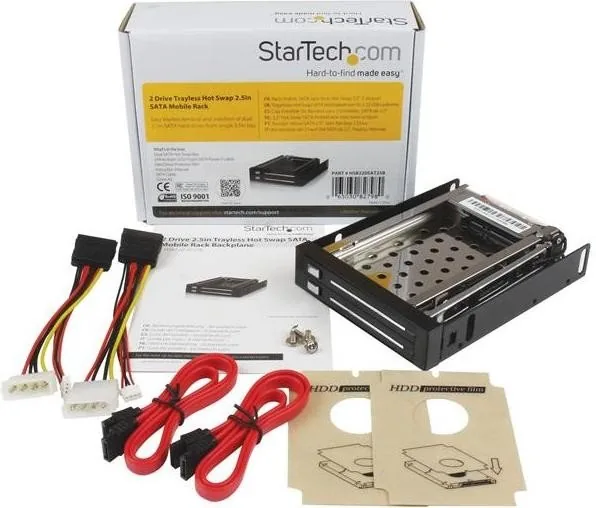
The package includes the dual-bay frame, a user manual, two SATA data cables, two LP4-to-15-pin SATA Y-power cables, and a set of mounting screws.
Is this answer helpful?
Yes, StarTech.com provides a two-year limited warranty covering material and workmanship defects from the date of purchase.
Is this answer helpful?
Absolutely. You can install a combination of mechanical hard drives and solid-state drives in the two slots simultaneously.
Is this answer helpful?
Advantages and Disadvantages
Advantages

- Supports hot-swap operations for easy drive management without shutting down the system
- Tool-free installation saves time and effort during setup and maintenance
- Enables use of two 2.5-inch drives in a single 3.5-inch bay to maximize space
- High-speed data transfer rates up to 3.0 Gbps ensure fast file access
- Includes all necessary cables and screws for immediate connectivity
Disadvantages

- Requires an available 3.5-inch floppy drive bay which may be scarce in modern cases
- Hot-swap capability depends on motherboard and operating system support
- Does not include cooling fans so airflow must be managed by the case
- Only supports 2.5-inch form factor drives limiting size options
- External ports require specific cable routing inside the chassis
Product Specification
Type
Rackmount
Internal connections
2x 2.5" SATA 6Gb/s
External connections
2x SATA 6Gb/s
Hot-Swap
Yes
Drive bay
3.5"
Case cooling
N/A
Lock
No
Features
Full metal construction, tool-free
Manufacturer warranty
two years
Product Description
StarTech HSB220SAT25B: The Ultimate 3.5-Inch Dual 2.5-Inch SATA Hot-Swap Solution
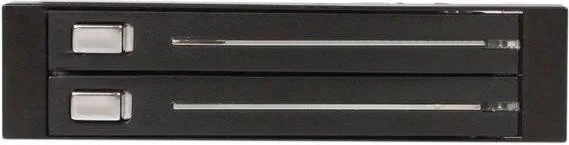
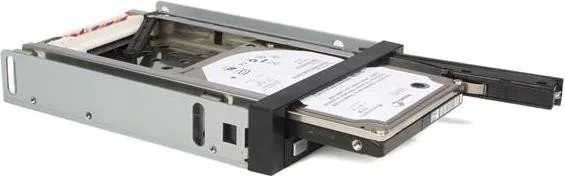
Upgrading your storage infrastructure often requires bridging the gap between legacy chassis designs and modern, compact hardware. The StarTech HSB220SAT25B is a specialized 3.5-inch adapter designed specifically to house two 2.5-inch SATA hard drives within a standard 3.5-inch drive bay. This tool transforms a single empty slot in your computer case into a powerful dual-drive station, making it an ideal choice for users who need expanded storage capacity without modifying their entire system architecture.
This device excels in environments where data accessibility and rapid deployment are critical. By supporting hot-swap functionality, you can add or remove drives while the system remains powered on, significantly reducing downtime for maintenance or upgrades. The interface supports high-speed data transfer rates of up to 3.0 Gbps with SATA II compatibility, ensuring that your performance needs are met even when handling large files or running complex applications. The installation process is remarkably straightforward, utilizing a tool-free design that allows you to slide drives in and secure them with simple locking flaps rather than tedious screwing and unscrewing.
The package includes everything required for a seamless setup, including dual Y-cables for power distribution and SATA data cables. Whether you are building a personal media server, a small business NAS, or simply expanding the storage on an older workstation, this adapter provides a robust and reliable connection method. It eliminates the frustration of finding compatible mounting solutions and ensures your 2.5-inch SSDs or HDDs are protected within a sturdy metal frame that fits perfectly into standard bays.
Beyond its technical specifications, the HSB220SAT25B represents a commitment to flexibility. It allows you to utilize space that would otherwise go to waste, maximizing the utility of your existing computer case. The included manual guides you through every step, from connecting the internal power and data lines to securing the drives with precision. With a lightweight design weighing only 270 grams and comprehensive warranty support, this adapter stands as a reliable component for any enthusiast or professional looking to optimize their storage layout efficiently.
Search for 67,706 Manuals online


Type-in Brand or Model