
StarTech HSB100SATBK Manual
PDF manual · 9 Pages
English



Quick check
Incorrect answer, please try again.
Chat with your StarTech HSB100SATBK manual using AI
Get instant AI answers from your StarTech HSB100SATBK manual
Ask anything about the StarTech HSB100SATBK. Answers come from this manual, with the pages they are based on.
Ask a Question
Do you recommend HSB100SATBK?
Yes No
NonQuibusdam30
9 months ago
Does the caddy include all cables for the front LED and is the wiring clearly explained? I read the manual might be missing details.

Manual.ly
9 months ago
The 3.5 SATA hot-swap frame supports an LED for the operating status, but the exact wiring depends on your mainboard and system panel connections. In some packages, the LED connection is not fully specified in the included description, so make sure you match the included 2-wire cable to your front-panel/system connector and the relevant power/SATA functions. For the hot-swap feature during operation, you typically must enable HotSwap in your BIOS for the corresponding SATA port. If anything required for the LED or connections is missing or unclear, contact support with your order number so we can advise the correct connection or help with missing parts.
Frequently Asked Questions
It converts a standard 5.25 inch bay slot to hold a 3.5 inch SATA hard drive. You slide the frame in, secure it with screws, and insert the drive into the latch mechanism.
Is this answer helpful?
Yes, the design supports hot-swapping, meaning you can remove or install the drive while the system is running, provided you follow safety guidelines to prevent data loss.
Is this answer helpful?
A special key is included to lock the drive in place. You can turn the key to secure the latch, preventing unauthorized or accidental removal of the hardware.
Is this answer helpful?
Yes, it includes a two-year limited warranty against manufacturing defects. The warranty covers parts and labor but excludes damage from misuse or wear.
Is this answer helpful?
Yes, it supports Serial ATA and SATA II interfaces. It works with older drives as long as they utilize the 3.5 inch form factor.
Is this answer helpful?
The frame measures approximately 184 millimeters by 149 millimeters. It is designed to fit standard drive bays found in most PC cases.
Is this answer helpful?
You must ground yourself to prevent static electricity damage. Do not drop the unit or remove cables while the drive is active to avoid data loss.
Is this answer helpful?
Advantages and Disadvantages
Advantages

- Enables hot-swapping without powering down
- Secure locking key included for theft protection
- Lifetime technical support from manufacturer
- Compatible with standard 5.25 and 3.5 inch slots
- High durability rating for repeated use
Disadvantages

- Limited to only 3.5 inch SATA drives
- Two-year warranty period is standard
- Requires careful handling to avoid static damage
- Not suitable for outdoor temperatures
- Needs FCC Class A compliance verification
Product Specification
Type
Chassis
Internal connections
1x 3.5" SATA 6Gb/s
External connections
1x SATA 6Gb/s
Hot-Swap
No
Drive Bay
1x 5.25"
Case Cooling
N/A
Lock
Yes
Features
tool-less, vibration dampeners
Manufacturer Warranty
2 years
Product Description
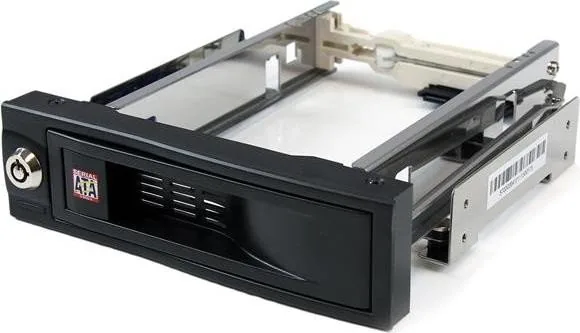
Upgrade Your Storage with the StarTech HSB100SATBK
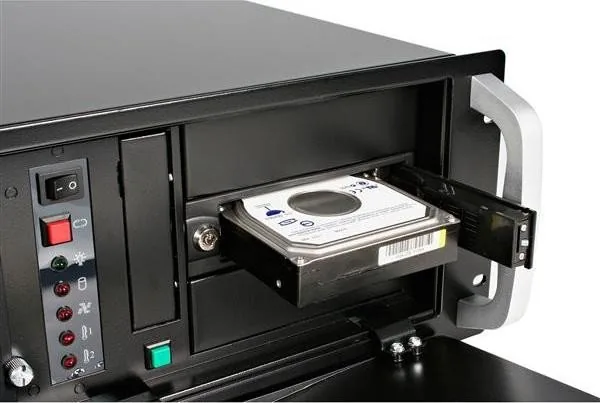
Transform your computer storage architecture with the StarTech HSB100SATBK 5.25 to 3.5 SATA drive bay adapter. This compact device enables the utilization of legacy 5.25 inch drive bays to host modern 3.5 inch hard drives efficiently. It eliminates the necessity for bulky carriers or traditional caddies that occupy unnecessary space inside the chassis. Users benefit from hot-swap capabilities that allow for drive changes without shutting down the machine completely. The design prioritizes secure data retention through an integrated locking mechanism on the front panel. A special key is included to prevent accidental or malicious removal of the hardware during operation.
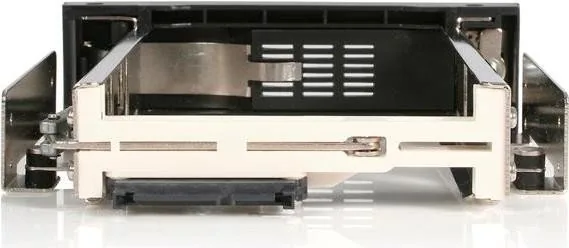
Installation is straightforward for enthusiasts and professionals alike to follow quickly. Start by accessing the computer interior chassis safely. Locate an available 5.25 inch bay slot on the front panel. Remove the faceplate cover carefully to access space. Slide the new frame into the opening until alignment matches. Secure it using the provided screws to ensure stability. Connect the SATA power and data lines to the rear ports. Ensure connections are firm. Finally, insert the hard drive. Position the label side up. Close the latch until it clicks. Use the key for maximum security and theft protection.
Technical Specifications
The device supports Serial ATA and SATA II interfaces for broad compatibility. It measures approximately 184 by 149 millimeters in size. It withstands operating temperatures from zero to 55 degrees Celsius reliably. The unit handles fifty thousand insertions over time without failure. The package includes the frame and instructions for setup. Ensure you avoid dropping the unit to prevent damage. Wear an antistatic band when handling components. StarTech.com provides lifetime technical assistance for all owners. Visit their support site for drivers and tools.
The product carries a two-year limited warranty against manufacturing defects. It is classified under FCC Class A regulations for commercial environments. Proper grounding prevents static electricity damage to electronics. Never remove cables while the drive is active to avoid data loss risks. Follow safety guidelines strictly to prevent injury. StarTech.com has been serving customers since 1985 successfully. They follow ISO 9001 standards for quality control. Their goal is to make hard to find parts accessible globally.
Conclusion
The adapter fits well in commercial or residential settings. Adhere to the guidelines for optimal performance guarantees. Enjoy expanded storage capacity with confidence in the hardware. The system requires minimal effort to maintain daily. Troubleshooting resources are available online for free. This solution bridges the gap between old and new tech efficiently. Compliance reflects Class A standards. Liability is limited regarding indirect damages. The company remains committed to industry leading solutions. You can contact a radio technician if signal interference occurs. The device requires a flat surface for proper operation. It is not suitable for outdoor environments.
Search for 67,706 Manuals online


Type-in Brand or Model
Klaus Weber
7 months ago
Does the drive tray manage heat effectively? Reviews mention drives reaching 60C during formatting. Is this safe for long-term storage, and how can I improve cooling?
Manual.ly
7 months ago
Thank you for your inquiry. Temperatures near 60C during intensive tasks are generally acceptable, but ensuring proper chassis airflow is crucial. We recommend checking that internal case fans are active before operation and that front ventilation slots remain unobstructed by cables or dust. Applying thermal pads between the drive casing and tray can also aid dissipation. Please contact us if temperatures remain excessive during idle operation for further assistance.