
StarTech FCREADMICRO3 Manual
PDF manual · 2 Pages
English



Quick check
Incorrect answer, please try again.
Chat with your StarTech FCREADMICRO3 manual using AI
Get instant AI answers from your StarTech FCREADMICRO3 manual
Ask anything about the StarTech FCREADMICRO3. Answers come from this manual, with the pages they are based on.
Ask a Question
Do you recommend FCREADMICRO3?
Yes NoVideo Manual
USB 3.0 PCI-e Expansion Card ,Pci Express pcie usb3.0 hib adapter , mini pci to usb 3.0 4 port
Frequently Asked Questions
The reader supports Secure Digital (SD), microSD/SDHC/SDXC, Mini-SD, MMC variants (MMC, RS-MMC, MMC-micro), Memory Stick families including MS Pro, MS Duo, MS-PRO Duo, MSPRO-HG and Micro-MS (M2), plus many legacy formats.
Is this answer helpful?
Most operating systems will automatically recognize the device and install generic drivers. Windows, macOS, and Linux are listed as supported. For any specific drivers or updated firmware, visit StarTech's downloads and support pages.
Is this answer helpful?
On Windows use the Safely Remove Hardware icon, select USB Mass Storage Device, and stop the device before unplugging. On macOS, eject the drive icons from the desktop (drag to Trash) before removal to avoid data loss.
Is this answer helpful?
When connected to a USB 3.0 port, the reader supports data transfer rates up to 5 Gbit/s (theoretical). Real-world speeds depend on the card's class, host controller, and system configuration; on USB 2.0 ports speeds will be lower.
Is this answer helpful?
StarTech offers lifetime technical support resources online and a two-year limited warranty covering defects in materials and workmanship. The warranty does not cover damage from misuse, alteration, or normal wear.
Is this answer helpful?
Yes. The device complies with FCC Class B limits. If interference occurs with radio/TV reception, follow recommended measures such as repositioning antennas, increasing separation, or using a different circuit outlet.
Is this answer helpful?
Advantages and Disadvantages
Advantages

- Wide card format support including SD, microSD, MMC, Memory Stick and legacy variants.
- USB 3.0 Type-A connector with up to 5 Gbit/s transfer rate and USB 2.0 backward compatibility.
- Plug-and-play automatic driver installation on Windows, macOS, and Linux systems.
- Compact, lightweight form factor suitable for travel and desk use.
- Manufacturer support: lifetime technical support, driver downloads, and a two-year warranty.
Disadvantages

- Requires host USB 3.0 port to reach full 5 Gbit/s speed; otherwise limited by USB 2.0.
- No built-in cable management or protective cap for the connector in some versions.
- Compatibility with very niche or emerging card formats may be limited—verify before purchase.
- Warranty excludes damage from misuse, abuse, alteration, or normal wear and tear.
- May cause radio interference in rare installations; FCC guidance may be needed.
Product Specification
Type
Card reader
Form factor
1x USB Stick
Connectivity
1x USB-A 3.0 (connector, 5Gbps)
Card Slots
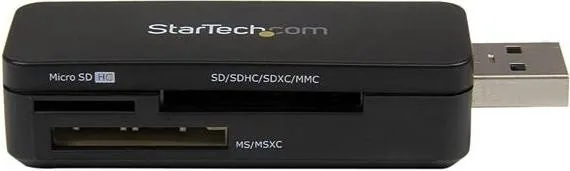
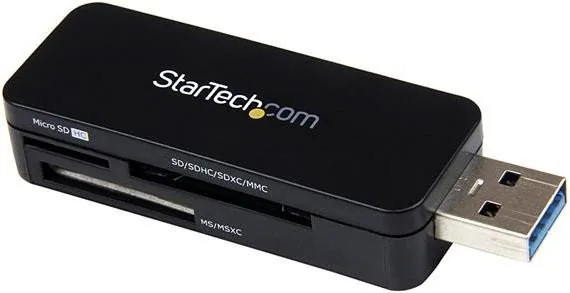
1x microSD, 1x SD Card, 1x Memory Stick
Supported Cards
1x microSD (microSD), 1x SD Card (SD Card, RSMMC), 1x Memory Stick (Memory Stick PRO-HG Duo, Memory Stick PRO Duo, Memory Stick Duo)
Power supply
Power supply only via connection
Chipset
Realtek RTS5307 (Card reader)
Dimensions
0.91x0.59x2.83in (WxHxD)
Weight
0.03 lb
Case color
black
Compatibility
universal
Manufacturer's warranty
two years
USB notation
Link
Product Description
StarTech Multi-Slot Card Reader, USB-A 3.0 (Plug) Manual
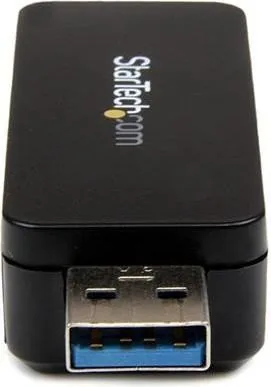
The StarTech Multi-Slot Card Reader, USB-A 3.0 (Plug) is a compact, high-speed memory card reader designed to bridge cameras, phones, and other devices to Windows, macOS, and Linux systems. With a USB 3.0 Type-A connector and a Realtek RTS5307 chipset, it supports a wide range of card formats including SD, SDHC, SDXC, microSD, MMC, Memory Stick variants, and many legacy formats. Its plug-and-play operation enables automatic driver installation on most systems, delivering transfer speeds up to 5 Gbit/s when connected to a USB 3.0 port while remaining backward compatible with USB 2.0.
This reader ships with the device and a brief instruction manual and emphasizes safe removal procedures to prevent data loss. Windows users are guided to use the Safely Remove Hardware process; macOS users simply eject drives from the desktop. The device is FCC Class B compliant, making it suitable for residential and office use with recommended troubleshooting steps if radio interference occurs.
The product is suitable for photographers, content creators, and everyday users who need quick access to multiple memory card types without adapters. Its lightweight form factor makes it a convenient desk accessory or travel companion. StarTech provides lifetime technical support resources online, driver downloads, and a two-year limited warranty covering defects in materials and workmanship, excluding damage from misuse or normal wear.
Overall, this StarTech reader is a reliable, universally compatible solution for multi-format card access, focusing on ease of use, broad compatibility, and manufacturer support. Whether recovering files, transferring large photo libraries, or moving multimedia between devices, its USB 3.0 performance and wide format support offer a practical balance of speed and convenience.
Notes
- Supports many legacy and modern card formats; check specific compatibility for niche cards.
- Use the OS eject/safe removal procedure to avoid data corruption.
- Visit StarTech support pages for drivers, troubleshooting, and warranty service.
Search for 67,706 Manuals online


Type-in Brand or Model