
StarTech ET91000SC2 Manual
PDF manual · 2 Pages
English



Quick check
Incorrect answer, please try again.
Chat with your StarTech ET91000SC2 manual using AI
Get instant AI answers from your StarTech ET91000SC2 manual
Ask anything about the StarTech ET91000SC2. Answers come from this manual, with the pages they are based on.
Ask a Question
Do you recommend ET91000SC2?
Yes NoFrequently Asked Questions
It converts Gigabit Ethernet from an RJ-45 copper connection to an SC duplex multimode fiber connection. This lets you extend network links over longer distances while keeping high-speed data transmission.
Is this answer helpful?
The converter supports multimode fiber connections up to 550 meters, depending on the network equipment, cabling quality, and overall installation conditions.
Is this answer helpful?
You need an RJ-45 terminated Cat5e or better Ethernet cable and an SC terminated multimode fiber cable. The connected equipment must also support 1000BASE-T and 1000BASE-SX standards.
Is this answer helpful?
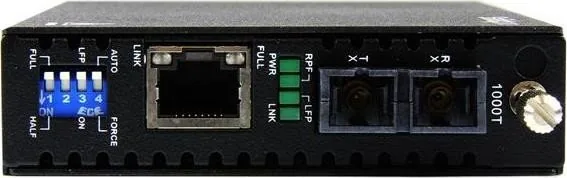
The DIP switches configure duplex behavior and link fault pass-through. They can also be used to set the unit to auto-negotiate or force full or half duplex, depending on the network design.
Is this answer helpful?
The LEDs show power status, fiber link activity, remote power failure, and link fault pass-through mode. These indicators help confirm whether the converter is working properly or if a link problem exists.
Is this answer helpful?
The package includes the fiber media converter, a universal power adapter, four regional power plugs, a grounding screw, and an instruction manual. This gives you the main parts needed for installation.
Is this answer helpful?
Yes. The product includes lifetime technical support and a two-year warranty covering defects in materials and workmanship, excluding damage from misuse, alteration, or normal wear and tear.
Is this answer helpful?
Advantages and Disadvantages
Advantages

- Extends Gigabit Ethernet over multimode fiber up to 550 meters for longer network runs.
- SC duplex and RJ-45 connectivity make it easy to bridge copper and fiber devices.
- DIP switches allow duplex and link fault pass-through configuration.
- LED indicators simplify monitoring of power, link status, and faults.
- Includes power adapter, regional plugs, grounding screw, and technical support.
Disadvantages

- Requires compatible 1000BASE-T and 1000BASE-SX equipment to operate correctly.
- Fiber installation needs proper Tx/Rx alignment, which can slow first-time setup.
- External power is required, so it is not a purely passive network adapter.
- Designed for multimode fiber, so it is not the right fit for single-mode deployments.
Product Specification
Type
LAN Converter
Form Factor
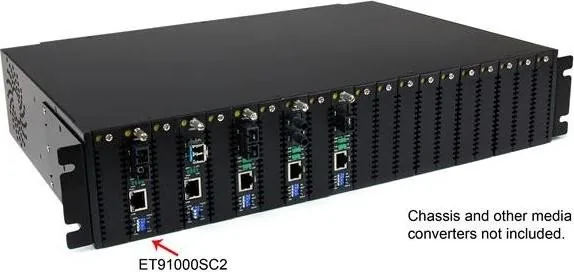
1x external wired, Standalone, rackmount
Interface
N/A
Connectivity
1x RJ-45, 1x SC-Duplex
Transfer Rate
1x RJ-45 (10/100/1000Base-T), 1x SC-Duplex (1000Base-SX 850nm 50/125um MM OM2 550m)
Dimensions
3.54x0.98x5.91in (WxHxD)
Weight
0.87 lb
Compatibility
universal
Features
Metal housing, external power supply
Manufacturer Warranty
two years
Product Description
StarTech ET91000SC2 RJ-45, SC Duplex Manual
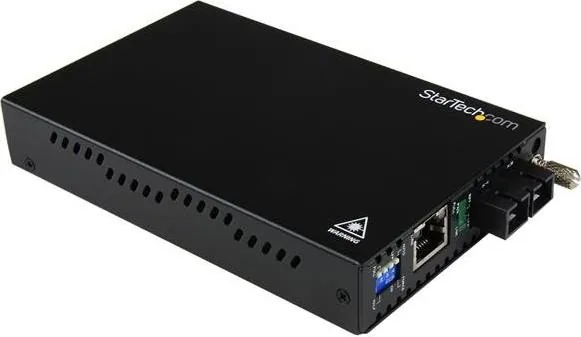
The StarTech ET91000SC2 is a practical Gigabit Ethernet to multimode fiber media converter designed for networks that need a reliable bridge between copper and fiber infrastructure. It connects a standard RJ-45 Ethernet link on one side and an SC duplex fiber connection on the other, making it a smart choice for extending a 1000BASE-T network into a 1000BASE-SX environment.
This model is especially useful when a network run needs to go beyond the distance limits of typical copper cabling. With support for multimode fiber distances up to 550 meters, it can help connect switches, hubs, and even computers through a fiber backbone while keeping data transfer fast and stable. The compact design also makes it easy to place in equipment rooms, offices, or other network spaces where flexibility matters.
A standout feature of the ET91000SC2 is its simple installation flow. Users can connect the fiber cable to the SC duplex port, attach an RJ-45 Cat5e or better cable, and then power the unit with the included universal adapter. The product also includes DIP switches for configuring duplex mode and link fault pass-through behavior, giving administrators more control over how the converter behaves in different network setups.
Status monitoring is straightforward thanks to the LED indicators. Power, fiber link, remote power failure, and link fault pass-through indicators help users quickly identify whether the unit is active, whether the fiber path is working, and whether a fault is present. This makes troubleshooting easier and reduces guesswork during deployment.
The package is well-rounded, including the media converter, power adapter, regional plugs, grounding screw, and manual. Combined with lifetime technical support and a two-year warranty, the ET91000SC2 offers a dependable option for professionals who want a compact fiber extension solution without unnecessary complexity.
Notes
- Match Tx and Rx connections correctly when attaching the fiber cable.
- Use compatible 1000BASE-T and 1000BASE-SX equipment for best results.
- Review DIP switch settings before deployment to avoid link issues.
- The unit requires external power and should be installed with proper cabling.
Search for 67,706 Manuals online


Type-in Brand or Model