
StarTech ECUSB3S254F Manual
PDF manual · 8 Pages
English



Quick check
Incorrect answer, please try again.
Chat with your StarTech ECUSB3S254F manual using AI
Get instant AI answers from your StarTech ECUSB3S254F manual
Ask anything about the StarTech ECUSB3S254F. Answers come from this manual, with the pages they are based on.
Ask a Question
Do you recommend ECUSB3S254F?
Yes NoFrequently Asked Questions
No, the product only supports Windows 2000/XP/Server 2003/Vista/Server 2008 R2/7. Windows 8 and newer are not officially supported by the drivers provided.
Is this answer helpful?
The power adapter is optional. Use it for high-consumption devices like external drives. Standard USB peripherals typically work without additional power.
Is this answer helpful?
Yes, provided your desktop has a compatible ExpressCard/54 slot. Most desktops lack this slot unless equipped with an external ExpressCard reader.
Is this answer helpful?
The product comes with a one-year warranty covering defects in materials and workmanship. It does not cover damage from misuse or normal wear.
Is this answer helpful?
Insert the driver CD after hot-plugging the card. Follow on-screen prompts for setup. AutoPlay should launch the installer automatically on supported Windows versions.
Is this answer helpful?
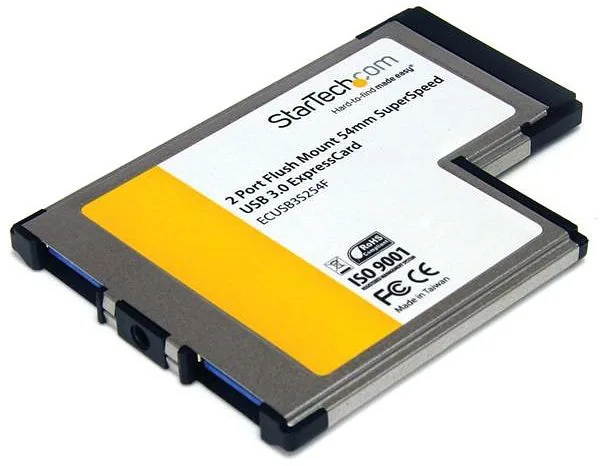
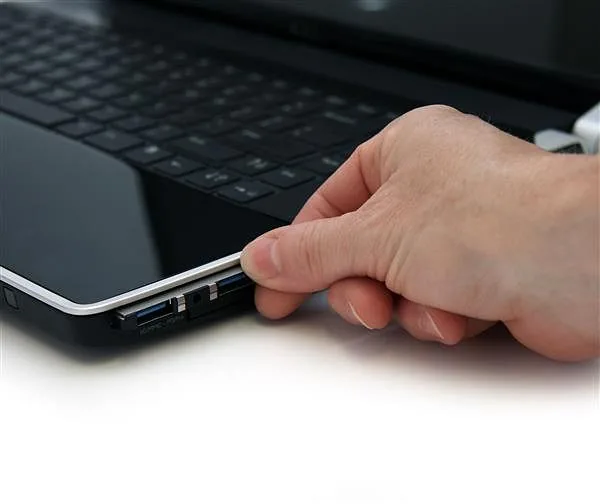
The flush design prevents the card from protruding, reducing the risk of damage when moving the laptop. It creates a seamless appearance and protects the card mechanism.
Is this answer helpful?
No, this ExpressCard/54 USB adapter is not compatible with Thunderbolt peripherals. It works only with standard USB devices via the ExpressCard interface.
Is this answer helpful?
Advantages and Disadvantages
Advantages

- Flush mount design avoids snagging during travel
- USB 3.0 data transfer speeds up to 5 Gbps
- Backward compatible with USB 2.0 and 1.1 devices
- Hot-pluggable for safe on-the-fly installations
- Includes power adapter cable for high-demand devices
Disadvantages

- ExpressCard 1.0 systems limited to 2.5 Gbps speed
- Optional power adapter needed for some high-draw devices
- No driver support for Windows 8 or newer OS versions
- Not compatible with non-ExpressCard laptop ports
- LED indicators absent for connection status feedback
Product Specification
External
2x USB-A 3.0
Internal
N/A
Interface
ExpressCard/54
Chipset
NEC Renesas uPD720200
Features
UASP
USB Naming
Link
Product Description
StarTech ECUSB3S254F USB 3.0 ExpressCard Adapter Review
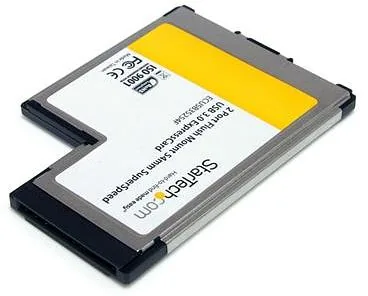
The StarTech ECUSB3S254F 2-Port Flush Mount USB 3.0 ExpressCard Adapter redefines laptop connectivity with its sleek, flush-mounted design. Perfect for modern travelers and professionals, this ExpressCard/54 solution allows users to connect high-speed USB 3.0 devices without protruding from the laptop chassis. Its compact form factor ensures it won't snag or get damaged during transit while leaving the USB ports always accessible.
Seamless Performance
Equipped with NEC uPD720200 chipset technology, the adapter delivers USB 3.0 speeds up to 5 Gbps when paired with ExpressCard 2.0 systems. For legacy machines running ExpressCard 1.0, it maintains backward compatibility at a robust 2.5 Gbps. The card also supports USB 2.0 (480 Mbps) and USB 1.1 (12 Mbps) protocols, making it versatile for older peripherals.
Installation & Power
This adapter is hot-pluggable, allowing seamless insertion and removal without system shutdown. An optional USB-to-DC power adapter cable supports power-hungry devices like external hard drives or high-capacity USB hubs. The included driver CD simplifies setup for Windows systems ranging from 2000 to 7 (32/64-bit).
Important Notes
- Flush design prevents physical damage during transport
- Power adapter recommended for high-consumption devices
- Compatible with major legacy and modern Windows platforms
- Requires ExpressCard/54 slot for functionality
Key Takeaways
- Ultra-slim design fits perfectly in laptop slots
- Future-proof USB 3.0 speeds with backward compatibility
- Hot-swappable for effortless device management
- One-year warranty backed by lifetime tech support
Search for 67,706 Manuals online


Type-in Brand or Model