
StarTech EC1394B2 Manual
PDF manual · 8 Pages
English



Quick check
Incorrect answer, please try again.
Chat with your StarTech EC1394B2 manual using AI
Get instant AI answers from your StarTech EC1394B2 manual
Ask anything about the StarTech EC1394B2. Answers come from this manual, with the pages they are based on.
Ask a Question
Do you recommend EC1394B2?
Yes NoFrequently Asked Questions
It adds two FireWire 800 ports through an ExpressCard/34 slot, letting you connect compatible 1394b and 1394a devices such as cameras, printers, audio gear, and other legacy peripherals.
Is this answer helpful?
The adapter supports FireWire speeds up to 800 Mbps. It also works with lower FireWire modes like 100, 200, and 400 Mbps for older devices.
Is this answer helpful?
It supports Windows 2000, XP, Vista, and 7 in 32- and 64-bit versions, plus Mac OS 10.5.x and later, and Linux.
Is this answer helpful?
No. Devices with their own power supply may work without it. Bus-powered FireWire devices may require the optional 12V power adapter for reliable operation.
Is this answer helpful?
Yes. The card is hot-pluggable, so it can be inserted while the system is powered on or off. After insertion, the driver should be installed if prompted.
Is this answer helpful?
No. It is designed for ExpressCard-equipped computers, but it can also be used on a desktop if paired with a compatible PCI Express to ExpressCard adapter.
Is this answer helpful?
Advantages and Disadvantages
Advantages

- Dual 9-pin FireWire 800 ports support connection to multiple peripherals.
- Up to 800 Mbps transfer speed helps older devices perform efficiently.
- Works across Windows, Mac OS, and Linux for broad compatibility.
- Hot-pluggable design makes installation quick and convenient.
- Backed by lifetime technical support and a lifetime warranty.
Disadvantages

- Requires an available ExpressCard slot or an additional desktop adapter.
- Older FireWire standard may not suit users focused on modern USB or Thunderbolt gear.
- Bus-powered devices may need an optional external power adapter.
- Driver installation is required before the ports can be used properly.
Product Specification
External
2x FireWire (1394B)
Internal
N/A
Interface
ExpressCard/34
Chipset
TI XIO2213A
USB Notation
Link
Product Description
StarTech EC1394B2: Compact FireWire 800 Expansion for Older Gear
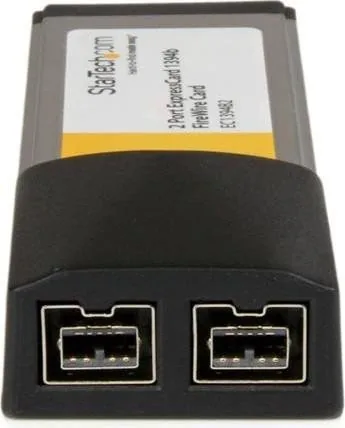
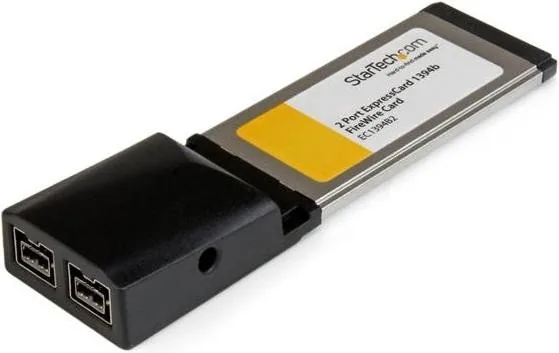
The StarTech EC1394B2, 2x FireWire 800, ExpressCard/34 Manual highlights a small but practical expansion card built for users who still rely on FireWire devices. With two 9-pin FireWire 800 ports, it gives compatible notebooks and ExpressCard-equipped systems a fast bridge to cameras, audio gear, printers, and other legacy peripherals that remain useful in creative and professional workflows.
One of the strongest points of this adapter is its flexibility. It supports both 1394b and 1394a standards, with transfer rates reaching up to 800 Mbps. That makes it a convenient option for tasks that need stable data movement rather than flashy modern connectivity. For users maintaining older hardware, the card offers a straightforward way to keep devices in service without replacing perfectly functional equipment.
Installation is designed to be simple. The adapter is hot-pluggable, so it can be inserted while the computer is on or off, and the operating system should recognize it once the driver is installed. It supports Windows 2000 through 7, Mac OS 10.5.x and later, and Linux, which broadens its usefulness across different setups. The card can even be used on a desktop system with a compatible PCI Express to ExpressCard adapter, extending its reach beyond notebooks.
Power options are also worth noting. FireWire devices with their own power supply may work without the optional adapter, while bus-powered devices may require external power to operate reliably. That detail makes the card especially useful in mixed environments where some peripherals are self-powered and others depend on the connection for energy as well as data.
Beyond performance, the product reflects StarTech.com’s focus on compatibility and long-term support. It carries RoHS, FCC, and CE certifications, comes with lifetime technical support, and is backed by a lifetime warranty. For anyone preserving an older workflow, this kind of reassurance matters just as much as the hardware itself.
Notes
- Best suited for legacy FireWire accessories and archival setups.
- Requires an available ExpressCard slot, or a desktop adapter workaround.
- Confirm power needs for bus-powered devices before connecting them.
Search for 67,706 Manuals online


Type-in Brand or Model