
StarTech DKM31C3HVCPD Manual
PDF manual · 2 Pages
English



Quick check
Incorrect answer, please try again.
Chat with your StarTech DKM31C3HVCPD manual using AI
Get instant AI answers from your StarTech DKM31C3HVCPD manual
Ask anything about the StarTech DKM31C3HVCPD. Answers come from this manual, with the pages they are based on.
Ask a Question
Do you recommend DKM31C3HVCPD?
Yes NoFrequently Asked Questions
Yes—when connected to a host that supports DisplayPort Alt Mode via USB-C, the HDMI 2.0b port can deliver up to 4K (4096x2160) at 60Hz, leveraging DP 1.4 Alt Mode and HDR10 support where applicable.
Is this answer helpful?
Yes—the USB-C 100W Power Delivery input accepts a compatible USB-C PD power adapter (sold separately) to provide up to 100W passthrough charging to the connected laptop while powering attached peripherals.
Is this answer helpful?
Not necessarily—your laptop’s USB-C port must support DP Alt Mode for video output. If the host lacks DP Alt Mode, the adapter cannot provide video signals via HDMI, VGA, or USB-C DP++.
Is this answer helpful?
The adapter uses USB 3.2 Gen 2 (10Gbps) for the host connection and applicable downstream ports, enabling high-speed transfers suitable for external SSDs and other bandwidth-hungry devices when supported by the host.
Is this answer helpful?
Possibly—if your display does not have a USB-C input, use the adapter’s HDMI or VGA outputs. If using the USB-C DP++ port for a DisplayPort or HDMI display, a suitable USB-C video adapter or cable may be required.
Is this answer helpful?
Without PD input, the adapter will rely on bus power from the host. USB ports will output available bus power (typically up to ~4.5W), charging and peripheral performance will be limited compared to when PD is connected.
Is this answer helpful?
Most modern operating systems will auto-detect and install required drivers when you connect the adapter’s built-in USB-C host cable. For additional drivers, manuals, or downloads, StarTech’s support site provides resources.
Is this answer helpful?
Advantages and Disadvantages
Advantages

- Multiple outputs: HDMI 4K@60Hz, VGA 1080p@60Hz, and USB-C DP++ for diverse display setups.
- High-speed data: USB 3.2 Gen 2 (10Gbps) connection for fast file transfers and responsive peripherals.
- Integrated power delivery: USB-C PD input supports up to 100W passthrough to charge laptops.
- Compact design: Built-in 25cm wrap-around cable reduces clutter and improves portability.
- Wired networking: GbE port adds reliable wired LAN connectivity for stable network performance.
Disadvantages

- Requires host USB-C with DP Alt Mode for video—no alternate solution for non-supporting ports.
- Limited bus power when PD adapter is not connected; USB charging reduced to ~4.5W.
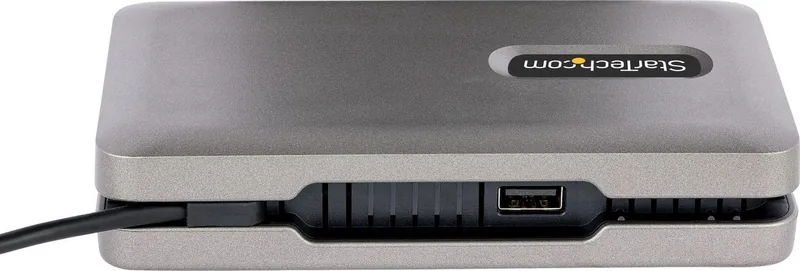
- One USB-A port located on Side C may be less accessible depending on setup orientation.
- USB-C Data/Charge port supplies only up to 10W to peripherals unless PD adapter is connected.
- Triple-monitor capability may be limited by host GPU and USB-C bandwidth constraints.
Product Specification
Type
LAN Adapter, USB Hub, Video Adapter
Form Factor
1x external wired (connection cable not detachable)
Host Connection
1x USB-C 3.1 (male via cable, 10Gb/s, USB-C with DisplayPort 1.4, USB PD 3.0 max. 20V/4A/80W, 9.84in cable length)
Ports
1x RJ-45, 1x USB-C 3.1 (female), 1x USB-A 3.1 (female), 1x HDMI (female), 1x VGA (female)
Transmission
1x RJ-45 (10/100/1000Base-T), 1x USB-C 3.1 (female, 10Gb/s, 5V/2A/10W, USB-C with DisplayPort 1.4, max. 3840x2160@60Hz or 2x 2560x1440@60Hz), 1x USB-A 3.1 (female, 10Gb/s), 1x HDMI (female, max. 3840x2160@30Hz or 2x 2560x1440@30Hz), 1x VGA (female, max. 1920x1200@60Hz)
Power Supply
Power supply also via host connection, power port (1x USB-C female USB PD 3.0, max. 20V/5A/100W, Passthrough 80W), external power supply possible but not included
Chipset
Genesys Logic GL3590 (USB Hub, USB 3.1), Realtek RTL8153BN (LAN Adapter, RJ-45)
Weight
5.93 oz
Housing Color
grey (Space Grey)
Compatibility
universal
Manufacturer Warranty
three years
USB Naming Convention
Link
Product Description
StarTech USB-C Multiport Adapter Space Grey, USB-C 3.1 [Plug] Manual
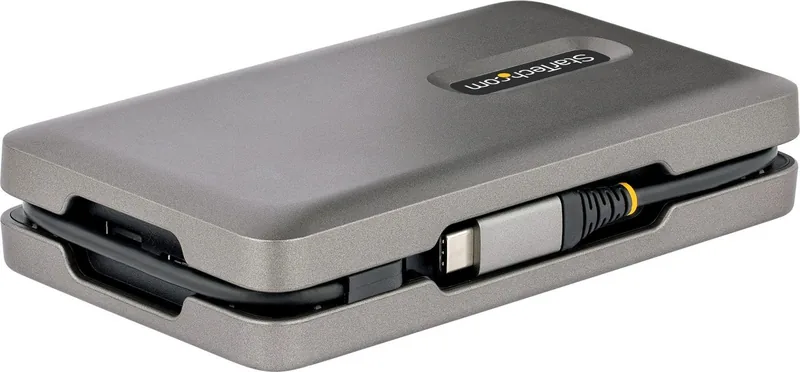
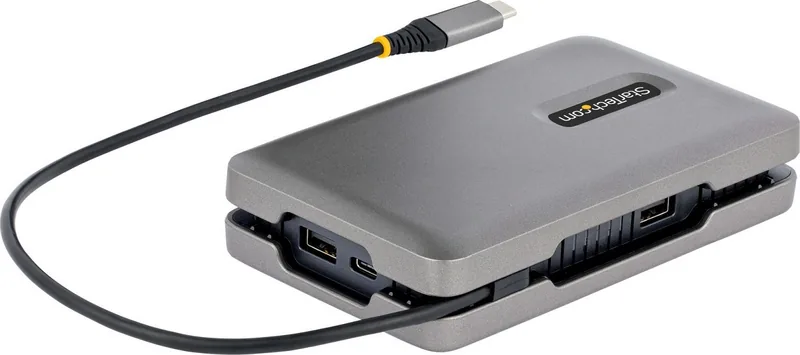
The StarTech USB-C Multiport Adapter in Space Grey is a compact, travel-friendly docking solution that expands a single USB-C port into multiple essential connections. Designed for modern laptops that support USB-C with DisplayPort Alt Mode and Power Delivery, this adapter provides HDMI and VGA video outputs, a USB-C data/charge/DP++ port, two USB-A 3.2 Gen 2 ports, a Gigabit Ethernet port, and a USB-C PD input for up to 100W pass-through charging. With a 10Gbps USB 3.2 Gen 2 host connection, it supports fast data transfers while enabling up to 4K@60Hz on HDMI or 1080p@60Hz on VGA displays.
The adapter is engineered for portability: a 25cm wrap-around built-in USB-C host cable keeps your workspace tidy and reduces cable clutter. It’s ideal for professionals who need to connect multiple peripherals—external displays, wired LAN, storage devices, and USB accessories—without carrying multiple adapters. The device supports HDR10 over HDMI 2.0b and leverages DisplayPort 1.4 Alt Mode to maximize video fidelity from compatible hosts.
Setup is straightforward—plug the built-in USB-C cable into a host laptop, attach displays via HDMI, VGA, or USB-C, connect USB peripherals to the USB-A ports, and plug a USB-C PD adapter into the 100W input to deliver laptop charging and power to connected devices. Note that host compatibility depends on the laptop’s USB-C implementation: video output requires DP Alt Mode and charging behavior depends on both the adapter and host power profiles. When no external power is connected, USB ports supply available bus power (up to ~4.5W) and the USB-C data/charge port can provide limited device charging (5V/2A, 10W) when a PD adapter is present.
With regulatory compliance for FCC and Industry Canada and a three-year warranty, the StarTech adapter blends robust construction with reliable support. It’s a practical choice for hybrid workers, frequent travelers, and anyone who needs a compact docking hub that delivers video, networking, fast data, and power delivery in one Space Grey package.
Notes
- Host laptop must support USB-C DP Alt Mode for video outputs to work.
- For USB-C displays or non-native ports, additional cables or adapters may be required.
- Connect a USB-C PD adapter to enable full laptop charging (up to 100W) and higher peripheral charging (up to 5V/2A on the USB-C port).
- Without PD input, USB ports are limited to bus power (approx. 4.5W).
Search for 67,706 Manuals online


Type-in Brand or Model