
StarTech DK30CHDPD Manual
PDF manual · 10 Pages
English



Quick check
Incorrect answer, please try again.
Chat with your StarTech DK30CHDPD manual using AI
Get instant AI answers from your StarTech DK30CHDPD manual
Ask anything about the StarTech DK30CHDPD. Answers come from this manual, with the pages they are based on.
Ask a Question
Do you recommend DK30CHDPD?
Yes NoVideo Manual
Atomos vs StarTech: USB 3.1 Powered Docking Station Comparison $75 vs $20
Frequently Asked Questions
It supports USB Power Delivery (when the host USB-C port provides PD), DP Alt Mode for video, a 4K-capable HDMI output, three USB 3.0 Type-A ports, and one BC1.2-compatible fast-charge USB port on the front. Functionality depends on host port features.
Is this answer helpful?
The dock can charge laptops only if the host laptop’s USB-C port supports USB Power Delivery. The docking station itself must be connected to its external power adapter to supply power and enable fast-charging via the front port.
Is this answer helpful?
Supported maximum HDMI outputs include 4096x2160 at 24Hz and 3840x2160 at 30Hz. Lower resolutions such as 2560x1600 @ 60Hz and 1920x1200 @ 60Hz are also supported. Actual results depend on the laptop’s GPU and monitor capabilities.
Is this answer helpful?
The docking station generally installs required drivers automatically when connected to a supported laptop. If prompted by the operating system, follow on-screen instructions to complete driver installation. Visit StarTech’s support site for downloads if needed.
Is this answer helpful?
Yes. The front BC1.2 fast-charge USB port can charge compatible devices even when no laptop is attached, but the docking station must remain connected to its power adapter for this feature to work.
Is this answer helpful?
Supported systems include Windows 7, 8/8.1, 10 (32/64-bit) and macOS El Capitan, Sierra, and High Sierra. Operating system requirements can change; check StarTech.com for the latest compatibility information.
Is this answer helpful?
StarTech provides a three-year warranty on this docking station and lifetime technical support. Warranty covers defects in materials and workmanship; misuse or normal wear and tear are excluded.
Is this answer helpful?
Advantages and Disadvantages
Advantages

- Single-cable connectivity: combines video, data, and power through one USB-C connection when host supports DP Alt Mode and PD.
- 4K HDMI support: enables up to 4096x2160 @ 24Hz or 3840x2160 @ 30Hz depending on host GPU and monitor.
- Multiple USB ports: three USB 3.0 Type-A ports plus a front BC1.2 fast-charge port for peripherals and charging.
- Plug-and-play on major OSes: automatic driver installation on supported Windows and macOS systems simplifies setup.
- Three-year warranty and lifetime support: StarTech offers extended support and a multi-year warranty for peace of mind.
Disadvantages

- Power delivery depends on host USB-C port: laptops without PD support won’t receive charging from the dock.
- 4K refresh limitations: maximum refresh rates at 4K are limited (24Hz/30Hz), which may not suit high-refresh workflows.
- Requires external power adapter: the dock cannot be powered by the laptop and must remain plugged into AC.
- Fast-charge limited to BC1.2-compliant devices: the front charging port only fast-charges devices that meet this spec.
- Video capabilities depend on host hardware: older or limited GPUs may restrict supported resolutions and refresh rates.
Product Specification
Compatibility
USB-C 3.0
Ports
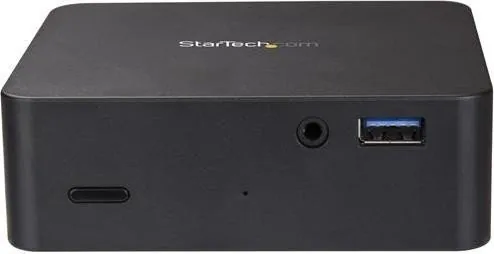
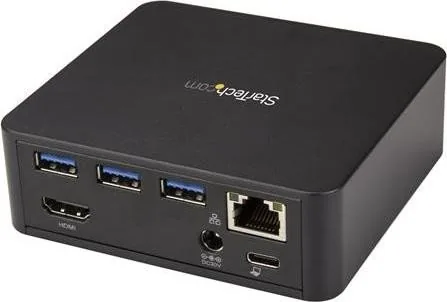
1x USB-C 3.0, 4x USB-A 3.0, 1x HDMI, 1x Jack, 1x Gb LAN
Power supply
100W, external
Dimensions
3.86x3.58x1.26in
Weight
0.44 lb
Special features
USB-C Power Delivery (85W)
Product Description
StarTech USB-C Docking Station for Laptops Manual
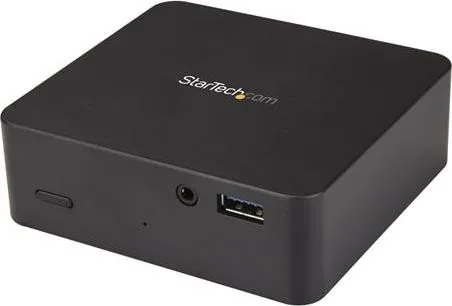
The StarTech USB-C Docking Station for Laptops delivers a compact, powerful hub that expands a laptop's connectivity with a single USB-C connection. Designed for professionals and power users, this dock supports 4K HDMI output, multiple USB 3.0 ports, and USB Power Delivery to charge compatible laptops. Its emphasis on compatibility and convenience makes it ideal for creating a clean, productive workstation with minimal cabling.
About the product
This docking station includes a USB-C host cable, a universal power adapter, and a quick-start guide. It supports DP Alt Mode for video and USB Power Delivery for charging, although power delivery requires a host USB-C port that supports the feature. The dock offers three rear USB-A 3.0 ports for high-speed peripherals and a front Battery Charge 1.2 fast-charge USB port that can charge devices even when no laptop is connected (power adapter must be attached).
The HDMI port supports up to 4K resolutions (4096x2160 @ 24Hz or 3840x2160 @ 30Hz) and a variety of lower refresh-rate options depending on host GPU and monitor capabilities. The dock installs with plug-and-play simplicity on supported Windows and macOS systems, automatically installing drivers where required. The product ships in regional power adapter variants and is backed by a three-year warranty and lifetime technical support from StarTech.
Key usage notes
- Ensure your laptop's USB-C port supports both DP Alt Mode and USB Power Delivery to take full advantage of video output and laptop charging.
- The docking station requires its external power adapter to provide device charging and to enable the front fast-charge port.
- Video output and maximum supported resolutions depend on the host computer's graphics hardware and the connected monitor.
Final thoughts
Practical and reliable, the StarTech USB-C docking station is a solid choice for users needing expanded ports and single-cable convenience. With broad OS support, fast-charge capability, and a focus on compatibility, it helps simplify multi-device workflows while maintaining essential performance for 4K displays.
Notes
- The dock must remain connected to its power adapter to charge devices or use the fast-charge port.
- Some USB-C laptop ports may not support full functionality; check DP Alt Mode and PD support.
- Driver installation may occur automatically on connection; follow prompts if shown.
Search for 67,706 Manuals online


Type-in Brand or Model