Manual.ly Logo

StarTech DisplayPort to 2x DisplayPort Manual

0.0 · 0 Ratings

PDF manual · 1 Pages

English

M: OA-GPT-54-NAN
page

/ 1

Loading...
2a478d82baa140eb6c77d69a9e326035e463 page 1
DE: Bedienungsanleitung - de.startech.com
FR: Guide de l'utilisateur - fr.startech.com
ES: Guía del usuario - es.startech.com
I T: Guida per l'uso - it.startech.com
NL: Gebruiksaanwijzing - nl.startech.com
PT: Guia do usuário - pt.startech.com
Manual Revision: 01/29/2015
For the most up-to-date information, please visit: www.startech.com
Quick Install Guide
System Requirements
• DisplayPort 1.2 enabled computer system
• Up to 2 DisplayPort monitors with cabling
Note: Dierent types of displays such as HDMI, DVI and VGA are
supported provided DisplayPort adapters are used. DisplayPort
adapters are not included.
Package Contents
• 1x 2-port mDP to DP MST Hub
• 1x Quick install guide
MSTDP122DP
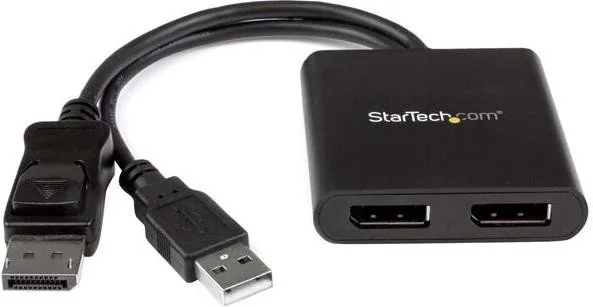
Multi Stream Transport Hub – DisplayPort™ 1.2 to dual head DisplayPort MST hub
*actual product may vary from photos
Installation
1. Ensure your computer system and monitors are powered o.
2. Connect the integrated Mini DisplayPort input cable to the Mini
DisplayPort connector on your computer system.
Product Overview
Integrated USB
power cable
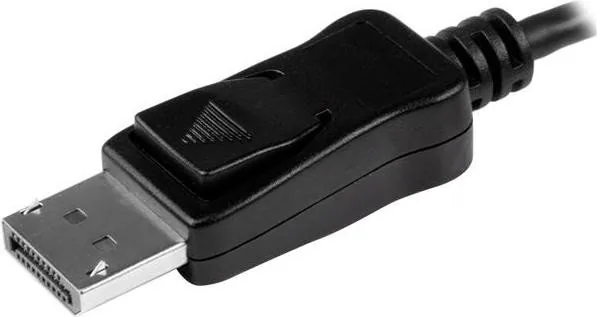
Integrated
DisplayPort input
cable
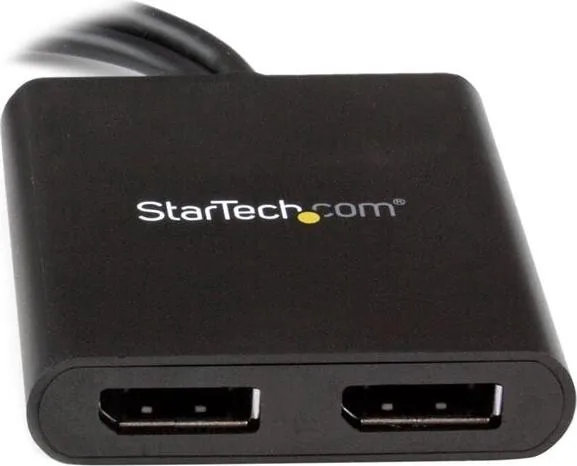
DisplayPort
output ports
Technical Support
StarTech.com’s lifetime technical support is an integral part of our commitment to provide industry-leading solutions. If you ever need help with your product, visit www.startech.com/support and access our comprehensive selection of
online tools, documentation, and downloads.
For the latest drivers/software, please visit www.startech.com/downloads
Warranty Information
This product is backed by a two year warranty.
In addition, StarTech.com warrants its products against defects in materials and workmanship for the periods noted, following the initial date of purchase. During this period, the products may be returned for repair, or replacement with
equivalent products at our discretion. The warranty covers parts and labor costs only. StarTech.com does not warrant its products from defects or damages arising from misuse, abuse, alteration, or normal wear and tear.
Limitation of Liability
In no event shall the liability of StarTech.com Ltd. and StarTech.com USA LLP (or their ocers, directors, employees or agents) for any damages (whether direct or indirect, special, punitive, incidental, consequential, or otherwise), loss of
prots, loss of business, or any pecuniary loss, arising out of or related to the use of the product exceed the actual price paid for the product. Some states do not allow the exclusion or limitation of incidental or consequential damages.
If such laws apply, the limitations or exclusions contained in this statement may not apply to you.
FCC Compliance Statement
This equipment has been tested and found to comply with the limits for a Class B digital device, pursuant to part 15 of the FCC Rules. These limits are designed to provide reasonable protection against harmful interference in a
residential installation. This equipment generates, uses and can radiate radio frequency energy and, if not installed and used in accordance with the instructions, may cause harmful interference to radio communications. However, there
is no guarantee that interference will not occur in a particular installation. If this equipment does cause harmful interference to radio or television reception, which can be determined by turning the equipment o and on, the user is
encouraged to try to correct the interference by one or more of the following measures:
• Reorient or relocate the receiving antenna.
• Increase the separation between the equipment and receiver.
• Connect the equipment into an outlet on a circuit dierent from that to which the receiver is connected.
• Consult the dealer or an experienced radio/TV technician for help
This device complies with part 15 of the FCC Rules. Operation is subject to the following two conditions: (1) This device may not cause harmful interference, and (2) this device must accept any interference received, including
interference that may cause undesired operation. Changes or modications not expressly approved by StarTech.com could void the user’s authority to operate the equipment.
Industry Canada Statement
This Class B digital apparatus complies with Canadian ICES-003.
Cet appareil numérique de la classe [B] est conforme à la norme NMB-003 du Canada.
CAN ICES-3 (B)/NMB-3(B)
Use of Trademarks, Registered Trademarks, and other Protected Names and Symbols
This manual may make reference to trademarks, registered trademarks, and other protected names and/or symbols of third-party companies not related in any way to
StarTech.com. Where they occur these references are for illustrative purposes only and do not represent an endorsement of a product or service by StarTech.com, or an endorsement of the product(s) to which this manual applies by the
third-party company in question. Regardless of any direct acknowledgement elsewhere in the body of this document, StarTech.com hereby acknowledges that all trademarks, registered trademarks, service marks, and other protected
names and/or symbols contained in this manual and related documents are the property of their respective holders.
3. Connect up to two DisplayPort monitors to the DisplayPort
output ports on the MST Hub, using your video cabling.
4. Connect the integrated USB power cable to an available USB
power source.
5. Power on your DisplayPort monitors followed by your computer
system.
6. The system will now detect the MST Hub, and add the attached
displays to the Display Settings of the System just as if the
monitors were connected directly to your native video card.

Chat with your StarTech DisplayPort to 2x DisplayPort manual using AI

Get instant AI answers from your StarTech DisplayPort to 2x DisplayPort manual

Ask anything about the StarTech DisplayPort to 2x DisplayPort. Answers come from this manual, with the pages they are based on.

Ask a Question

0/1000

Do you recommend DisplayPort to 2x DisplayPort?

Yes No

Frequently Asked Questions

A

It splits one Mini DisplayPort output into two DisplayPort monitor connections using MST technology, allowing you to extend or manage a dual-screen setup from a single source.

Is this answer helpful?

A

You need a system with DisplayPort 1.2 support. Without MST-capable output, the hub may not function as expected or may not detect both displays correctly.

Is this answer helpful?

A

Yes, but only if you use the proper DisplayPort adapters. Those adapters are not included, so they must be purchased separately if your monitors are not DisplayPort native.

Is this answer helpful?

A

The hub uses an integrated USB power cable. You connect it to an available USB power source to help ensure stable operation for both displays.

Is this answer helpful?

A

No, installation is straightforward. Connect the input cable to the computer, attach the monitors, plug in USB power, and restart the system so it can detect the hub automatically.

Is this answer helpful?

A

StarTech provides lifetime technical support and backs the product with a two-year warranty, covering defects in materials and workmanship under normal use conditions.

Is this answer helpful?

M: OA-GPT-54-NAN

Advantages and Disadvantages

Advantages

  • Supports dual DisplayPort monitors from one Mini DisplayPort source.
  • Compact MST design helps create a cleaner, more efficient workstation.
  • USB-powered operation adds flexibility for stable display output.
  • Works with adapters for HDMI, DVI, and VGA setups when needed.
VS

Disadvantages

  • Requires a DisplayPort 1.2-enabled computer to function properly.
  • Adapters for non-DisplayPort monitors are not included.
  • Only supports up to two displays, which may limit larger work setups.
  • Needs external USB power, so an extra cable and port are required.
M: OA-GPT-54-NAN

Product Specification

Video Inputs

1x DisplayPort 1.2 In

Video Outputs

2x DisplayPort 1.2 Out

Other Ports

1x USB 2.0

Resolutions up to

3840x2160@30Hz

Dimensions

2.28x0.55x2.44in (WxHxD)

Weight

0.13 lb

M: OA-GPT-54-NAN

Product Description

StarTech MST-Hub DisplayPort to 2x DisplayPort Manual: A Simple Way to Expand Your Workspace

If you need a clean and practical way to run two monitors from a single DisplayPort 1.2 connection, the StarTech MST Hub is designed to make that setup easier. Built around Multi-Stream Transport technology, this compact adapter helps turn one video output into a dual-display workspace without requiring a complicated docking station or a major hardware upgrade. It is especially useful for users who want more screen space for multitasking, productivity, or content review.

What the hub does

At its core, the device takes a Mini DisplayPort signal from a compatible computer and splits it into two DisplayPort outputs. That means one system can drive two separate monitors while keeping the installation relatively straightforward. The hub also supports DisplayPort adapters for HDMI, DVI, and VGA displays, giving users extra flexibility when working with mixed monitor setups.

This makes it a practical choice for offices, creative workstations, and home users who need to mirror or extend their desktop across multiple screens. Once connected, the operating system recognizes the attached monitors much like they were connected directly to the graphics card, which helps simplify day-to-day use.

Setup and compatibility

The installation process is refreshingly simple: power off the computer and monitors, connect the integrated Mini DisplayPort input cable, attach both displays, plug in the USB power cable, and then power everything back on. After that, the system detects the hub automatically and makes the displays available in the monitor settings.

The StarTech MST-Hub DisplayPort to 2x DisplayPort Manual emphasizes the importance of using a DisplayPort 1.2-enabled computer and suitable cabling. That makes the hub best suited to users who already have modern hardware and want to add dual-monitor support without hassle. The included quick install guide and lifetime technical support also add peace of mind for first-time users.

Why it stands out

Beyond the hardware itself, the hub offers a balanced mix of convenience and reliability. It comes with a two-year warranty, and StarTech backs it with technical support and downloadable resources for setup help and drivers. For users who want a practical expansion solution, it delivers a compact way to build a more efficient desktop environment.

Notes

  • Requires a DisplayPort 1.2-capable computer system.
  • USB power is needed for stable operation.
  • Adapter-based connections to HDMI, DVI, or VGA are supported, but adapters are not included.
  • Actual product appearance may vary from photos.
M: OA-GPT-54-NAN

© Copyright 2026 Manual.ly
