
StarTech CPUWALLMNT Manual
PDF manual · 18 Pages
English



Quick check
Incorrect answer, please try again.
Chat with your StarTech CPUWALLMNT manual using AI
Get instant AI answers from your StarTech CPUWALLMNT manual
Ask anything about the StarTech CPUWALLMNT. Answers come from this manual, with the pages they are based on.
Ask a Question
Do you recommend CPUWALLMNT?
Yes NoFrequently Asked Questions
The mount supports up to 10 kg (22 lb). Exceeding this limit may cause failure, injury, or property damage.
Is this answer helpful?
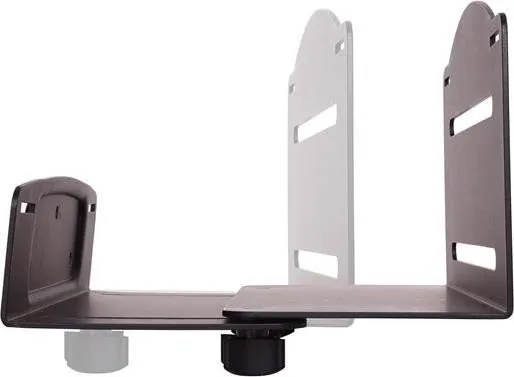
The adjustable mount fits CPUs with widths from approximately 122 mm (5 in) to 212 mm (8 in) by sliding the front bracket within the rear bracket slots to match your tower.
Is this answer helpful?
Not necessarily. The supplied anchors and screws may not be adequate for every wall structure. Ensure your wall can support at least four times the mounted equipment weight, and consult a construction professional if unsure.
Is this answer helpful?
A wrench is required to disassemble and reassemble parts. You may also need a drill, appropriate drill bits, and anchors/screws suited to your wall material.
Is this answer helpful?
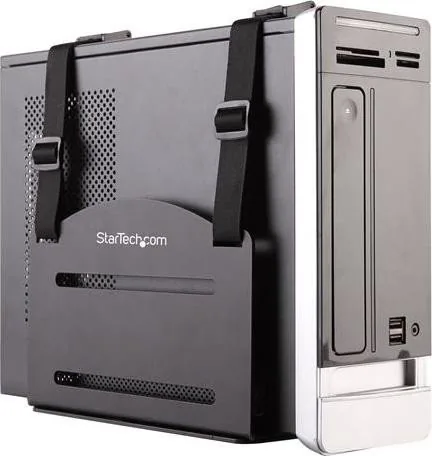
Thread the straps through the rear and front strap slots, loop them through the buckle slots, adjust to the CPU height, then close the clasps to hold the CPU snugly against the mount.
Is this answer helpful?
Yes. StarTech offers lifetime technical support resources online and a two-year limited warranty covering defects in materials and workmanship; it excludes damage from misuse, alteration, or normal wear.
Is this answer helpful?
If you lack the necessary expertise, contact a qualified construction professional to install the mount or recommend appropriate anchors and mounting methods for your wall type.
Is this answer helpful?
Advantages and Disadvantages
Advantages

- Space-saving design keeps CPU off the floor and frees desk space.
- Adjustable width (122–212 mm) fits a variety of desktop towers.
- Includes straps and hardware for secure retention and easy installation.
- Supports up to 10 kg (22 lb), suitable for most small-to-mid towers.
- Backed by StarTech technical support and a two-year warranty.
Disadvantages

- Included mounting hardware may be unsuitable for some wall types.
- Requires basic tools and some installation know-how (wrench needed).
- 10 kg weight limit excludes heavier workstations or servers.
- Multiple wall anchors required; improper installation risks damage.
- No CPU included — measure tower dimensions before purchase.
Product Specification
Type
Mount (PC)
Color
black
USB specification
Link
Product Description
StarTech Adjustable CPU Wall Mount — Overview
The StarTech adjustable CPU wall mount is a compact, practical solution for freeing desk space by securely mounting desktop computer towers to a wall. Engineered to support up to 10 kg (22 lb), this adjustable mount accommodates a range of CPU widths (min 122 mm / 5 in to max 212 mm / 8 in) and includes strap-based retention for safe, snug placement. Ideal for home offices, shared workspaces, retail point-of-sale setups, and workshops, it keeps towers off the floor, improves airflow, and reduces clutter.
Key Features and Design
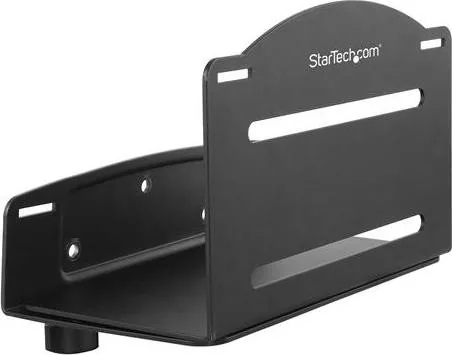
This mount consists of a rear bracket that attaches to the wall and a front bracket that slides within rear slots to match your CPU width. Adjustable straps with buckles and clasps secure the case in place. The kit includes three wall anchors, screws, two adjustable straps, two thumbscrews, and the CPU mount assembly. Installation requires basic tools (a wrench) and some familiarity with wall types; the included mounting hardware may not suit all wall constructions.
Practical Use and Installation Notes
To install, separate front and rear brackets, mark and drill three mounting points, attach the rear bracket level to a wall capable of supporting four times the device weight, route straps through the slots, then reassemble the front bracket and set the thumbscrews. Slide the CPU under the straps and fasten the buckles and clasps for a snug fit. For nonstandard walls or uncertainty about wall strength, consult a construction professional to select appropriate anchors and ensure safety.
Safety and Capacity
The mount supports up to 10 kg (22 lb). Overloading or improper installation can cause injury or property damage. Verify the chosen wall can safely support the combined weight of mount, CPU, and hardware. Retain washers removed during disassembly for reassembly. Follow manufacturer guidance for best results.
Warranty and Support
StarTech provides lifetime technical support resources online and a two-year limited warranty covering defects in materials and workmanship (excluding misuse, alteration, or normal wear). For drivers, documentation, or support, visit StarTech.com/support or StarTech.com/downloads.
Notes
- Ensure the wall structure can handle at least four times the mounted load.
- If mounting hardware seems inadequate for your wall type, use specialist anchors or hire a professional.
- Keep washers and included hardware handy during reassembly.
Search for 67,706 Manuals online


Type-in Brand or Model