


StarTech BRACKET25SAT Manual
PDF manual · 2 Pages
English



Quick check
Incorrect answer, please try again.
Chat with your StarTech BRACKET25SAT manual using AI
Get instant AI answers from your StarTech BRACKET25SAT manual
Ask anything about the StarTech BRACKET25SAT. Answers come from this manual, with the pages they are based on.
Ask a Question
Do you recommend BRACKET25SAT?
Yes NoFrequently Asked Questions
It lets you mount a 2.5" SATA hard drive in a standard 3.5" drive bay. This is useful when upgrading a desktop system or installing a smaller drive in a larger bay format.
Is this answer helpful?
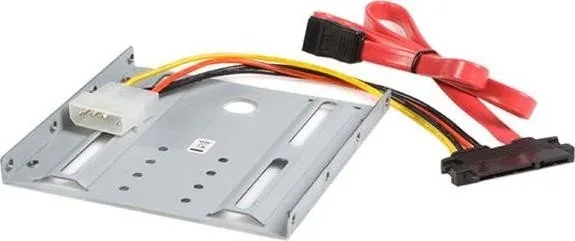
The kit includes a 3.5" mounting bracket, a SATA data/power combination cable, and a screw kit. These parts help secure the drive and connect it to the system.
Is this answer helpful?
The process is straightforward if you are comfortable opening a PC case. You connect the cable, secure the drive to the bracket, mount it in the bay, and attach it to power and data.
Is this answer helpful?
No special tools are mentioned beyond the included screws and standard PC access. A careful installation and basic screwdriver use are typically enough for mounting the drive.
Is this answer helpful?
Yes. The instructions warn that computer parts can be damaged by static electricity. Ground yourself before handling the drive or opening the case to reduce risk.
Is this answer helpful?
StarTech provides lifetime technical support and a two-year warranty. The warranty covers defects in materials and workmanship under normal use conditions.
Is this answer helpful?
Advantages and Disadvantages
Advantages

- Fits 2.5" SATA drives into standard 3.5" bays for easy desktop upgrades.
- Includes a mounting bracket, screw kit, and data/power cable.
- Simple installation with clear steps for securing the drive.
- Backed by lifetime technical support and a two-year warranty.
Disadvantages

- Limited to drive-bay conversion use cases; not a universal storage accessory.
- Requires manual installation inside the PC case, which may not suit beginners.
- Depends on available 3.5" bay space and compatible SATA connections.
Product Specification
Type
Mounting Frame
Height
1x 3.5"
Supported Form Factors
1x 2.5"
USB Notation
Link
Product Description
StarTech BRACKET25SAT: A Practical Way to Fit a 2.5" SATA Drive into a 3.5" Bay
The StarTech BRACKET25SAT is a compact mounting solution designed to help you install a 2.5" SATA hard drive into a standard 3.5" drive bay. For anyone upgrading a desktop system, building a custom workstation, or replacing older storage hardware, this bracket offers a simple path to better compatibility without complicating the setup.
What makes the BRACKET25SAT appealing is its straightforward design. The kit includes a 3.5" mounting bracket, a SATA data/power combination cable, and a screw kit, giving users the core pieces needed for a tidy installation. Instead of forcing a drive to sit loosely in the case, the bracket secures it in place and helps align it with the bay as intended. That means less movement, a cleaner internal layout, and a more stable mounting experience overall.
The installation process is also easy to follow. After grounding yourself and powering down the computer, the drive connects to the combined SATA data and power cable, then gets fastened to the bracket with the included screws. Once mounted, the assembly slides into an open 3.5" bay and connects to the motherboard and power supply. The result is a practical conversion that can make an older case more flexible for modern 2.5" drives.
This product is especially useful for users who want to repurpose a smaller SATA drive as a primary storage device, boot drive, or extra data drive inside a desktop tower. It supports a clean upgrade path and avoids the need for improvised mounting methods. StarTech also backs the product with lifetime technical support and a two-year warranty, which adds confidence for both home users and IT professionals.
Another plus is the attention to safe installation. The manual includes a static electricity warning, reminding users to ground themselves before opening the case or handling components. That small detail reflects a practical, user-focused approach and helps reduce the risk of accidental damage during setup.
Notes
- Best for converting a 2.5" SATA drive to fit a standard 3.5" bay.
- Includes mounting hardware and a SATA data/power cable for convenience.
- Follow anti-static precautions during installation.
- Check compatibility with your case and power connections before starting.
Search for 67,706 Manuals online


Type-in Brand or Model