
Free ST7735R Manuals – Read, Download & Print
1 Manuals
Manuals
Categories

ST7735R Manuals Overview
The ST7735R is a widely used single-chip driver for small color TFT LCD displays, commonly found in embedded systems, wearable devices, and educational projects. Understanding the ST7735R manual is essential for developers looking to integrate these displays into their hardware designs effectively. This guide provides a comprehensive look at the documentation available for this display controller, ensuring that users can navigate its features, pinouts, and communication protocols with ease.
Purpose of the ST7735R Manual
The primary purpose of the ST7735R manual is to serve as a technical reference for engineers and hobbyists working with 128x160 or similar resolution TFT screens. It details the internal architecture of the display driver, including memory mapping, command sets, and timing requirements. Without a clear understanding of these specifications, integrating the display can lead to initialization errors, flickering images, or complete failure to render graphics. The manual acts as the bridge between the theoretical capabilities of the chip and practical implementation on microcontrollers like Arduino, ESP32, or STM32.
Key Sections in the Documentation
A typical ST7735R manual is structured into several critical sections that cover every aspect of the chip's operation. These sections are designed to help users move from basic setup to advanced customization. The first section usually covers the general description, outlining the key features such as support for RGB interface, built-in power supply circuitry, and compatibility with various host interfaces. Following this, the electrical characteristics section provides voltage levels, current consumption data, and operating temperature ranges, which are vital for power management planning.
Pin Configuration and Electrical Specifications
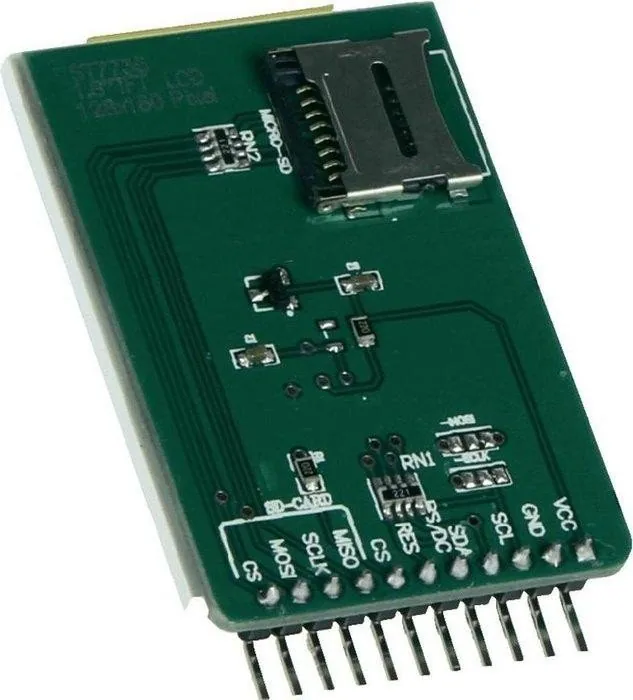
One of the most important parts of the manual is the pin configuration table. The ST7735R typically uses an SPI interface for data transmission, though some variants support 8-bit parallel modes. The manual lists each pin, its function, and its electrical properties. For instance, the RESET pin is crucial for initializing the display, while the CS (Chip Select) pin allows the microcontroller to communicate with multiple devices on the same bus. Understanding the voltage tolerance of these pins is necessary to prevent damage when interfacing with 3.3V or 5V logic levels. The manual also specifies the maximum clock frequency for the SPI bus, ensuring reliable data transfer without corruption.
Command Set and Register Map
The core of the ST7735R functionality lies in its command set. The manual provides a detailed register map, explaining what each command does and how to write data to specific registers. Commands include setting the address window for scrolling, configuring the color depth, enabling sleep mode, and adjusting gamma correction. Developers must refer to this section to send the correct sequence of commands during initialization. A common mistake is skipping specific initialization sequences, which results in inverted colors or incorrect screen orientation. The manual often includes example code snippets or flowcharts to illustrate the proper order of operations for bringing the display online.
Timing Diagrams and Waveforms
Timing diagrams are another indispensable component of the ST7735R manual. These visual representations show the relationship between the clock signal, data lines, and control signals like CS and RS (Register Select). Accurate timing is required to meet the setup and hold times specified by the manufacturer. If the microcontroller sends data too quickly or too slowly, the display may not interpret the signals correctly. The manual provides these diagrams to help developers configure their SPI peripherals correctly, whether using hardware SPI libraries or bit-banging methods on GPIO pins.
Common Applications and Integration Scenarios
The ST7735R is favored for applications where space and power efficiency are priorities. Its compact size and low power consumption make it ideal for portable gadgets, digital clocks, and sensor dashboards. The manual often includes application notes that describe how to connect the display to popular development boards. For example, connecting the ST7735R to an Arduino Uno requires wiring specific pins to the SPI header and powering the display through the 3.3V rail. The documentation helps users troubleshoot common issues such as blank screens, distorted images, or slow refresh rates.
Driver Libraries and Software Support
While the manual focuses on hardware, it frequently references software drivers. Many open-source libraries exist for platforms like Arduino, MicroPython, and RTOS environments. These libraries abstract the low-level register writes described in the manual, allowing developers to focus on application logic rather than protocol details. However, understanding the underlying commands from the manual is still beneficial when customizing the library or debugging unexpected behavior. The manual may list compatible libraries or provide guidelines on writing custom drivers if existing solutions do not meet specific needs.
Troubleshooting and Best Practices
Even with a solid manual, integration challenges can arise. The troubleshooting section of the ST7735R documentation offers solutions to frequent problems. Issues like ghosting, color shifts, or incomplete rendering often stem from incorrect initialization sequences or insufficient power supply. The manual advises checking connections, verifying voltage levels, and ensuring that the reset pin is toggled correctly. Best practices include using pull-up resistors on control lines, keeping SPI wires short to reduce noise, and implementing delay functions after sending critical commands. Adhering to these recommendations ensures stable performance and longevity of the display module.
Conclusion
Mastering the ST7735R manual is a fundamental step for anyone working with small TFT displays. It provides the necessary technical depth to understand the chip's capabilities and limitations. By carefully studying the pinout, command set, timing diagrams, and application examples, developers can create robust and efficient display interfaces. Whether building a simple project or a complex commercial product, the ST7735R manual remains an invaluable resource for successful implementation. Always refer to the latest version of the datasheet to account for any revisions or updates in the chip's design.
Search for 67,706 Manuals online


Type-in Brand or Model