
Sportstech STX300 Manual
PDF manual · 77 Pages
English



Quick check
Incorrect answer, please try again.
Chat with your Sportstech STX300 manual using AI
Get instant AI answers from your Sportstech STX300 manual
Ask anything about the Sportstech STX300. Answers come from this manual, with the pages they are based on.
STX300 Maintenance Schedule
Clean the stepper with a soft damp cloth at least once a week. Do not use aggressive or corrosive cleaning agents.
If squeaking noises are heard, lubricate the stepper, moving parts, and axial connections.
Check before each exercise for damage or wear, especially plastic washers, tread areas, and pull straps.
Periodically check whether screws and nuts are still tight to ensure secure standing.
Replace the LR44 battery if the display information becomes faint.
Ask a Question
Do you recommend STX300?
Yes NoFrequently Asked Questions
The stepper is designed for a maximum user weight of 120 kg. Exceeding this limit may compromise safety and device performance.
Is this answer helpful?
Use the bottom-mounted adjusting screw to increase resistance and step height. Turn the screw clockwise to raise resistance; adjust gradually to find a comfortable intensity.
Is this answer helpful?
Yes — attach the provided pull straps to the designated eyelets and perform guided strap exercises. With straps you can work arms, shoulders, chest and back, while stepping or stationary. Keep handles horizontal and avoid overstressing wrists.
Is this answer helpful?
The display shows mode (STOP/CNT), elapsed TIME, STRIDES/MIN, CAL (calories) and SCAN mode cycles data every 4 seconds. The device conforms to accuracy Class C, so readouts are estimates and not clinically precise.
Is this answer helpful?
Wipe the stepper weekly with a soft damp cloth, avoid aggressive cleaners or solvents, lubricate moving parts if squeaks occur, and inspect screws, pedals, plastic washers and straps regularly. Remove the battery if storing long-term.
Is this answer helpful?
The computer uses an LR44 battery. Carefully detach the computer, turn it over, remove the old battery and install a new one observing polarity. Reinstall the computer—TTR total step count resets only when battery is replaced.
Is this answer helpful?
Yes. Allow about 2 x 2 meters clearance, place the unit on a level surface, keep children away from pedals and packaging, do not touch hot hydraulic dampers, avoid water contact with the computer, and consult a physician before starting if you have medical conditions.
Is this answer helpful?
Advantages and Disadvantages
Advantages

- Compact stepper that simulates stair climbing and targets legs and glutes effectively.
- Adjustable resistance screw lets you scale intensity and step height.
- Detachable pull straps enable upper-body and full-body workouts.
- Simple training computer shows time, step count, rpm and calories with auto-sleep.
- Low-maintenance: weekly wipe-downs, occasional lubrication and easy battery replacement (LR44).
Disadvantages

- Display accuracy is Class C; metrics are approximate, not medical-grade.
- Hydraulic dampers heat during use and can leak oil—requires care and possible mat underneath.
- Pull straps limited to 185 cm stretch; overstretching can cause damage or injury.
- Maximum user weight 120 kg may exclude heavier users.
- Repairs require authorised service and original parts; DIY fixes not recommended.
Product Specification
Colors
black, red
Max. user weight
264.55 lb
Dimensions
14.17x10.24x15.35 in
Weight
6.17 lb
Product Description
Sportstech STX300 Stepper — Efficient Home Cardio and Strength Trainer
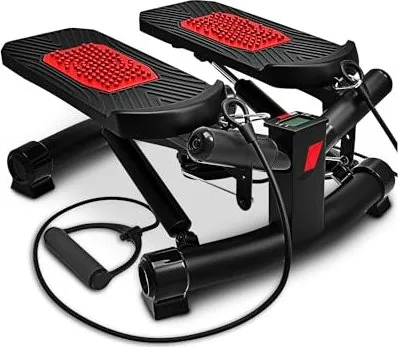
The Sportstech STX300 Stepper is a compact, versatile fitness device designed to simulate stair climbing while offering additional resistance training via detachable pull straps. Built for home use and rated for users up to 120 kg, the stepper combines hydraulic damping, an adjustable resistance screw, non-slip feet and a simple training computer to help improve cardiovascular fitness, tone legs and glutes, and strengthen upper body muscles when using the straps.
Key features and how it helps
The STX300 uses hydraulic cylinders for smooth stepping action and includes cushioning on the pedals to reduce impact. A bottom-mounted adjusting screw lets you increase resistance and step height, letting you scale workouts from light cardio to more intense sessions. The pull straps (max stretch 185 cm) attach via carabiners to dedicated eyelets and enable arm, shoulder and back exercises while stepping or stationary.
A basic training computer displays mode, step count (CNT), elapsed time (TIME), strides per minute (STRIDES/MIN), calories (CAL) and a SCAN mode that cycles data every four seconds. It runs on an LR44 battery and auto-sleeps after five minutes of inactivity.
Practical guidance for users
Before starting, warm up 5–10 minutes and perform recommended stretches (quadriceps, hamstrings, calves, inner thigh, head/shoulder mobility). Start with short daily sessions (10–15 minutes) and increase intensity gradually; a sample weekly pattern is three days training, one day rest, two days training, one day rest. Maintain upright posture, avoid hollow lower back, and distribute load between legs when stepping. Keep wrists neutral when using pull straps and hold handles horizontally.
Maintenance is straightforward: clean weekly with a soft damp cloth, lubricate moving parts if squeaks occur, and regularly check screws, plastic washers, pedals and straps for wear. Replace the LR44 battery when the display dims. For safety, place the stepper on a stable, level surface with ~2 x 2 meters clearance and consider a non-slip rubber mat to protect floors from possible hydraulic oil leaks.
Safety notes
The stepper is not a toy—keep children away from pedals and packaging film. Hydraulic dampers heat during use—do not touch. Only qualified technicians should perform repairs and only original parts should be used. Avoid exposing the computer to water or strong sunlight and remove the battery if storing the unit for extended periods.
Quick setup tips
- Attach the two pull-strap carabiners to the designated eyelets.
- Fit the four end caps on the main frame so feet align with the floor.
- Turn the bottom adjustment screw clockwise to increase resistance.
- Scan the QR code or visit www.sportstech.de/qr/stx300.html for video tutorials on assembly and use.
Notes:
- Maximum user weight: 120 kg.
- Pull straps max stretch: 185 cm; overstretching risks damage and injury.
- Device meets display accuracy Class C—use displayed metrics as estimates.
Search for 67,706 Manuals online


Type-in Brand or Model