
SPL MTC Mk2 Manual
PDF manual · 13 Pages
English



Quick check
Incorrect answer, please try again.
Chat with your SPL MTC Mk2 manual using AI
Get instant AI answers from your SPL MTC Mk2 manual
Ask anything about the SPL MTC Mk2. Answers come from this manual, with the pages they are based on.
Ask a Question
Do you recommend MTC Mk2?
Yes NoVideo Manual
MTC Mk2 – The next generation Monitor & Talkback Controller 🎶
Frequently Asked Questions
The Phonitor Matrix recreates speaker-like cues on headphones by adding time and level differences between channels. It improves spatial perception and helps translate headphone mixes to speaker playback, aiding reference accuracy during mixing and mastering.
Is this answer helpful?
Cue Mix routes only the IN C/CUE MIX input to the Artist headphone output and Cue Out. When activated, it mutes the Phonitor Matrix and other monitoring modes for that feed, and the talkback mic can be added so the performer hears their dedicated monitor mix.
Is this answer helpful?
Yes. The MTC Mk2 provides a rear-panel jack for a latching or momentary footswitch that can activate the talkback function as an alternative to the front-panel Talkback button.
Is this answer helpful?
The unit offers LR swap, phase inversion, mono summing, dim (-10 dB) and mute switches. These let you verify channel balance, phase issues, mono compatibility and quickly reduce or mute speaker outputs for level management.
Is this answer helpful?
Yes. Use the correct mains voltage and supplied or specified power cable, avoid exposing the unit to moisture, don’t insert mono plugs into stereo headphone jacks, and follow ventilation and grounding guidance to prevent damage or hazards.
Is this answer helpful?
It features balanced XLR and TRS I/O plus RCA inputs, high dynamic range, wide frequency response and low THD. An internal linear power supply with a toroidal transformer supports stable analog performance suited for critical monitoring.
Is this answer helpful?
DIP switches on the unit underside allow additional input attenuation and talkback dim options (various dB steps). They offer permanent configuration changes for input levels and talkback behavior but require physical access to the device base.
Is this answer helpful?
Advantages and Disadvantages
Advantages

- Phonitor Matrix provides speaker-like headphone monitoring for improved spatial reference.
- Multiple balanced XLR/TRS outputs and RCA inputs for flexible routing and source selection.
- Dedicated Artist Cue Mix and Cue Out for isolated performer monitoring and talkback.
- Robust build with linear power supply and toroidal transformer for low noise and stable performance.
- Handy monitoring tools: LR swap, phase invert, mono, dim and mute for quick checks and adjustments.
Disadvantages

- Phonitor Matrix parameters are partly fixed (angle and center attenuation) limiting customization.
- Cue Mix disables advanced monitoring modes, reducing functionality for the Artist feed.
- No audio cables included; requires purchasing appropriate TRS/XLR/RCA cables separately.
- Front-panel headphone jacks require careful insertion — mono plugs can short the headphone amp.
- DIP switch adjustments require access under the unit, less convenient for frequent changes.
Product Specification
Type
Monitor Controller
Channels
6
Format
tabletop
Product Description
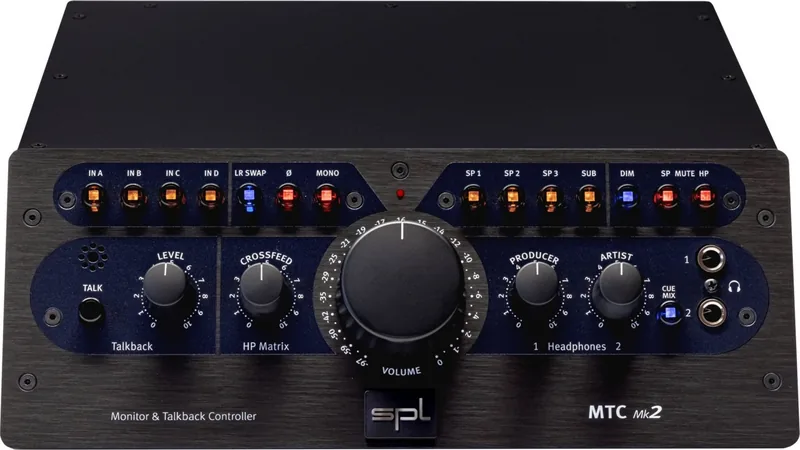
SPL MTC Mk2 — Monitor & Talkback Controller
The SPL MTC Mk2 is a compact, studio-grade monitor controller and talkback unit designed for professional monitoring workflows. It combines flexible routing, high-quality analog I/O and a speaker-like headphone virtualization (Phonitor Matrix) to support mixing, tracking and mastering sessions with precision and convenience.
Key features and workflow
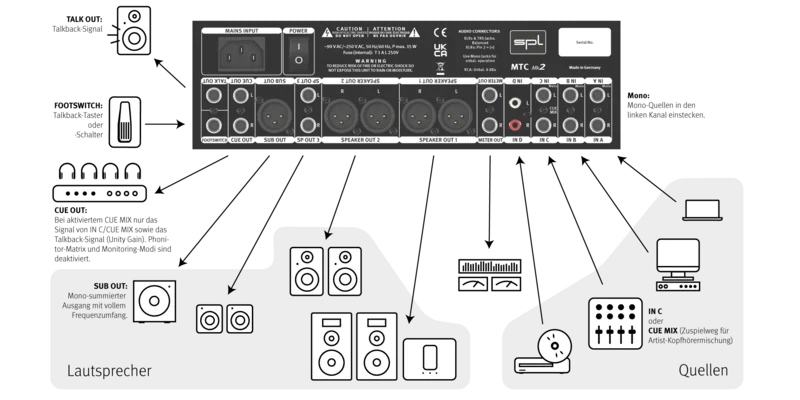
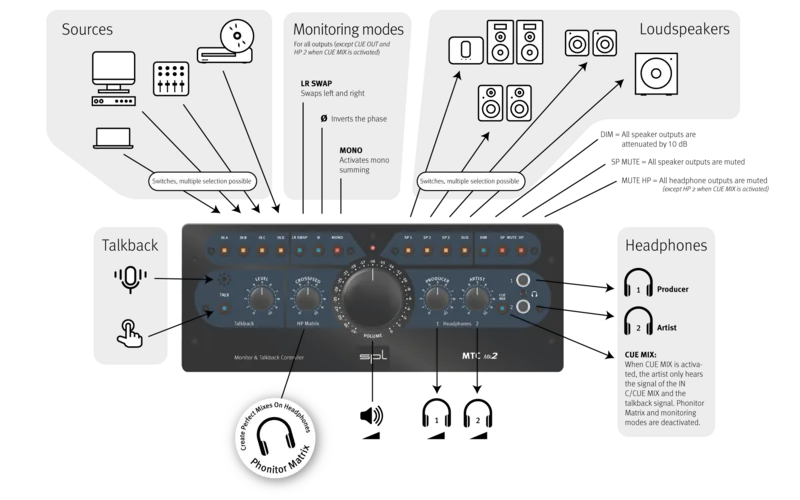
Equipped with balanced XLR and TRS inputs and outputs plus RCA inputs, the MTC Mk2 lets you connect multiple sources and monitor through up to three speaker outputs and a summed sub output. Dedicated headphone outputs include an Artist feed with Cue Mix for an isolated performer mix and a Cue Out for external monitoring. The talkback section integrates a mic input and footswitch control, allowing smooth communication with performers while attenuating the monitor feed.
The Phonitor Matrix emulates speaker listening on headphones by introducing controlled interaural time and level differences, improving spatial perception and reference translation when mixing on headphones. Essential monitoring tools include LR swap, phase invert, mono summing and dim/mute functions for quick compatibility checks and level management. DIP switches under the unit provide further configuration for input attenuation and talkback behavior.
Build and sound quality
The unit uses an internal linear power supply with a toroidal transformer, supporting stable analog performance and low noise. Technical specs show wide frequency response, high dynamic range and low distortion, making the MTC Mk2 suitable for critical listening tasks. Robust front-panel controls and clear LEDs help manage complex monitoring setups during sessions.
Applications
The MTC Mk2 is ideal for small studios, project rooms and mastering setups where precise monitoring, intuitive talkback and artist headphone mixes are required. Its combination of speaker outputs, sub integration and headphone virtualization make it a versatile centerpiece for monitoring chains, enabling both accurate reference listening and convenient in-session communication.
Notes
- Cue Mix disables the Phonitor Matrix and most monitoring modes for the Artist feed, ensuring an isolated performer mix.
- Avoid using mono plugs in the stereo headphone jacks to prevent short circuits.
- DIP switches allow additional attenuation and tailoring of talkback and input levels.
Search for 67,732 Manuals online


Type-in Brand or Model