
SPL Channel One Mk3 Manual
PDF manual · 32 Pages
English



Quick check
Incorrect answer, please try again.
Chat with your SPL Channel One Mk3 manual using AI
Get instant AI answers from your SPL Channel One Mk3 manual
Ask anything about the SPL Channel One Mk3. Answers come from this manual, with the pages they are based on.
Ask a Question
Do you recommend Channel One Mk3?
Yes NoFrequently Asked Questions
Connect mic first, then activate 48V. Wait one minute after deactivation before disconnecting to discharge residual current. Follow manual safety instructions to avoid damage.
Is this answer helpful?
Two microphone inputs on rear panel plus line and instrument inputs. Front instrument jack is accessible for quick access.
Is this answer helpful?
Yes, the Tube Post switch allows moving saturation after EQ or preamp and before de-esser.
Is this answer helpful?
The device covers a frequency range from 10 Hz to 200 kHz for wide bandwidth performance.
Is this answer helpful?
Use the GND Lift switch on the back panel to disconnect internal ground from housing ground.
Is this answer helpful?
Yes, it fits standard 19 inch slots with width of 482 mm and depth of 210 mm.
Is this answer helpful?
Device must be unplugged immediately to avoid secondary connections from damage during storms or outages.
Is this answer helpful?
Advantages and Disadvantages
Advantages

- Discrete preamplifier offers up to 68 dB of gain for clear audio capture.
- Dual microphone inputs with individual phantom power enable flexible recording setups.
- Tube saturation stage adds warm harmonic distortion to signals easily.
- Comprehensive EQ with Low Mid High filters covers entire frequency spectrum.
- Transient designer controls attack and sustain to shape dynamics precisely.
Disadvantages

- Audio cables are not included in scope of delivery for initial setup.
- Strict phantom power procedure requires waiting one minute before unplugging.
- Premium transformer option requires separate ordering for full signal isolation.
- Voltage selection requires manual adjustment on rear panel before plugging in.
- Front instrument input deactivates rear line input when both used simultaneously.
Product Specification
Type
Channel Strip
Channels
1
Product Description
SPL Channel One Mk3
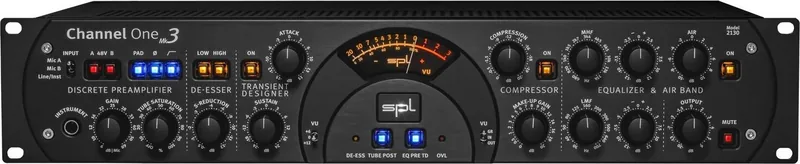
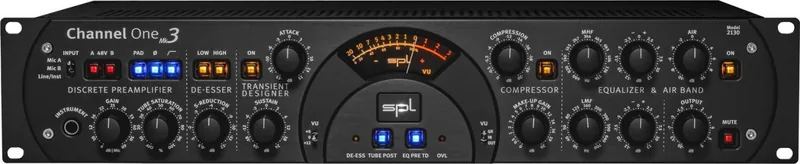
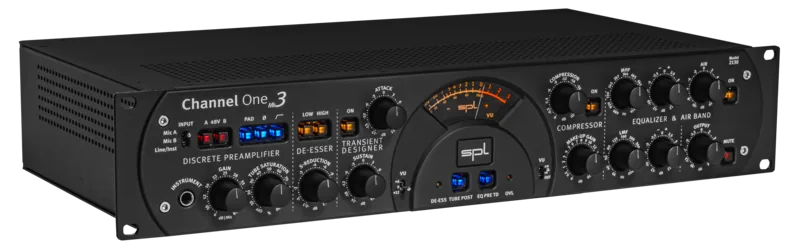
The SPL Channel One Mk3 is a premier channel strip designed for professional audio recording environments. This versatile hardware solution combines a discrete preamplifier with a comprehensive suite of analog processing tools. It is essential for users to consult the SPL Channel One Mk3 Manual before initial setup to ensure voltage compatibility. The preamplifier offers up to 68 dB of gain for microphone signals and handles line signals with flexibility. Two microphone inputs allow for dual recording setups while the front input simplifies instrument connection. Audio cables are not included in the scope of delivery so users must source appropriate XLR cables separately. The signal path features tube saturation options that can be placed before or after the equalizer stage. A built-in compressor with makeup gain controls dynamics effectively. The equalizer module includes LMF, MHF, and AIR bands for tonal shaping. A de-esser with low and high bands manages sibilance without affecting the full signal. The transient designer adjusts attack and sustain phases dynamically. Safety instructions emphasize disconnecting phantom power before changing microphones to prevent damage. Ground lift switches assist in removing electrical hum from cables. The VU meter provides clear visual feedback for gain reduction or output levels. Fuse types vary based on 115 or 230 volt selection configurations. Specifications indicate a frequency range from 10 Hz to 200 kHz for wide bandwidth. Premium variants may include transformer outputs for isolation. Careful handling prevents condensation damage when moving between temperature zones. Cleaning should involve only dry cloths without solvents. Proper disposal follows environmental protection rules for electronic equipment. This unit represents high German engineering quality in audio interfaces. Read safety instructions starting on page 14 for secure operation. Make sure the mains voltage corresponds to your region to avoid damage. Connect devices with appropriate audio cables to the inputs and outputs. Power on switch must be on rear panel. Activate phantom power only after connecting microphone. Wait one minute after deactivation before disconnecting. Do not expose to rain or moisture. Do not open the case for service. Use only supplied power cord. Unplug when not used for a while. The unit weighs about 6 kg without packaging. It is designed for rack mounting in standard 19 inch slots. The input impedance for microphones is 10 kilo ohms while instruments require mega ohms. This ensures proper signal matching for various sources without loading effects. Common mode rejection is better than 80 dB at 1 kHz for clean mic signals. THD plus noise remains below 0.05 % even at maximum gain settings for high fidelity. Maintenance requires keeping vents clear to prevent overheating during long sessions. Store manuals in a safe place for future reference regarding technical changes. The WEEE symbol indicates this device must not go to standard waste streams. Contact dealer if power supply issues arise during normal operation.
Technical Notes
Ensure all devices are switched off before connecting cables. Set all volume levels to minimum before powering on. This unit contains user-serviceable parts so do not open the case under any circumstances. Keep the manual safe for warranty purposes. The product is made in Germany.
Search for 67,732 Manuals online


Type-in Brand or Model