
Speedlink Ludicium Manual
PDF manual · 40 Pages
English



Quick check
Incorrect answer, please try again.
Chat with your Speedlink Ludicium manual using AI
Get instant AI answers from your Speedlink Ludicium manual
Ask anything about the Speedlink Ludicium. Answers come from this manual, with the pages they are based on.
Ask a Question
Do you recommend Ludicium?
Yes NoFrequently Asked Questions
No, the product is intended for use only indoors in home or office environments with dry and closed spaces. Using it outside may void safety expectations and warranty terms.
Is this answer helpful?
The unit connects via USB. While the text mentions recycling batteries if present, the device itself functions as a wired input device for computers without needing power from within the keyboard unit.
Is this answer helpful?
If the device is damaged physically, stop using it immediately. The product contains no user-serviceable parts and attempting to fix it can create hazards.
Is this answer helpful?
Do not throw it in household waste. Dispose of it through official recycling points to protect the environment from hazardous substances contained within.
Is this answer helpful?
Yes, extended use can cause discomfort or pain. Regular breaks are recommended to prevent health issues. Consult a doctor if problems persist.
Is this answer helpful?
Yes, strong static, electrical, or high-frequency fields like from microwaves or mobile phones may cause interference. Increase distance to resolve issues.
Is this answer helpful?
The product is manufactured by Jöllenbeck GmbH, which operates under the Speedlink brand. They offer support via their official website for technical issues.
Is this answer helpful?
Advantages and Disadvantages
Advantages

- USB connectivity provides simple plug-and-play functionality for instant computer access.
- Integrated multimedia function keys allow direct control of media and calculator.
- Device is maintenance-free, ensuring reliability without requiring user intervention.
- Clear health guidelines are provided to prevent strain from extended use periods.
- FCC compliance ensures the device meets Class B digital device interference standards.
Disadvantages

- Indoor use restriction limits flexibility for outdoor or wet environment applications.
- Self-service repair is impossible as the product contains no user-serviceable parts.
- Prolonged usage carries inherent health risks of pain or physical discomfort.
- Disposal requires recycling through official points rather than household waste bin.
- Performance may suffer near strong static, electrical, or high-frequency fields.
Product Specification
Layout
German
Type
Rubber Dome
Backlight
N/A
Keycap Height
Standard, with frame
Keycap Shape
Standard
Keycap Profile
Concave
Numpad
Standard
Arrow Keys
Standard
Modifier Keys
Standard
Enter Key
Standard
Delete Key
Standard
Status Indicators
Caps Lock, Num Lock, Scroll Lock
Wrist Rest
N/A
Housing
Plastic
Housing Color
Solid, Black
Keycap Design
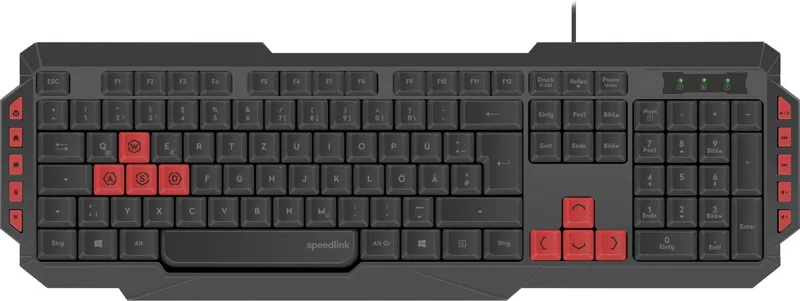
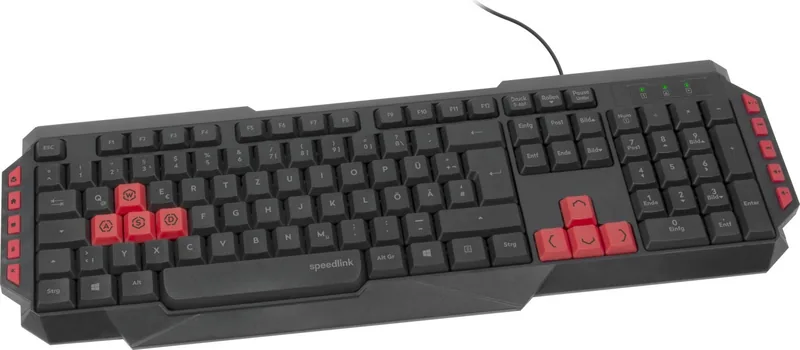
Solid, Black (8 additional keycaps included, red)
Keycap Print
Single-color, White
Connection
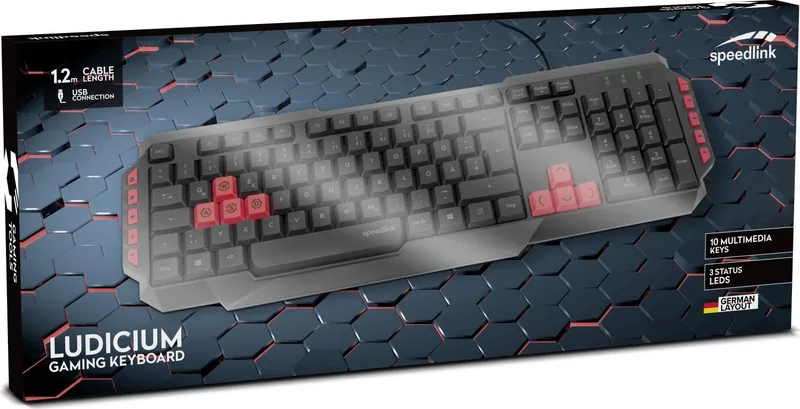
Wired (3.94 ft), USB-A 2.0
Power Supply
USB
Dimensions (W x H x D)
18.43 x 1.06 x 6.02 in
Weight
1.00 lbs
Features
10 Multimedia Keys (Red), 8 Additional Keycaps Included, Cursor Keys Highlighted, WASD Keys Highlighted
Product Description
The Speedlink Ludicium Gaming Keyboard Experience
Welcome to the world of efficient typing with the Speedlink Ludicium Gaming Keyboard. This USB input device is designed specifically for indoor home or office environments where dry and closed spaces are present. Users will find comfort in its straightforward connectivity and practical function keys that enhance daily computing tasks. The keyboard allows quick access to email, homepage, computer functions, and even a calculator. Media controls are also integrated for seamless music management including mute, play pause, track navigation, and volume adjustments without leaving your applications.
Health and Safety Considerations
Extended use of input devices can sometimes lead to physical discomfort or pain over time. It is highly recommended to take regular breaks during long writing or gaming sessions. If persistent health problems arise, consulting a doctor is advised to prevent strain or injury. The product contains no user-serviceable parts inside its casing. Do not attempt to open the device for repairs. If it becomes damaged physically, stop using it immediately to prevent potential hazards to yourself or your computer system. Manufacturers advise against careless use to avoid voiding any implicit guarantees regarding durability.
Disposal and Recycling
Environmental responsibility is key when owning electronic hardware. This product must not be disposed of with regular household waste for safety reasons. Old equipment should be recycled through official points to avoid harming the environment due to hazardous substances they may contain. In the European Union, large electronics retailers often take back small appliances under twenty-five centimeters for free. Ensure batteries are removed if possible before recycling to ensure safety and compliance with local laws regarding electronics waste management. Proper storage is crucial during the lifespan of the device.
Technical Compliance and Support
The device complies with Part 15 of the FCC Rules for Class B digital devices. While it should not cause harmful interference to other electronics, it must accept any received interference that may occur. Static, electrical, or high-frequency fields from other devices like mobile phones or microwaves might affect performance temporarily. Increasing distance from such sources can help resolve any connectivity or function issues encountered. Technical support is available via the official Speedlink website for any problems encountered with the unit. Keep all provided information safe for future reference regarding maintenance and usage guidelines. The manufacturer Jöllenbeck GmbH offers warranty information but no liability for misuse.
Search for 67,706 Manuals online


Type-in Brand or Model
Lisa Huber
8 months ago
I am worried because one review said there is no Fn key or software. Does the official site claim are accurate for this specific model?
Manual.ly
8 months ago
Thank you for bringing this to our attention. While some batches may vary, this model officially supports Fn function keys for shortcuts. Software is optional for basic use. Please verify your unit manual or contact support if the key feels unresponsive to ensure proper configuration.