“uygunluk beyanı” altında belirtilen standartlara uygun olduğunu beyan eder.
Bu ürün lityum-iyon pil içerir. Atmadan önce pillerin/akülerin boş
olduğundan emin olun. Evsel atıklarla birlikte atmayın ve yerel atık
seçeneklerine uyun. Pilleri/aküleri dikkatlice çıkarın ve bunları bir
toplama noktasına veya işletmeye teslim edin.
Daha fazla bilgi için: www.speedlink.com.
KULLANIM AMACI
Bu ürün kuru ve kapalı bir alanda evde veya ofiste kullanım amacıyla
bilgisayara bağlantı için giriş cihazı görevi görür. Bakım gerektirmez. Açmayın
veya hasarlıysa kullanmayın. Zeitfracht GmbH, dikkatsiz ve uygunsuz kullanım
veya belirtilen amaca uygun olmayan kullanımdan kaynaklanan
ürün hasarı veya kişisel yaralanma için hiçbir sorumluluk kabul etmez.
RU
Техническая поддержка: www.speedlink.com
Указания по безопасности: www.speedlink.com
WEEE: Не выбрасывайте изделие вместе с бытовыми отходами.
Изучите варианты утилизации и сдайте его в пункт утилизации.
Неправильное хранение/утилизация может нанести вред
окружающей среде и/или здоровью. Zeitfracht подтверждает, что продукт
соответствует требованиям, перечисленным в разделе «Уведомление о
соответствии».
Этот продукт содержит литиево-ионный аккумулятор.
Перед утилизацией убедитесь, что батареи/аккумуляторы
разряжены. Не выбрасывайте вместе с бытовыми отходами и
соблюдайте местные правила утилизации. Аккуратно извлеките батареи/
аккумуляторы и сдайте их в пункт сбора или в розничный магазин.
Дополнительную информацию см. на сайте: www.speedlink.com.
ИСПОЛЬЗОВАНИЕ ПО НАЗНАЧЕНИЮ
Это изделие предназначено только для использования в качестве
устройства для ввода для подключения к компьютеру дома и в офисе
в сухих, закрытых помещениях. Оно не нуждается в техническом
обслуживании. Не открывать и не использовать, если оно повреждено.
Zeitfracht GmbH не несет ответственности за ущерб изделию или
травмы лиц вследствие неосторожного, ненадлежащего, или не
соответствующего указанной цели использования. Сохраните эту
информацию для использования в будущем.
NL
Technische ondersteuning: www.speedlink.com
Waarschuwingen: www.speedlink.com
WEEE: Gooi het product niet weg met het huisvuil. Houd rekening met
de plaatselijke procedures voor afvalverwerking en lever deze in bij
een recyclingpunt. Onjuiste opslag/verwijdering kan schadelijk zijn
voor het milieu en/of de gezondheid. Zeitfracht verklaart dat het product
voldoet aan de voorwaarden zoals vermeld onder de
„Conformiteitsverklaring“.
Dit product bevat een lithium-ionbatterij. Zorg ervoor dat de
batterijen/oplaadbare batterijen leeg zijn voordat u ze weggooit.
Niet weggooien met het huisvuil maar de plaatselijke procedures
voor verwijdering opvolgen. Verwijder batterijen/oplaadbare batterijen
voorzichtig en lever ze in bij een inzamelpunt of winkel. Voor meer
informatie: www.speedlink.com.
BEDOELD GEBRUIK
Dit product is bedoeld als invoerapparaat om te worden aangesloten op
een computer en voor gebruik thuis of op kantoor en uitsluitend in droge
binnenruimtes. Het is onderhoudsvrij. Maak het niet open en gebruik het niet
als het beschadigd is. Zeitfracht GmbH is niet aansprakelijk voor schade aan
het product of persoonlijk letsel als gevolg van ondoordacht of ondeskundig
gebruik, of gebruik dat niet in overeenstemming is met het aangegeven doel.
Bewaar deze informatie voor toekomstige naslag.
PL
Pomoc techniczna: www.speedlink.com
Wskazówki bezpieczeństwa: www.speedlink.com
WEEE: nie wyrzucaj produktu wraz z odpadami domowymi.
Przestrzegaj lokalnych możliwości utylizacji i oddaj produkt do punktu
recyklingu. Niewłaściwe przechowywanie/utylizacja może szkodzić
środowisku i/lub zdrowiu. Zeitfracht oświadcza, że produkt jest zgodny z
wymaganiami wymienionymi w „Informacji o zgodności”.
Ten produkt zawiera akumulator litowy. Przed utylizacją upewnij się,
że baterie/akumulatory są wyczerpane. Nie wyrzucaj ich razem z
odpadami domowymi i przestrzegaj lokalnych możliwości utylizacji.
Ostrożnie wyjmij baterie/akumulatory i oddaj je do punktu zbiórki lub do
sklepu. Więcej informacji: www.speedlink.com.
UŻYTKOWANIE ZGODNE Z PRZEZNACZENIEM
Ten produkt służy jako urządzenie wprowadzające do podłączenia do
komputera do użytku w domu lub w biurze, w suchych, zamkniętych
pomieszczeniach. Nie wymaga on konserwacji. Nie otwierać ani nie
korzystać z niego w razie uszkodzenia. Zeitfracht GmbH nie ponosi
żadnej odpowiedzialności za uszkodzenia produktu lub obrażenia u
ludzi spowodowane nieuważnym, nieodpowiednim lub niezgodnym z
przeznaczeniem użytkowaniem produktu. Prosimy zachować tę informację
do późniejszego wykorzystania.
HU
Műszaki támogatás: www.speedlink.com
Tudnivalók: www.speedlink.com
WEEE: Ne dobja a terméket a háztartási hulladék közé. Vegye
figyelembe a helyi hulladékkezelési lehetőségeket, és terméket adja le
egy újrahasznosítási helyen. A nem megfelelő tárolás/megsemmisítés
károsíthatja a környezetet és/vagy az egészséget. A Zeitfracht kijelenti, hogy
a termék megfelel a „Megfelelőségi nyilatkozat” részben felsorolt
követelményeknek.
Ez a termék lítium-ion-akkumulátorokat tartalmaz. Az ártalmatlanítás
előtt győződjön meg arról, hogy az elemek/akkumulátorok
lemerültek. Ne dobja ki a háztartási hulladékkal együtt, és vegye
figyelembe a helyi hulladékkezelési lehetőségeket. Óvatosan vegye ki az
elemeket/akkumulátorokat, és adja le egy gyűjtőhelyen vagy egy üzletben.
További információk: www.speedlink.com.
RENDELTETÉSSZERŰ HASZNÁLAT
Ez a termék otthoni vagy irodai környezetben, száraz, zárt térben
számítógéphez csatlakozó beviteli eszközként használható. Nem igényel
karbantartást. Ne nyissa fel és károsodás esetén ne használja. A Zeitfracht
GmbH nem vállal felelősséget a termék károsodásaiért és személyi
sérülésekért, ha gondatlan, szakszerűtlen vagy nem a célnak megfelelő
használatból ered. Kérem, ezt az információt tartsa meg referenciaként.
GR
Τεχνική υποστήριξη: www.speedlink.com
Υποδείξεις ασφαλείας: www.speedlink.com
WEEΕ: Μην απορρίπτετε το προϊόν μαζί με τα οικιακά απόβλητα.
Ενημερωθείτε για τις τοπικές δυνατότητες απόρριψης και παραδώστε
το σε ένα σημείο ανακύκλωσης. Η ακατάλληλη αποθήκευση/απόρριψη
μπορεί να προκαλέσει βλάβες στο περιβάλλον ή/και την υγεία. Η Zeitfracht
δηλώνει ότι το προϊόν συμμορφώνεται με τις απαιτήσεις της ενότητας
«Conformity notice».
Αυτό το προϊόν περιέχει έναν συσσωρευτή λιθίου - ιόντων.
Πριν από την απόρριψη, βεβαιωθείτε ότι οι μπαταρίες/συσσωρευτές
είναι κενοί. Μην απορρίπτετε μαζί με τα οικιακά απόβλητα
και ενημερωθείτε για τις τοπικές δυνατότητες απόρριψης. Αφαιρέστε
προσεκτικά τις μπαταρίες/τους συσσωρευτές και παραδώστε τους σε
ένα σημείο συλλογής ή σε ένα κατάστημα λιανικής. Για περισσότερες
πληροφορίες: www.speedlink.com.
ΧΡΉΣΉ ΣΎΜΦΩΝΉ ΜΕ ΤΟΎΣ ΚΑΝΟΝΙΣΜΟΎΣ
Αυτό το προϊόν ενδείκνυται ως συσκευή εισαγωγής για τη σύνδεση σε έναν
υπολογιστή για οικιακή χρήση ή χρήση σε γραφείο σε ξηρούς, κλειστούς
χώρους. Δεν απαιτεί συντήρηση. Μην ανοίγετε ή μη χρησιμοποιείτε σε
περίπτωση ζημιάς. Η Zeitfracht GmbH δεν αναλαμβάνει καμία ευθύνη
για ζημιές στο προϊόν ή για τραυματισμούς ατόμων λόγω απρόσεκτης,
ακατάλληλης χρήσης ή χρήσης του προϊόντος για διαφορετικό σκοπό από
THE FOLLOWING FUNCTIONS CAN BE PERFORMED
WHEN THE ‘FN’ KEY IS ALSO HELD PRESSED:
DIE FOLGENDEN FUNKTIONEN WERDEN DURCH
KOMBINIERTES DRÜCKEN MIT DER FN-TASTE ERREICHT:
FN+
Mute
FN+
Volume down
FN+
Volume up
FN+
Previous track
FN+
Play / pause
FN+
Next track
FN+
Reduce brightness
FN+
Increase brightness
FN+
Select all
FN+
Copy
FN+
Paste
FN+
Cut
FN+
Stumm
FN+
Lautstärke runter
FN+
Lautstärke hoch
FN+
Vorheriger Titel
FN+
Play / Pause
FN+
Nächster Titel
FN+
Helligkeit reduzieren
FN+
Helligkeit erhöhen
FN+
Alles auswählen
FN+
Kopieren
FN+
Einfügen
FN+
Ausschneiden
GET STARTED
Switch to 2.4 GHz mode
Switch to Bluetooth* 1 channel
Switch to Bluetooth* 2 channel
Switch to Bluetooth* 3 channel
Wechsel in den 2.4 GHz Modus
Wechsel zum Bluetooth* 1 Gerät
Wechsel zum Bluetooth* 2 Gerät
Wechsel zum Bluetooth* 3 Gerät
FN-Lock and unlock
FN-Feststelltaste
2.4 GHz BUTTON
1. Briefly press FN + 2.4GHz key to switch to 2.4GHz mode, blue light is on
for one second.
2. Pairing: Press and hold ESC + 0 key (large keypad) for 2 seconds, blue
2.4GHz light is on for 30 seconds and turns o after pairing is successful.
3. Put the receiver in a free USB-port.
BT1 BUTTON
1. Briefly press the FN + BT1 key to switch to the Bluetooth* 1 channel, the
blue BT light stays on for 1 second.
2. Pairing: first switch to the Bluetooth* 1 channel, then press the BT1 key
for more than two seconds to enter the pairing status. Select “Speedlink
Levia”. The BT1 light flashes quickly (3 times per second) when pairing. If
the blue BT1 light is on for 1 second then turns o, pairing is successful. If
the light keeps flashing for two minutes and then turns o, the pairing has
failed. The keyboard turns into sleep mode.
The instruction for “BT 2” and “BT3” is similar.
2.4 GHz TASTE
1. Drücken Sie kurz FN + 2.4GHz-Taste, um in den 2.4GHz-Modus zu wechseln,
blaues Licht ist für eine Sekunde an.
2. Pairing: Halten Sie die ESC + 0-Taste (großes Tastenfeld) 2 Sekunden lang
gedrückt, das blaue 2,4-GHz-Licht leuchtet 30 Sekunden lang und erlischt,
nachdem die Kopplung erfolgreich war.
3. Stecken Sie den Empfänger in einen freien USB-Anschluss.
BT1 TASTE
1. Drücken Sie kurz die FN + BT1-Taste, um zum Bluetooth* 1-Kanal zu wechseln, das
blaue BT-Licht bleibt für 1 Sekunde an und erlischt dann.
2. Pairing: Wechseln Sie zuerst zum Bluetooth* 1-Kanal, drücken Sie dann die
BT1-Taste länger als zwei Sekunden, um in den Pairing-Status zu gelangen.
Wählen Sie „Speedlink Levia“. Das BT1-Licht blinkt schnell (3-mal pro
Sekunde), während der Kopplung. Wenn die blaue BT1-Leuchte 1 Sekunde
lang leuchtet und dann erlischt, ist die Kopplung erfolgreich. Wenn die
Leuchte zwei Minuten lang blinkt und sich dann ausschaltet, ist die Kopplung
fehlgeschlagen. Die Tastatur schaltet in den Ruhemodus.
Die Kopplung von „BT 2“ und „BT3“ folgt den gleichen Schritten wie „BT 1“.
WIRED MODE:
Briefly press the FN+ Pause key to switch to wired mode.
ILLUMINATION:
Es gibt 7 Beleuchtungsvarianten und “Aus“ sowie 3 Helligkeitseinstellungen
KABELGEBUNDENER MODUS:
Drücken Sie kurz die FN+ Pause-Taste, um in den kabelgebundenen Modus
zu wechseln.
Change lighting and lighting o (switching through)
Increase Brightness of lighting
Decrease Brightness of lighting
FN+
FN+
Beleuchtung wechseln und Beleuchtung aus (Durchschalten)
Helligkeit der Beleuchtung erhöhen
Helligkeit der Beleuchtung reduzieren
ILLUMINATION:
There are 7 lighting variants and „O“ as well as 3 brightness settings:
/2
%
Quick check
I'm not a robot
Incorrect answer, please try again.
Chat with your Speedlink Levia manual using AI
Get instant AI answers from your Speedlink Levia manual
Ask anything about the Speedlink Levia. Answers come from this manual, with the pages they are based on.
Ask a Question
0/1000
Do you recommend Levia?
YesNo
0
ut77
8 months ago
Does this keyboard support the German QWERTZ layout and how long does the battery last on a single charge?
0
Manual.ly
7 months ago
Yes, the Speedlink Levia features a native German QWERTZ layout. The wireless connection offers excellent battery life, lasting for extended periods without frequent recharging, ensuring uninterrupted work in your home office environment. The aluminum build and quiet keystrokes are also included.
M: qwen/qwen3.5-flash-20260224
M: qwen/qwen3.5-flash-20260224
Frequently Asked
Questions
A
To switch to 2.4GHz mode, briefly press the FN and 2.4GHz keys. For Bluetooth, press FN and BT1 for channel one, then hold the BT1 key for more than two seconds to enter pairing mode and select Speedlink Levia on your device. Repeat for BT2 and BT3 on other channels.
Is this answer helpful?
A
Yes, the Speedlink Levia supports multiple modes. You can connect to a computer via 2.4GHz receiver and simultaneously have devices paired via three Bluetooth channels. This allows you to switch seamlessly between sources for efficient multitasking.
Is this answer helpful?
A
If the device gets hot or becomes damaged, stop using it immediately to prevent injury or further damage. Ensure you are not using it in a damp environment and keep it away from extreme heat or cold sources as per safety instructions.
Is this answer helpful?
A
There are seven lighting variants and three brightness settings available. You can change lighting and turn it off by pressing FN plus the illumination key. Use FN plus increase or decrease keys to adjust the brightness level according to your preference.
Is this answer helpful?
A
This product contains a lithium-ion accumulator. Before disposal, ensure the battery is empty. Do not dispose of with household waste. Carefully remove the battery if possible and take it to a recycling point. The product requires care during charging and storage.
Is this answer helpful?
A
Wired mode allows the keyboard to function via cable connection. To switch to wired mode, briefly press the FN and Pause keys. This ensures the device works even if the battery is low, providing a backup connection method for office use.
Is this answer helpful?
M: qwen/qwen3.5-flash-20260224
Advantagesand
Disadvantages
Advantages
Versatile connectivity with 2.4GHz and three Bluetooth channels for seamless multitasking across devices.
Durable metal construction provides a premium feel and stability for extended typing sessions.
Customizable RGB lighting offers seven variants and brightness control to suit any decor.
Multi-device support allows switching between devices without complex re-pairing procedures.
VS
Disadvantages
Requires careful battery disposal and recycling due to the lithium-ion component.
Specific German QWERTZ layout limits immediate use for English-only keyboard users.
Learning curve exists for FN key combinations to access advanced media and function shortcuts.
Device is not user-serviceable and voids warranty if opened by the user.
M: qwen/qwen3.5-flash-20260224
Product
Specification
Layout
German
Type
Rubber Dome
Lighting
RGB, 8 colors
Keycap Profile
Standard, Framed, Chiclet
Keycap Shape
Flat
Keycap Dome
Straight
Numpad
Standard
Arrow Keys
Standard
Control Keys
Standard
Function Keys
Standard (Top Row, No Bottom Spacing, Ungrouped)
Enter Key
Standard
Delete Key
Standard
Status LEDs
Caps Lock, Num Lock, Scroll Lock
Wrist Rest
N/A
Chassis
Metal
Chassis Color
Solid, Grey
Keycap Finish
Solid, Black
Legend Style
Solid, White
Connection
Wired (4.92 ft), USB-A or Wireless (2.4GHz), USB-A (USB-A Receiver via Adapter) or Wireless (Bluetooth), Detachable Cable (USB-C Port)
Power Source
Battery (Integrated, 1600mAh)
Dimensions (WxHxD)
17.24x0.35x4.84 in
Weight
1.44 lbs
Features
Switchable Bluetooth connections via button (3 devices), FN Key
M: qwen/qwen3.5-flash-20260224
Product
Description
Speedlink Levia Wireless Office Keyboard Review
Design and Build Quality
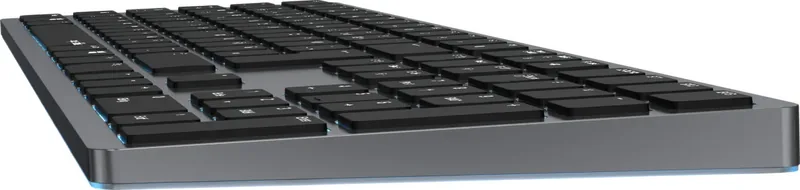
The Speedlink Levia Wireless Office Keyboard features a sleek gray metal chassis that looks professional on any desk. This illuminated metal keyboard is designed for both home and office environments. The typing experience feels solid due to the durable construction materials used throughout the design. It is important to note that this device is not user-serviceable and should not be opened under any circumstances. Keeping the device clean is easy, but do not use liquids or expose it to moisture. The layout provided is specifically German, ensuring compatibility for European users requiring QWERTZ input methods. It offers a robust foundation for daily productivity tasks.
Connectivity Options
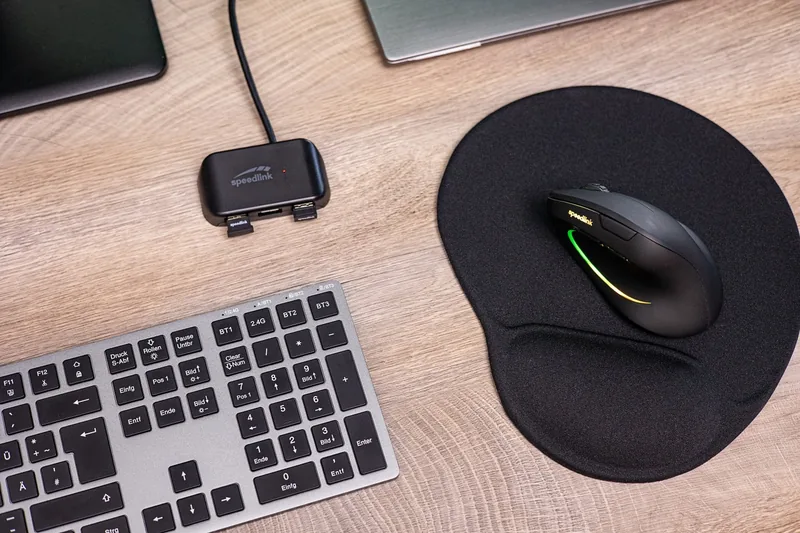
Connectivity is central to what makes this peripheral stand out for modern multitasking. Users gain significant versatility by switching between 2.4GHz wireless mode and three separate Bluetooth channels. This allows connection to a laptop, tablet, and phone simultaneously without constant re-pairing. Pairing is straightforward by holding specific keys like ESC plus zero for 2.4GHz or FN plus BT buttons for Bluetooth. If you run into power issues, a wired mode is available by pressing FN and the Pause key to plug in and charge directly. The lithium-ion battery ensures long-lasting performance during your daily workflows. This multi-mode approach eliminates cable clutter significantly.
Lighting Features
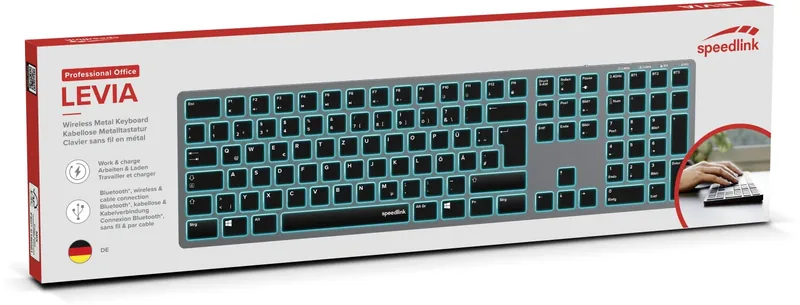
One of the most visually appealing aspects of this product is the RGB lighting system. There are seven distinct lighting variants available for users to choose from to match their room decor. Additionally, you can adjust the brightness using three different settings to suit different ambient light conditions. This customization is managed through a key combination involving the FN button plus other designated keys. The lights provide visual feedback and add a personalized touch to your workspace setup. It allows you to adapt to different lighting environments easily.
Safety and Maintenance
Safety is strictly enforced with specific instructions regarding disposal and battery care. You must not throw the lithium-ion battery in regular household waste. Instead, take it to a local recycling point to avoid environmental harm. If the product becomes damaged, stop using it immediately to prevent injury. Zeitfracht GmbH accepts no liability for misuse or carelessness. Please keep these safety instructions for later reference to ensure proper compliance. Extended use may cause health issues so take regular breaks to maintain good health during long sessions. Proper care ensures longevity for the device.
Conclusion
In conclusion, this keyboard offers a blend of style, function, and connectivity. It meets the needs of users looking for a reliable wired or wireless solution. The German layout ensures accurate typing for local markets. While it requires careful battery disposal, the overall quality justifies its place in a professional setup. It serves as a powerful tool for enhancing office efficiency significantly.




ut77
8 months ago
Does this keyboard support the German QWERTZ layout and how long does the battery last on a single charge?
Manual.ly
7 months ago
Yes, the Speedlink Levia features a native German QWERTZ layout. The wireless connection offers excellent battery life, lasting for extended periods without frequent recharging, ensuring uninterrupted work in your home office environment. The aluminum build and quiet keystrokes are also included.