Manual.ly Logo

SpeaKa Professional SP-MM-940 Manual

0.0 · 0 Ratings

PDF manual · 8 Pages

English

M: QW-35-FL
page

/ 8

Loading...
debdc7977ee6253abf6b500e83af45c8c336 page 3
3
Safety Instructions
Monitor Holder with Multiport Hub
Item no: 2731204 (SP-MM-800)
1 Intended use
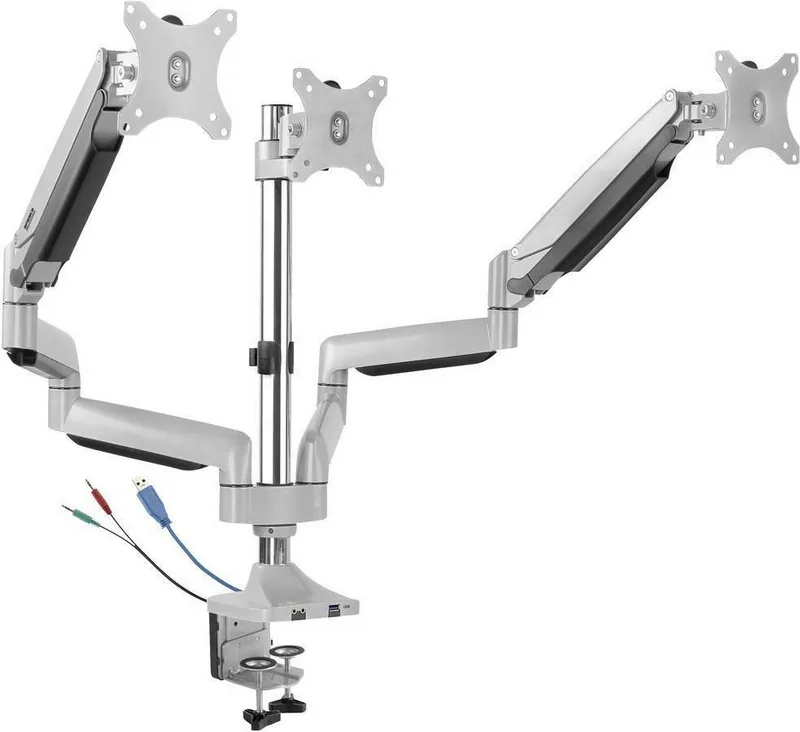
The product is a spring loaded three monitor arm with integrated hub. It secures to your table
using a clamp.
The product is intended for indoor use only. Do not use it outdoors.
Contact with moisture must be avoided under all circumstances.
If you use the product for purposes other than those described, the product may be dam-
aged.
Improper use can result in short circuits, fires, electric shocks or other hazards.
The product complies with the statutory national and European requirements.
For safety and approval purposes, you must not rebuild and/or modify the product.
Read the operating instructions carefully and store them in a safe place. Make this product
available to third parties only together with the operating instructions.
All company names and product names are trademarks of their respective owners. All rights
reserved.
2 Delivery contents
■
Product
■
Operating instructions
3 Latest product information
Download the latest product information at www.conrad.com/downloads or scan the QR
code shown. Follow the instructions on the website.
4 Description of symbols
The following symbols are on the product/appliance or are used in the text:
The symbol warns of hazards that can lead to personal injury.
The symbol warns of dangerous voltage that can lead to personal injury by elec-
tric shock.
5 Safety instructions
Read the operating instructions carefully and especially observe the safety
information. If you do not follow the safety instructions and information on
proper handling, we assume no liability for any resulting personal injury or
damage to property. Such cases will invalidate the warranty/guarantee.
5.1 General
■
The product is not a toy. Keep it out of the reach of children and pets.
■
Do not leave packaging material lying around carelessly. This may become dangerous
playing material for children.
■
If you have questions which remain unanswered by this information product, contact our
technical support service or other technical personnel.
■
Maintenance, modifications and repairs must only be completed by a technician or an
authorised repair centre.
5.2 Handling
■
Handle the product carefully. Jolts, impacts or a fall even from a low height can damage
the product.
5.3 Operating environment
■
Do not place the product under any mechanical stress.
■
Protect the appliance from extreme temperatures, strong jolts, flammable gases, steam
and solvents.
■
Protect the product from high humidity and moisture.
■
Protect the product from direct sunlight.
■
Do not switch the product on after it has been taken from a cold to a warm environment.
The condensation that forms might destroy the product. Allow the product to reach room
temperature before you use it.
5.4 Operation
■
Consult an expert when in doubt about the operation, safety or connection of the
product.
■
If it is no longer possible to operate the product safely, take it out of operation and pro-
tect it from any accidental use. DO NOT attempt to repair the product yourself. Safe op-
eration can no longer be guaranteed if the product:
– is visibly damaged,
– is no longer working properly,
– has been stored for extended periods in poor ambient conditions or
– has been subjected to any serious transport-related stresses.
5.5 Connected devices
■
Also observe the safety and operating instructions of any other devices which are con-
nected to the product.
5.6 Installation location
■
Select an installation location for the monitor holder and any supplied accessories that
facilitates safe and ergonomic use.
5.7 Before assembly and installation
■
Verify that the delivery content is complete before assembling the monitor holder and ac-
cessories. Do not assemble if any parts are missing.
■
Prevent damage to the monitor. Refer to the manufacturer instructions that came with
the monitor to find out how and where to attach a monitor holder or monitor mount.
■
Handle the monitor and screen with care. Always lay the monitor flat and use a pad or
cloth to protect the table surface and monitor from damage.
■
Risk of injury and/or damage when unpacking the spring loaded arm! Hold each spring
arm together while someone else cuts the zip tie. Slowly release the pressure on the
spring arms and open slowly to full length.
5.8 Table mounting
If you mount the monitor holder on a table:
■
Attach the monitor holder only to a sufficiently stable, horizontal table top. Tables made
of glass, ceramic or stone slabs or thin plastic-coated wooden-fibre slabs, are categoric-
ally unsuitable for attachments. Furthermore, you must not attach the monitor holder to
shelves or similar unstable or unsteady surfaces.
■
Attach the monitor holder only at a position on the table top that is suitable for this pur-
pose. Consider the significant lever action involved!
■
The weight of the monitor and monitor holder as well as its fixed position and significant
lever action can all cause pressure marks on the table top. For this reason, we do not re-
commend that you mount it on valuable furniture items!
■
For safety reasons, the monitor holder and the monitor that is attached to it should be
situated only above the table surface. The design of many monitor holders means that it
is not suitable for the monitor arm to be situated anywhere other than above the table
surface. There is also a danger of it toppling over in certain circumstances!
■
Ensure that the monitor holder is fixed to the table top securely. Otherwise it could slip
off the table top when you are moving the monitor and the monitor holder. As well as
causing material damage, this poses a danger of personal injury!
5.9 Removing a monitor
■
Risk of injury and/or damage from spring loaded arm! Before removing an attached mon-
itor, always set the front arm to the highest position so it cannot "spring up" after the
monitor is removed.
6 Maintenance
■
Adjusting the positions of the monitor and the monitor mount can cause the screws to
become loose over time. Check all the screw fittings from time to time.
7 Cleaning and care
Important:
– Do not use aggressive cleaning agents, rubbing alcohol or other chemical solutions.
They damage the housing and can cause the product to malfunction.
– Do not immerse the product in water.
1. Disconnect the product from the power supply.
2. Clean the product with a dry, fibre-free cloth.
8 Disposal
This symbol must appear on any electrical and electronic equipment placed on
the EU market. This symbol indicates that this device should not be disposed of
as unsorted municipal waste at the end of its service life.
Owners of WEEE (Waste from Electrical and Electronic Equipment) shall dispose
of it separately from unsorted municipal waste. Spent batteries and accumulators,
which are not enclosed by the WEEE, as well as lamps that can be removed from
the WEEE in a non-destructive manner, must be removed by end users from the
WEEE in a non-destructive manner before it is handed over to a collection point.
Distributors of electrical and electronic equipment are legally obliged to provide free take-
back of waste. Conrad provides the following return options free of charge (more details on
our website):
■
in our Conrad offices
■
at the Conrad collection points
■
at the collection points of public waste management authorities or the collection points
set up by manufacturers or distributors within the meaning of the ElektroG
End users are responsible for deleting personal data from the WEEE to be disposed of.
It should be noted that different obligations about the return or recycling of WEEE may apply
in countries outside of Germany.

Chat with your SpeaKa Professional SP-MM-940 manual using AI

Get instant AI answers from your SpeaKa Professional SP-MM-940 manual

Ask anything about the SpeaKa Professional SP-MM-940. Answers come from this manual, with the pages they are based on.

SP-MM-940 Maintenance Schedule

Periodically
Check all screw fittings

Adjusting the monitor positions can cause screws to loosen over time. Check all screw fittings from time to time.

As needed
Clean the product housing

Disconnect from power and clean with a dry, fibre-free cloth. Do not use aggressive cleaners or immerse in water.

M: qwen/qwen3.8-flash

Ask a Question

0/1000

Do you recommend SP-MM-940?

Yes No

Frequently Asked Questions

A

No, the product is intended for indoor use only. Contact with moisture is not allowed under any circumstances. Using it outside can lead to damage or safety hazards like electric shocks.

Is this answer helpful?

A

This system handles up to three monitors. Each monitor can weigh between one and seven kilograms. Ensure the total weight on the clamp does not exceed table limits.

Is this answer helpful?

A

The holder supports VESA 75x75 and 100x100 millimeter patterns. Monitor sizes range from 13 inches to 32 inches. Always check your specific monitor specifications before attaching.

Is this answer helpful?

A

Disconnect the product from power first. Use a dry, fibre-free cloth. Do not use water, alcohol, or chemical cleaning agents as they may damage the housing.

Is this answer helpful?

A

Risk of injury exists from spring loaded arms. Hold arms together while cutting fasteners. Release pressure slowly. Ensure the table is stable and horizontal to prevent tipping.

Is this answer helpful?

A

Do not throw in unsorted municipal waste. Follow local electronic waste laws for separate collection. Delete personal data before handing it over to collectors.

Is this answer helpful?

A

Yes, the Multiport Hub requires five volts direct current at one amp. It connects via a USB-A interface. Ensure your connected sources provide appropriate power levels.

Is this answer helpful?

M: QW-35-FL

Advantages and Disadvantages

Advantages

  • Integrates Multiport Hub for streamlined connectivity.
  • Supports up to three monitors simultaneously.
  • VESA compatible with 75x75 and 100x100 standards.
  • Spring-loaded arm ensures smooth vertical positioning.
  • Compliant with European safety and regulatory requirements.
VS

Disadvantages

  • Indoor use only, moisture must be avoided.
  • Spring arms pose injury risk during unpacking.
  • Requires stable table top, not suitable for glass.
  • Weight limit per monitor is seven kilograms maximum.
  • Cleaning restricted to dry cloth, no chemicals.
M: QW-35-FL

Product Specification

Type

Desk

Monitor Count

3

Screen Size

13-32"

Adjustability

Tilt (-95°, +90°), Swivel (180°), Pivot (180°), Height Adjustable

Max Load

15.43 lbs

VESA

75x75, 100x100

Key Features

Gas Spring, Cable Management, USB Hub

Color

Silver

Dimensions (WxHxD)

60.24 x 27.56 x 7.48 in

Weight

20.97 lbs

M: QW-35-FL

Product Description

SpeaKa Professional SP-MM-940 Overview

Elevate your workspace efficiency with the SpeaKa Professional SP-MM-940. This innovative monitor holder is designed to transform your ergonomic setup. Featuring a Multiport Hub, it simplifies cable management significantly. The arm supports up to three monitors simultaneously. This ensures optimal screen real estate for multitasking professionals. The integrated spring-loaded mechanism provides smooth adjustments for height and angle. You can customize your viewing experience to reduce neck strain during long hours.

Installation is straightforward with the provided clamp. It secures to a stable table top within specific thickness limits. A C-clamp is also included for alternative mounting methods. Ensure the surface is horizontal and strong enough to support the load. VESA compatibility supports various monitor sizes ranging from thirteen to thirty-two inches. Weight capacity per monitor ranges between one and seven kilograms. This flexibility accommodates different screen types effectively.

Safety is a top priority with this equipment. Keep the device indoors only to prevent moisture damage. Avoid direct sunlight and extreme temperatures to maintain durability. Condensation risks exist when moving from cold to warm environments. Allow warming before use. Do not attempt self-repair if safety is compromised. Keep children away as it is not a toy. Packaging materials should be disposed of safely to avoid hazards.

The hub connects via USB-A requiring five volts direct current. This allows convenient power for peripherals without extra adapters. Dimensions are substantial at one thousand five hundred thirty millimeters in height. The weight of the unit is approximately nine kilograms fifty-one grams. Assembly requires caution due to spring loading. Cut zip ties carefully while holding arms. Release pressure slowly to prevent sudden movement.

Maintenance involves regular checks on screw fittings. Adjustment can cause loosening over time. Clean only with a dry fibre-free cloth. No water immersion allowed. Do not use chemicals. Disconnect power first. For disposal, follow local electronic waste laws. Return to collection points if available. Always verify the delivery content before assembly. Reference the SpeaKa Professional SP-MM-940 Manual for continued safety and compliance. This ensures structural integrity.

M: QW-35-FL

© Copyright 2026 Manual.ly
