
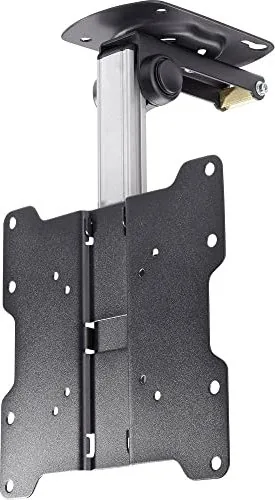
SpeaKa Professional LCD-CM222 Manual
PDF manual · 6 Pages
English



Quick check
Incorrect answer, please try again.
Chat with your SpeaKa Professional LCD-CM222 manual using AI
Get instant AI answers from your SpeaKa Professional LCD-CM222 manual
Ask anything about the SpeaKa Professional LCD-CM222. Answers come from this manual, with the pages they are based on.
Ask a Question
Do you recommend LCD-CM222?
Yes No
Julia M
7 months ago
What is the price range and overall quality of this TV ceiling mount?
Frequently Asked Questions
The rated weight limit is 20kg (44lbs). Exceeding this limit may cause serious injury or property damage.
Is this answer helpful?
No, this product is intended for indoor use only. Using it outdoors could lead to product failure and personal injury.
Is this answer helpful?
You should check that the bracket is secure and safe to use at regular intervals, at least every three months.
Is this answer helpful?
The package includes a 4mm and 6mm Allen key. You will also need a drill for pilot holes and appropriate anchors for your ceiling type.
Is this answer helpful?
Loosen the adjustment screws slightly without removing them, move the display to the desired height, and then tighten the screws to fix the position.
Is this answer helpful?
It is recommended that the product be installed by someone with good mechanical ability who understands the manual fully.
Is this answer helpful?
Advantages and Disadvantages
Advantages

- Space-saving design allows the display to fold back completely
- Compatible with multiple ceiling types including wood and concrete
- Height adjustable for customized viewing angles
- Includes detailed component checklist for easy verification
- Robust construction supports standard LCD display weights
Disadvantages

- Requires basic mechanical ability and building experience
- Indoor use only limits outdoor application potential
- Installation demands precise alignment of tear-drop holes
- Over-tightening screws can compromise structural integrity
- Heavy lifting requires assistance or mechanical equipment
Product Specification
Type
Ceiling mount
Number of monitors
1
Screen size
17-37 inches
Mobility
tiltable (-15.80 to 21.20 degrees), swivel (60.70 degrees), height adjustable
Distance from wall
5.91-11.42 inches
Max load
44.09 lbs
VESA
75x75, 100x100, 200x100, 200x200
Color
black, silver
Weight
3.31 lbs
Product Description
SpeaKa Professional 629563 Manual: The Ultimate Guide to Ceiling Installation
The SpeaKa Professional 629563 represents a pinnacle in ceiling mounting solutions designed specifically for folding LCD displays. This system is engineered to maximize space efficiency while ensuring the highest levels of safety and stability for your visual equipment. Whether you are setting up a conference room, a retail display, or an educational facility, understanding the proper installation procedures is crucial for optimal performance.
This guide covers the essential steps for mounting the unit securely on various surfaces, including wooden ceilings and solid brick or concrete structures. The design allows for flexible adjustment, enabling users to fold the display back to save space when not in use or adjust the height to suit specific viewing angles. Safety is paramount throughout the process, with strict warnings against exceeding the rated weight limits to prevent serious injury or property damage.
Proper assembly requires attention to detail, starting with verifying all components from the package checklist. Users must ensure that the supporting surface can safely bear the combined weight of the display and hardware. The installation involves drilling pilot holes, securing the ceiling plate with appropriate anchors, and carefully aligning the VESA plate with the mount. Once installed, the mechanism allows for smooth vertical adjustments using Allen keys to fine-tune tension and position.
Regular maintenance is recommended to keep the system functioning correctly. It is advised to check the bracket security at least every three months to ensure it remains safe for daily use. By following these guidelines, owners can enjoy a reliable and versatile mounting solution that integrates seamlessly into their environment.
Important Notes
- Always use an assistant or mechanical lifting equipment during installation.
- Do not over-tighten screws as this reduces holding power and may cause damage.
- This product is intended for indoor use only.
- Verify that all parts are present before beginning assembly.
Search for 67,706 Manuals online


Type-in Brand or Model
Stefan K
6 months ago
Is this ceiling mount easy to install in tight corners near a wall?
Manual.ly
6 months ago
The mount is designed for easy installation and handling. However, installing it in a corner requires some dexterity as access may be limited once the monitor is attached. Some users suggest loosening the vertical screws to split the unit into two parts for better maneuverability, though reinserting the slotted nuts can be challenging.