Manual.ly Logo

SpeaKa Professional 10125216 Manual

5.0 · 1 Ratings

PDF manual · 8 Pages

English

M: QW-35-FL
page

/ 8

Loading...
58f90aa509bf39274d8946856ea4d7317930 page 3
3
Important Information
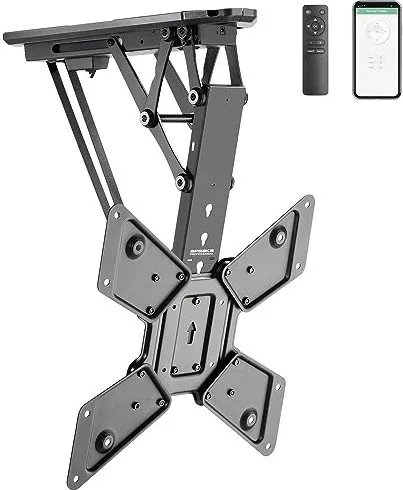
Smart Motorized TV Ceiling Mount
Item no: 2531304 / SP-TVCM-510
Item no: 2531305 / SP-TVCM-520
1 Intended use
The product is a motorized TV/monitor ceiling mount. The product must be mounted to a ceiling before
use. The product is designed to hold one TV/monitor. The built-in motor moves the mount and TV/monitor
into a suitable position. The user can control the built-in motor in the following ways:
■
Remote control
■
Tuya mobile app
The product is intended for indoor use only. Do not use it outdoors.
Contact with moisture must be avoided under all circumstances.
If you use the product for purposes other than those described, the product may be damaged.
Improper use can result in short circuits, fires, electric shocks or other hazards.
The product complies with the statutory national and European requirements.
For safety and approval purposes, you must not rebuild and/or modify the product.
Read the safety instructions and any accompanying instructions carefully and store them in a safe place.
Make this product available to third parties only together with the safety instructions and any accompany-
ing instructions.
All company names and product names are trademarks of their respective owners. All rights reserved.
2 Latest product information
Download the latest product information at www.conrad.com/downloads or scan the QR code shown. Fol-
low the instructions on the website.
3 Description of symbols
The following symbols are on the product/appliance or are used in the text:
The symbol warns of hazards that can lead to personal injury.
The symbol warns of dangerous voltage that can lead to personal injury by electric shock.
4 Safety instructions
Read this document and the accompanying operating instructions carefully and espe-
cially observe the safety information. If you do not follow the safety instructions and
information on proper handling, we assume no liability for any resulting personal in-
jury or damage to property. Such cases will invalidate the warranty/guarantee.
4.1 General
■
The product is not a toy. Keep it out of the reach of children and pets.
■
Do not leave packaging material lying around carelessly. This may become dangerous playing mater-
ial for children.
■
If you have questions which remain unanswered by this information product, contact our technical
support service or other technical personnel.
■
Maintenance, modifications and repairs must only be completed by a technician or an authorised re-
pair centre.
4.2 Do not misuse
■
Do not sit, stand, hang onto, or support yourself on the product. The product can collapse or fall down
and cause injury.
■
Do not hang objects onto the product. The product can collapse or fall down and cause injury.
4.3 Handling
■
Handle the product carefully. Jolts, impacts or a fall even from a low height can damage the product.
4.4 Operating environment
■
Do not place the product under any mechanical stress.
■
Protect the appliance from extreme temperatures, strong jolts, flammable gases, steam and solvents.
■
Protect the product from high humidity and moisture.
■
Protect the product from direct sunlight.
■
Do not switch the product on after it has been taken from a cold to a warm environment. The con-
densation that forms might destroy the product. Allow the product to reach room temperature before
you use it.
4.5 Mounting surface
■
Unsuitable mounting surfaces can cause the mount to fall down and cause serious personal injury.
The mounting surface must be able to support the combined weight of the mount and the installed
monitor. If you are in doubt, ask a specialist before mounting.
4.6 Mounting materials
■
Unsuitable mounting materials can cause the mount to fall down and cause serious personal injury.
Select mounting materials (example: screws and dowels) that are suitable for the base wall material
(example: concrete).
4.7 Drilling
When penetrating the surface (example: drilling or inserting fasteners), make sure no cables
or pipes are damaged. Inadvertently penetrating electric cables causes the life-threatening
danger of an electric shock! Check for concealed wires and pipes before drilling or inserting
fasteners.
4.8 Monitor installation
■
Verify that the delivery content is complete before assembling the product. Do not assemble the
product if the delivery content is not complete.
■
Before beginning the installation process, check whether there are appropriate mounting options for a
mount on the back of your monitor.
■
A falling monitor or mount can cause serious personal damage. Keep people away from underneath
the installation location while installing the monitor.
■
Depending on the size and design of the monitor and mount concerned, it is sensible for a second
person to help with the installation. This person can hold the monitor still, for example, while you are
attaching the monitor to the mount.
■
Observe the maximum permissible monitor weight in the product documentation. Overloading can
cause the mount to collapse and lead to injury or property damage.
■
Proceed with care when assembling and installing the product! The product has some sharp edges.
There is a risk of injury!
■
Carry out only the work on the mount that is necessary to install it (or to change its location). Never
dismantle the mount and never attempt to convert it or to repair it in any way. Some mounts contain
highly pre-stressed metal springs. Dismantling such a mount in the wrong way could cause you
severe injury!
■
When fixing the monitor to the mount, make certain you use the correct screws. Not only must these
be of the correct thread type for the monitor, but they must also not be too long; otherwise, they will
damage the monitor. The screws must not be too short, however, since otherwise the connection will
not be secure.
■
The screws must be screwed into the threaded fixture holes on the monitor with at least 5 full 360°
turns. The correct screws are usually supplied together with the mount or with the monitor. Occasion-
ally, however (depending on the monitor type), other screws are required; these can be purchased
from specialist retailers.
■
Do not use any force when tightening the screws; otherwise, the monitor may be destroyed, leading
to loss of warranty/guarantee!
■
If you have any doubt about the correct length of the screws required, we recommend that you con-
tact the monitor manufacturer or an appropriate specialist.
■
Apply your full concentration when carrying out the installation, because if the monitor and/or mount
were to fall, this could cause expensive damage to the equipment and there is the potential danger of
personal injury!
■
Lay all the monitor’s cables in such a way that they do not get jammed or kinked in the mount.
■
Check all the screw fittings from time to time. Adjusting the position of the monitor and/or the mount
and moving them can sometimes cause the screws to become loose over time.
4.9 Power adapter
Do not modify or repair mains supply components including mains plugs, mains cables, and
power supplies. Do not use damaged components. Risk of death by electric shock!
■
Connect the appliance to a wall socket that can be accessed easily.
■
As power supply, only use the supplied mains adaptor.
■
Only connect the power adaptor to a normal mains socket connected to the public supply. Before
plugging in the power adaptor, check whether the voltage stated on the power adaptor complies with
the voltage of your electricity supplier.
■
Never connect or disconnect power adaptors if your hands are wet.
■
Never unplug the power adaptor from the mains socket by pulling on the cable; always use the grips
on the plug.
■
For safety reasons, disconnect the power adaptor from the mains socket during storms.
■
Do not touch the power adapter if there are any signs of damage, as this may cause a fatal electric
shock! Take the following steps:
– Switch off the mains voltage to the socket containing the power adapter (switch off the correspond-
ing circuit breaker or remove the safety fuse, and then switch off the corresponding RCD protective
switch).
– Unplug the power adapter from the mains socket.
– Use a new power adapter of the same design. Do not use the damaged adapter again.
■
Ensure that cables are not pinched, kinked or damaged by sharp edges.
■
Always lay cables so that nobody can trip over or become entangled in them. This poses a risk of in-
jury.
4.10 Batteries
■
Correct polarity must be observed while inserting batteries.
■
The batteries should be removed from the device if it is not used for a long period of time to avoid
damage through leaking. Leaking or damaged batteries might cause acid burns when in contact with
skin, therefore use suitable protective gloves to handle corrupted batteries.
■
Batteries must be kept out of reach of children. Do not leave batteries lying around, as there is risk,
that children or pets swallow them.
■
All batteries should be replaced at the same time. Mixing old and new batteries in the device can lead
to battery leakage and device damage.
■
Batteries must not be dismantled, short-circuited or thrown into fire. Never recharge non-rechargeable
batteries. There is a risk of explosion!
4.11 Operation
■
Consult an expert when in doubt about the operation, safety or connection of the product.
■
If it is no longer possible to operate the product safely, take it out of operation and protect it from any
accidental use. DO NOT attempt to repair the product yourself. Safe operation can no longer be guar-
anteed if the product:
– is visibly damaged,

Chat with your SpeaKa Professional 10125216 manual using AI

Get instant AI answers from your SpeaKa Professional 10125216 manual

Ask anything about the SpeaKa Professional 10125216. Answers come from this manual, with the pages they are based on.

10125216 Maintenance Schedule

Periodically
Check all screw fittings

Verify that screws have not loosened over time due to monitor adjustments or mount movement. Tighten if necessary.

As needed
Clean the product housing

Disconnect from power and wipe with a dry, fiber-free cloth. Do not use aggressive cleaners or immerse in water.

M: qwen/qwen3.8-flash

Ask a Question

0/1000

Do you recommend 10125216?

Yes No
0
User Pic

NisiQui94

5 months ago

Is the wall mounting system stable, and does the companion app allow easy TV height adjustment?

0
User Pic

Manual.ly

5 months ago

Yes, users confirm the mount is very satisfying. The app controls TV movement up and down flawlessly via smartphone. Additionally, the included manual and drilling template assist significantly with product hanging. Installation is straightforward, and performance is working perfectly according to feedback.

M: QW-35-FL
M: QW-35-FL

Frequently Asked Questions

A

No, this product is designed for indoor use only. Contact with moisture must be avoided under all circumstances to prevent damage and ensure safety. Using it outside violates warranty terms.

Is this answer helpful?

A

Depending on the specific model variant, it can support up to thirty or thirty-five kilograms. Always verify the ceiling surface can support the combined weight of the mount and your device.

Is this answer helpful?

A

You can control the built-in motor using the included remote control or by connecting to the Tuya Mobile App. This provides flexible positioning options for your entertainment setup.

Is this answer helpful?

A

The remote control requires two type AAA batteries providing 1.5 volts each. Ensure you replace both batteries simultaneously when needed to maintain proper function.

Is this answer helpful?

A

Use a dry, fiber-free cloth to clean the housing. Disconnect the product from the power supply first. Do not immerse it in water or use aggressive cleaning chemicals.

Is this answer helpful?

M: QW-35-FL

Advantages and Disadvantages

Advantages

  • Motorized adjustment via remote or mobile app
  • Supports large screens up to seventy inches
  • Meets European safety and compliance standards
  • Wireless connectivity with twenty meter range
  • Indoor installation saves floor space
VS

Disadvantages

  • Strictly indoor use only
  • Cannot be used outdoors in moisture
  • Assembly requires precise screw length verification
  • Pre-stressed springs present installation risks
  • Mandatory battery replacement every time
M: QW-35-FL

Product Specification

Type

Ceiling mount

Number of Monitors

1

Screen Size

23-55 inches

Mobility

tiltable (0 deg, +75 deg), swivelable (6 deg), height adjustable, motorized

Max Load

66.14 lbs

VESA

100x100, 200x200, 300x300, 400x200, 400x400

Color

Black

Weight

16.40 lbs

M: QW-35-FL

Product Description

Transform Your Living Space with the SpeaKa Professional 10125216

Upgrade your home entertainment setup with the SpeaKa Professional 10125216. This innovative motorized TV ceiling mount offers sleek design and advanced functionality. Referencing the SpeaKa Professional 10125216 Manual ensures proper installation for safety and longevity. The built-in motor adjusts positioning effortlessly via a convenient remote or the Tuya Mobile App. It is designed specifically for indoor use only. Contact with moisture must be avoided under all circumstances to prevent damage.

This device holds one television or monitor securely above eye level. Installation requires a ceiling surface capable of supporting the combined weight of the mount and the device. Specific model variations support weight limits up to thirty-five kilograms with compatible screen sizes ranging from twenty-three to seventy inches. Always verify screw lengths carefully to prevent internal damage. Sharp edges exist during assembly so handle with extreme care to avoid injury to yourself.

Maintenance involves regular cleaning with a dry, fiber-free cloth. Do not use water or aggressive chemicals on the housing. Ensure power is disconnected before any cleaning process begins. The power adapter requires standard household voltage compliant with public supply standards. Batteries in the remote control are type AAA and must be replaced simultaneously. Wi-Fi coverage reaches up to twenty meters reliably. Bluetooth also supports a twenty meters range for connectivity.

Safety is paramount during the entire lifecycle of ownership. Do not misuse the mount by sitting or hanging objects on it. Do not attempt to dismantle the mount yourself as it contains pre-stressed springs. Keep children away from packaging materials to prevent choking hazards. If visibly damaged, do not repair yourself. Consult a technician to ensure warranty remains valid and safety is maintained. Environmental conditions must stay between zero and forty degrees Celsius with relative humidity between twenty and eighty-five percent.

Proper disposal is required at the end of the product life. Separate batteries from the unit before discarding. Follow local electronic waste regulations strictly. This device meets European safety requirements. Enjoy a flexible viewing angle without permanent structural limitations once installed correctly. The SpeaKa Professional 10125216 brings smart convenience to your room layout and maximizes floor space efficiency. Check all fittings periodically because movement may loosen them over time.

Usage Notes

Ensure power is disconnected before cleaning. Check all screw fittings periodically because movement may loosen them over time. Regular inspection ensures your investment lasts.

M: QW-35-FL

© Copyright 2026 Manual.ly
