
Sonoff SNZB-03 Manual
PDF manual · 14 Pages
English



Quick check
Incorrect answer, please try again.
Chat with your Sonoff SNZB-03 manual using AI
Get instant AI answers from your Sonoff SNZB-03 manual
Ask anything about the Sonoff SNZB-03. Answers come from this manual, with the pages they are based on.
Ask a Question
Do you recommend SNZB-03?
Yes NoFrequently Asked Questions
The device requires a SONOFF ZigBee Bridge or another gateway supporting the ZigBee 3.0 protocol to operate.
Is this answer helpful?
Download the eWeLink app, select your gateway, tap add, then long press the reset button for 5 seconds until the LED flashes three times.
Is this answer helpful?
No, you should not install the device on metal surfaces as it will negatively affect the wireless communication distance.
Is this answer helpful?
The SNZB-03 uses a single CR2450 battery which provides a 3V working voltage.
Is this answer helpful?
You can delete it by long pressing the reset button for 5 seconds until the light flashes, or by removing it directly from the eWeLink app interface.
Is this answer helpful?
Advantages and Disadvantages
Advantages

- Low power consumption with battery life notification
- Easy setup via eWeLink app and ZigBee protocol
- Compact size allows for discreet placement
- Supports smart scene automation and device triggering
Disadvantages

- Requires a separate ZigBee gateway for operation
- Performance may degrade if installed near metal surfaces
- Limited to ZigBee 3.0 networks only
- No built-in Wi-Fi connectivity
Product Specification
Type
Sensor
Standard
ZigBee
Function
Motion
Topology
Mesh
Dimensions
1.38x1.57x1.10 in
Features
Battery powered (1x CR2450), app-controlled (Android, iOS)
Product Description
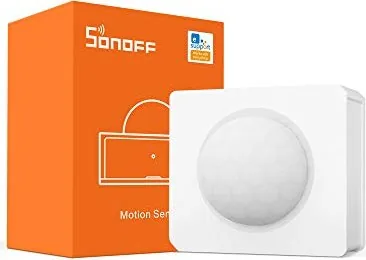
Sonoff SNZB-03 ZigBee Motion Sensor: A Smart Home Essential
The Sonoff SNZB-03 ZigBee Motion Sensor is a compact and efficient device designed to bring advanced automation capabilities to your home. This Bewegungssensor operates on the ZigBee wireless protocol, requiring a compatible SONOFF gateway or other ZigBee 3.0 hubs to function within a smart ecosystem. Its primary purpose is to detect movement in real-time, allowing users to trigger complex scenes or automate other connected devices seamlessly.
Installation is incredibly straightforward, offering flexibility for various environments. You can simply place the sensor on a desktop or use the pre-applied 3M adhesive to mount it on walls. However, it is crucial to avoid metal surfaces during installation, as they can significantly interfere with the wireless signal range. The device runs on a CR2450 battery, ensuring long-term operation with minimal maintenance. It features a low-power design that includes notifications when the battery level drops, preventing unexpected downtime.
Setting up the device involves downloading the eWeLink application and pairing it with your gateway. To initiate pairing, you must remove the battery insulation strip first. Then, hold the reset button for five seconds until the LED indicator flashes three times, signaling that the sensor is ready to connect. Once paired, the sensor integrates smoothly into existing smart routines, enabling actions like turning on lights when motion is detected or sending alerts to your smartphone.
This sensor supports a wide operating temperature range from -10 to 40 degrees Celsius and handles humidity levels up to 90% without condensation. Its small dimensions of 40x35x28mm make it unobtrusive in any room. By combining reliable motion detection with smart scene linking, the Sonoff SNZB-03 serves as a foundational element for creating a responsive and automated living space.
Important Notes
- Do not install on metal surfaces to ensure optimal wireless communication.
- Keep the device close to the gateway during the initial pairing process.
- Remove the battery insulation tab before the first use.
- Use the eWeLink app to manage device deletion and settings.
Search for 67,732 Manuals online


Type-in Brand or Model