
Sonoff POWR3 Manual
PDF manual · 15 Pages
English



Quick check
Incorrect answer, please try again.
Chat with your Sonoff POWR3 manual using AI
Get instant AI answers from your Sonoff POWR3 manual
Ask anything about the Sonoff POWR3. Answers come from this manual, with the pages they are based on.
Ask a Question
Do you recommend POWR3?
Yes NoFrequently Asked Questions
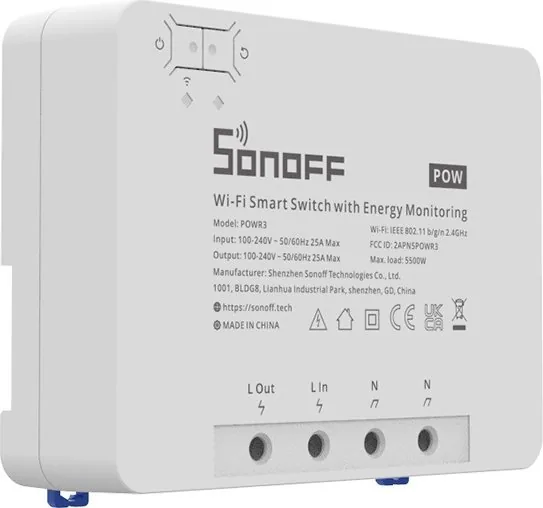
The Sonoff POWR3 can handle a maximum load of 25 Amperes, which translates to approximately 5500 Watts at 220V, making it ideal for high-power appliances.
Is this answer helpful?
No, the device only supports IEEE 802.11 b/g/n protocols operating on the 2.4GHz frequency band. It will not connect to 5GHz networks.
Is this answer helpful?
You can reset the device by deleting it from the eWeLink app. Alternatively, long press the pairing button for 5 seconds until the light flashes two short and one long flash to re-enter pairing mode.
Is this answer helpful?
Offline status often results from weak Wi-Fi signals, incorrect SSID/password entry, router capacity limits, or MAC address blacklisting. Check LED indicators for specific error codes.
Is this answer helpful?
Yes, the eWeLink app displays real-time voltage, current, and power data, allowing you to monitor energy usage from anywhere with an internet connection.
Is this answer helpful?
Installation involves high-voltage wiring and should strictly be performed by a qualified electrician to avoid electric shock hazards.
Is this answer helpful?
Advantages and Disadvantages
Advantages

- Supports high load up to 25A (5500W) for heavy appliances
- Built-in energy monitoring tracks voltage, current, and power usage
- Compatible with major voice assistants like Alexa and Google Home
- Offers remote control, scheduling, and timer functions via eWeLink app
- Includes overload protection and operation history logging
Disadvantages

- Requires professional installation due to high-voltage wiring risks
- Only supports 2.4GHz Wi-Fi networks, not 5GHz
- Pairing process can fail if location permissions are not enabled on mobile devices
- Device may disconnect if router has low capacity or weak signal strength
- Initial setup requires specific Wi-Fi credentials (ITEAD-******)
Product Specification
Type
Actuator
Standard
WLAN (802.11b/g/n)
Function
Switch actuator (on/off), current measurement function
Topology
meshed
Dimensions
6.38x4.80x1.80 in
Features
app-controlled (Android, iOS), voice assistant (Amazon Alexa, Google Assistant)
Product Description
Discover the Sonoff POWR3 Smart Switch WiFi
The Sonoff POWR3 Smart Switch is a powerful addition to any modern smart home setup. Designed for high-power applications, this device handles up to 25A of current, making it suitable for heavy-duty appliances like heaters, pumps, and large lighting systems. Its compact design fits easily into standard electrical boxes while delivering robust performance.
One of the standout features of the POWR3 is its built-in energy monitoring sensor. Unlike basic smart switches that only toggle power, this unit provides real-time data on voltage, current, and power consumption directly through the eWeLink app. This functionality allows users to track electricity usage patterns, identify energy hogs, and potentially reduce utility bills by managing when devices are active.
Remote control capabilities are seamless via the eWeLink application available on both Android and iOS. You can turn connected devices on or off from anywhere in the world, set countdown timers for automatic shut-offs, or create schedules that align with your daily routine. The switch also supports voice control integration with popular assistants like Alexa and Google Assistant, adding another layer of convenience to your smart home ecosystem.
Safety is paramount with the POWR3. It includes over-load protection to prevent damage during surges and maintains operation logs so you can review switching history. Installation requires professional handling due to high-voltage connections, ensuring that zero and live wires are correctly identified before powering up. Once installed, the blue Wi-Fi LED indicator provides visual feedback on pairing status and connectivity health.
Important Notes
- Always install by a qualified electrician.
- Ensure your Wi-Fi network operates on the 2.4GHz band.
- Keep the device within 20cm of your body during initial setup to avoid interference issues.
Search for 67,732 Manuals online


Type-in Brand or Model