Manual.ly Logo

Smartwares SmarthomeBasic SH5-SET-FL Manual

0.0 · 0 Ratings

PDF manual · 2 Pages

English

M: OA-GPT-54-NAN
page

/ 2

Loading...
62a6d533dc1b61c2c66cc7ed4c7c73406043 page 1
Connecter le récepteur (SH5-RPS-04A) à un émetteur
a. Insérer le récepteur dans la prise murale
1
. Pendant cette opération, la DEL commence
à clignoter. Votre récepteur est à présent en mode de connexion. Après 10 secondes, la
DEL s’éteindra. Si cela se produit, débranchez le récepteur de la prise murale, attendez 3
secondes et réessayez.
b. Appuyez sur le bouton “I” / “ON” de l’émetteur pour le connecter à un récepteur. Pendant
cette opération, la DEL du récepteur s’allumera
2
.
Attention : il est possible de connecter un récepteur à de multiples émetteurs, six
positions de mémoire sont disponibles.
Attention : Lorsque la DEL du récepteur continue à clignoter rapidement, la mémoire
est pleine. Déconnecter un émetteur ou déconnecter tous les liens.
Connecter un appareil
• Insérez la prise de l’appareil dans la prise de l’interrupteur
3
.
Utiliser les récepteurs
a. Appuyez sur le bouton “I” / “ON” de l’émetteur pour mettre le récepteur en marche.
b. Appuyez sur le bouton “0” / “OFF” de l’émetteur pour éteindre le récepteur.
Déconnecter un lien
a. Débranchez le récepteur de la prise murale et attendez 3 secondes
4
.
b. Insérer le récepteur dans la prise murale. Pendant cette opération, la DEL commence à
clignoter.
c. Suivez l’une des étapes suiantes :
- Appuyez sur le bouton “0” / “OFF” de l’émetteur pour le déconnecter d’un récepteur.
Pendant cette opération, la DEL du récepteur s’éteindra.
- Appuyez sur le bouton ”OFF” sous l’indication ALL (de l’émetteur) pour déconnecter
tous les liens. Pendant cette opération, la DEL du récepteur s’éteindra.
EN
Verbindung des Empfängers (SH5-RPS-04A) mit einem Transmitter
a. Führen Sie den Empfänger in die Wandsteckdose ein
1
. Während dieses Vorgangs
beginnt die LED zu blinken. Ihr Empfänger wurde jetzt in den Verbindungsmodus
geschaltet. Nach 10 Sekunden erlischt die LED. Wenn dies geschieht, entfernen Sie den
Empfänger aus der Wandsteckdose, warten Sie 3 Sekunden und versuchen Sie es erneut.
b. Drücken Sie die „I“ / „EIN“-Taste am Transmitter, um ihn mit dem Empfänger zu
verbinden. Bei diesem Vorgang leuchtet die LED am Empfänger auf
2
.
Achtung: Es ist möglich, einen Empfänger mit mehreren Transmittern zu verbinden, es
sind sechs Speicherstellen vorhanden.
Achtung: Wenn die LED am Empfänger weiterhin schnell blinkt, ist der Speicher voll.
Trennen Sie einen Transmitter oder trennen Sie alle Verbindungen.
Anschluss eines Geräts
• Führen Sie den Stecker des Geräts in die Steckdose des Schalters ein
3
.
Bedienung der Empfänger
a. Drücken Sie die „I“ / „EIN“-Taste am Transmitter, um den Empfänger einzuschalten.
b. Drücken Sie die „O“ / „AUS“-Taste am Transmitter, um den Empfänger auszuschalten.
Eine Verbindung trennen
a. Entfernen Sie den Empfänger aus der Wandsteckdose und warten Sie 3 Sekunden lang
4
.
b. Führen Sie den Empfänger in die Wandsteckdose ein. Während dieses Vorgangs beginnt
die LED zu blinken.
c. Führen Sie einen der folgenden Schritte aus:
- Drücken Sie am Transmitter die „0“ / „AUS“-Taste, um ihn vom Empfänger zu trennen.
Bei diesem Vorgang erlischt die LED am Empfänger.
- Drücken Sie die „AUS“-Taste unter ALLE (am Transmitter), um alle Verbindungen zu
trennen. Bei diesem Vorgang erlischt die LED am Empfänger.
DE
De ontvanger (SH5-RPS-04A) met een zender koppelen
a. Plaats de ontvanger in het stopcontact
1
. De LED op de ontvanger zal gedurende 10
seconden knipperen. Uw ontvanger bevindt zich nu in de koppelmodus. Wanneer u
langer wacht zal de LED doven. Trek in dit geval uw ontvanger uit het stopcontact, wacht
3 seconden en probeer het opnieuw.
b. Druk op “I” / “ON” op de zender om deze te koppelen. Bij deze handeling gaat de LED op
de ontvanger branden
2
.
Let op! Het is mogelijk om een ontvanger aan meerdere zenders te koppelen, zes
geheugenplaatsen zijn beschikbaar.
Let op! Wanneer de LED op de ontvanger snel blijft knipperen, zijn alle
geheugenplaatsen vol. Ontkoppel dan één ontvanger of maak alle koppelingen
ongedaan.
Een apparaat aansluiten
• Steek de stekker van het apparaat in de stekkeraansluiting van de schakelaar
3
.
Een ontvanger bedienen
a. Druk op “I” / ”ON” op de zender om de ontvanger in te schakelen.
b. Druk op “0” / “OFF” op de zender om de ontvanger uit te schakelen.
Een koppeling ongedaan maken
a. Trek de schakelaar uit het stopcontact en wacht 3 seconden
4
.
b. Steek de schakelaar terug in het stopcontact, de led van de schakelaar zal knipperen.
c. Voer een van de volgende handelingen uit:
- Druk op “0” / “OFF” op de zender om deze te ontkoppelen. Bij deze handeling dooft de
LED op de ontvanger.
- Druk op “OFF” onder ALL (op de zender) om het gehele geheugen van de ontvanger te
wissen. Bij deze handeling dooft de LED op de ontvanger.
NL
FR
ES
1
2
3
4
Conectar el receptor (SH5-RPS-04A) a un transmisor
a. Introduzca el receptor en la toma de corriente
2
. Durante esta operación el LED
comenzará a parpadear. El receptor pasará a modo conexión. Pasados 10 segundos el
LED se apagará. Si sucede, saque el receptor de la toma de corriente, espere 3 segundos
y pruebe otra vez.
b. Pulse el botón “I” / “ON” del transmisor para conectarlo a un receptor. Durante la
operación se encenderá el LED del receptor
2
.
Atención: es posible conectar un receptor a múltiples transmisores, dispone de seis
posiciones de memoria.
Atención: Cuando el LED del receptor siga parpadeando rápidamente, la memoria
estará llena. Desconecte un transmisor o desconecte todas las conexiones.
Conectar un dispositivo
• Introduzca el enchufe del dispositivo en la toma del interruptor
3
.
Uso de receptores
a. Pulse el botón “I” / “ON” en el transmisor para encender el receptor.
b. Pulse el botón “0” / “OFF” en el transmisor para apagar el receptor.
Desconectar una conexión
a. Saque el receptor de la toma de corriente y espere 3 segundos
4
.
b. Introduzca el receptor en la toma de corriente. Durante esta operación el LED comenzará
a parpadear.
c. Realice uno de los pasos siguientes:
- Pulse el botón “0” / “OFF” del transmisor para desconectarlo de un receptor. Durante la
operación se apagará el LED del receptor.
- Pulse el botón “OFF” debajo de ALL (en el transmisor) para desconectar todas las
conexiones. Durante la operación se apagará el LED del receptor.
Pairing the receiver (SH5-RPS-04A) with a transmitter
a. Insert the receiver into the wall outlet
1
. During this operation the LED starts to blink.
Your receiver is now switched into the pairing mode. After 10 seconds the LED will turn
o. If this happens, remove the receiver from the wall outlet, wait 3 seconds and try
again.
b. Press the “I” / ”ON” button on the transmitter to pair it with a receiver. During this
operation the LED on the receiver will light up
2
.
Attention: It is possible to pair a receiver with multiple transmitters, six memory
positions are available.
Attention: When the LED on the receiver keeps blinking rapidly, the memory is full.
Disconnect one transmitter or disconnect all links.
Connecting a device
• Insert the plug of the device into the socket of the switch
3
.
Operating receivers
a. Press the “I” / ”ON” button on the transmitter to turn on the receiver.
b. Press the “0” / “OFF” button on the transmitter to turn o the receiver.
Disconnecting a link
a. Remove the receiver from the wall outlet and wait 3 seconds
4
.
b. Insert the receiver into the wall outlet. During this operation the LED starts to blink.
c. Perform one of the following steps:
- Press the “0” / “OFF” button on the transmitter to disconnect it from a receiver. During
this operation the LED on the receiver turns o.
- Press the ”OFF” button beneath ALL (on the transmitter) to disconnect all links. During
this operation the LED on the receiver turns o.
Specifications:
Max. capacity: 460W
Range: 30 m
Voltage: 230V~50Hz.
Warranty: 2 years
10.037.07 | SH5-RPS-04A
433.92MHz.
EN Wireless plug-in light switch
NL Draadloze plug-in lichtschakelaar
DE Funk-Einstecklichtschalter
FR Interrupteur d’éclairage sans fil à brancher
ES Interruptor de luz inalámbrico con enchufe
IT Prese interruttore
IT
Associazione di un ricevitore (SH5-RPS-04A
con un trasmettitore
a. Inserire il ricevitore nella presa a parete
1
. Durante questa operazione il LED inizia a
lampeggiare. Il ricevitore a questo punto è in modalità di associazione. Dopo 10 secondi
il LED si spegne. In tal caso, rimuovere il ricevitore dalla presa, attendere 3 secondi e
riprovare.
b. Premere il pulsante “I” / “ON” sul trasmettitore per associarlo al ricevitore. Durante
questa operazione il LED sul ricevitore si accende
2
.
Attenzione: È possibile associare un ricevitore a vari trasmettitori, sono disponibili sei
posizioni di memoria.
Attenzione: Quando il LED sul ricevitore continua a lampeggiare rapidamente, la
memoria è piena. Scollegare un trasmettitore o tutti i collegamenti.
Collegamento di un dispositivo
• Inserire la spina di alimentazione del dispositivo nella presa dell’interruttore
3
.
Utilizzo dei ricevitori
a. Premere il pulsante “I” / “ON” sul trasmettitore per attivare il ricevitore.
b. Premere il pulsante “0” / “OFF” sul trasmettitore per disattivare il ricevitore.
Scollegamento di un collegamento
a. Rimuovere il ricevitore dalla presa e attendere 3 secondi
4
.
b. Collegare il ricevitore alla presa a parete. Durante questa operazione il LED inizia a
lampeggiare.
c. Eettuare una delle seguenti operazioni:
- Premere il pulsante “0” / “OFF” sul trasmettitore per scollegarlo dal ricevitore. Durante
questa operazione il LED sul ricevitore si spegne.
- Premere il pulsante “OFF” sotto ALL (tutti) (sul trasmettitore) per scollegare tutti i
collegamenti. Durante questa operazione il LED sul ricevitore si spegne.

Chat with your Smartwares SmarthomeBasic SH5-SET-FL manual using AI

Get instant AI answers from your Smartwares SmarthomeBasic SH5-SET-FL manual

Ask anything about the Smartwares SmarthomeBasic SH5-SET-FL. Answers come from this manual, with the pages they are based on.

Ask a Question

0/1000

Do you recommend SmarthomeBasic SH5-SET-FL?

Yes No

Frequently Asked Questions

A

It is a wireless socket set that lets you switch connected devices on or off remotely. It is especially handy for lamps, small appliances, and outlets that are difficult to reach.

Is this answer helpful?

A

Insert the receiver into a wall outlet until the LED blinks, then press the ON button on the transmitter. The LED on the receiver lights up to confirm the connection.

Is this answer helpful?

A

Yes. The receiver can store multiple transmitters, with up to six memory positions available. This is useful if several people need control or if you want remotes in different rooms.

Is this answer helpful?

A

You can connect common indoor devices that stay within the power limit. The set supports a maximum load of 460W, so it is best for lamps and smaller electronics rather than high-power appliances.

Is this answer helpful?

A

The specified range is up to 30 meters. Actual performance can vary depending on walls, furniture, and other interference in the home.

Is this answer helpful?

A

Unplug the receiver, wait a few seconds, plug it back in, and then use the OFF button on the transmitter or the ALL OFF option to clear links.

Is this answer helpful?

M: OA-GPT-54-NAN

Advantages and Disadvantages

Advantages

  • Simple remote on/off control for plugged-in devices.
  • LED indicator helps confirm pairing and connection status.
  • Supports up to six transmitter memory positions.
  • 30 m range offers flexible use around the home.
  • Compact plug-in design keeps setup quick and tidy.
VS

Disadvantages

  • 460W maximum load limits use with larger appliances.
  • Pairing must be done within a short time window.
  • Memory can fill up if too many transmitters are added.
  • Requires outlet access for pairing and unlinking steps.
M: OA-GPT-54-NAN

Product Specification

Type

Set

Standard

Wireless bus (433.92MHz)

Function

Switch actuator (on/off)

Topology

Star

Special features

controllable via app (iOS, Android)

Set consists of

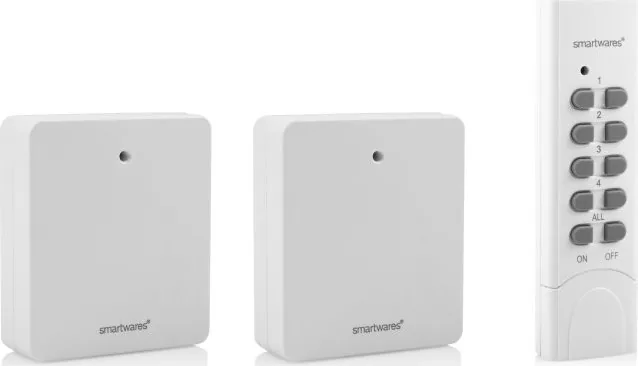
2x wireless socket, 1x 4-channel remote control

M: OA-GPT-54-NAN

Product Description

Smartwares SmarthomeBasic SH5-SET-FL White: Easy Wireless Control for Everyday Comfort

The Smartwares SmarthomeBasic SH5-SET-FL white, 2-pack wireless socket set with remote control is designed for people who want a simpler way to manage lighting and small household devices. With its clean white finish and compact plug-in design, it blends into a modern home while offering practical remote switching without complex installation.

This set works by pairing a receiver with a transmitter, allowing you to switch connected devices on or off from a distance. That makes it especially useful for lamps, decorative lights, and other appliances that are awkward to reach behind furniture or in corners. Instead of walking across the room each time, a single press on the remote is enough to control power.

One of the most convenient features is the clear LED feedback during pairing and setup. When the receiver is inserted into the wall outlet, it enters pairing mode and the LED starts blinking. Pressing the ON button on the transmitter confirms the connection, and the light on the receiver gives immediate visual feedback. The system also supports multiple transmitters, with space for up to six memory positions, which is helpful in shared homes or when different remotes are used in different rooms.

The set is built for everyday use, with a maximum capacity of 460W, a range of up to 30 meters, and 230V~50Hz operation. Those specifications make it suitable for many common indoor applications, as long as the connected device stays within the power limit. It is a straightforward solution for anyone who wants convenient wireless control without replacing existing appliances.

Resetting or disconnecting links is also simple. If you need to remove a single transmitter or clear all connections, the receiver can be unplugged and reinserted to begin the unlinking process. This makes it flexible for changing setups, moving rooms, or replacing devices over time.

Why it stands out

The Smartwares wireless socket set is appealing because it combines ease of use, quick setup, and practical remote operation in a compact package. It is not meant for heavy-duty equipment, but for daily comfort it offers a reliable and low-effort upgrade to the home.

Notes

  • Best suited for lights and smaller electrical devices.
  • Check the 460W limit before connecting any appliance.
  • Pairing works best when you follow the timing steps closely.
  • Multiple remotes can be stored for shared use across a home.
M: OA-GPT-54-NAN

© Copyright 2026 Manual.ly