
Manual.ly Logo

Smartwares SH5-TDR-F Manual

4.0 · 4 Ratings

PDF manual · 2 Pages

English

M: QW-35-FL
page

/ 2

Loading...
a6cf6042ada897c8a01f12272c6d2873541d page 1
10.037.06
EN
Remote
NL A
fstandsbediening
DE
Fernbedienung
FR T
élécommande
ES C
ontrol remoto
IT Telecomando
SV
Fjärrkontroll
PL
Pilot
EN Instruction manual
PREPARATION BEFORE USE (1)
• Slide off the battery cover at the front of the remote.
• Place an A23 battery (not included).
• Slide the battery cover back on to the remote.
Pairing the receiver with a sender
A. Follow the instructions of the receiver to put it in pairing mode.
B. Press the ”ON” button on the sender (2) to pair it with a receiver.
The LED on the receiver will light up.
C. Repeat these steps for any other receiver.
• Press the ”OFF” button on the sender (5) to disconnect it from a
receiver. The LED on the receiver turns off.
OPERATION
A. Press the ”ON” button on the remote to turn on the device.
B. Press the “OFF” button on the remote to turn off the device.
C. Press the ”ON” button ALL (on the remote) to turn on all devices at
the same time.
D. Press the ”OFF” button ALL (on the remote) to turn off all devices
at the same time.
Operating a dimmer receiver (4).
A. Press the ”ON” button on the remote control to turn on the dimmer
to the last set dim level.
B. When the dimmer is turned on: briefly press the “ON” button to dim
the light; press the “ON” button again to stop the dimming.
C. Press the “OFF” button on the remote control to turn off the
dimmer.
FR Manuel d'instructions
PRÉPARATION AVANT UTILISATION (1)
• Faire glisser le couvercle de la pile à l'avant de la télécommande.
• Mettre une pile A23 (non incluse).
• Remettre le couvercle de la pile en place sur la télécommande.
Couplage du récepteur à un émetteur
A. Suivez les instructions du récepteur pour le mettre en mode de
couplage.
B. Appuyez sur le bouton «ON» de l'émetteur (2) pour le coupler
avec un récepteur. La LED sur le récepteur s'allume.
C. Répétez la procédure pour tout autre récepteur.
• Appuyer sur le bouton «OFF» de l'émetteur (5) pour le
déconnecter d'un récepteur. La LED sur l'interrupteur intégré
s'éteint.
UTILISATION
A. Appuyer sur la touche «ON» de la télécommande pour allumer
l'appareil.
B. Appuyer sur la touche «OFF» de la télécommande pour éteindre
l'appareil.
C. Appuyer sur la touche «ON» ALL (sur la télécommande) pour
allumer tous les appareils en même temps.
D. Appuyer sur la touche «OFF» ALL (sur la télécommande) pour
éteindre tous les appareils en même temps.
Utilisation d'un récepteur-variateur d'intensité lumineuse (4).
A. Appuyer sur la touche «ON» de la télécommande pour allumer le
variateur d'intensité lumineuse au dernier niveau de luminosité
réglé.
B. Lorsque le variateur d'intensité lumineuse est allumé: appuyer
brièvement sur le bouton «ON» pour diminuer la lumière;
appuyer à nouveau sur le bouton «ON» pour arrêter la
diminution.
C. Appuyer sur la touche «OFF» de la télécommande pour éteindre
le variateur d'intensité lumineuse.
NL Gebruiksaanwijzing
VOORBEREIDING VOOR GEBRUIK (1)
• Schuif het batterijdeksel van de voorzijde van de
afstandsbediening.
• Plaats een A23-batterij (niet meegeleverd).
• Schuif het batterijdeksel terug op de afstandsbediening.
De ontvanger koppelen aan een zender
A. Volg de instructies van de ontvanger om deze in de
koppelingsmodus te zetten.
B. Druk op de knop ON op de zender (2) om deze te koppelen met
een ontvanger. Het ledlampje op de ontvanger gaat branden.
C. Herhaal deze stappen voor eventuele andere ontvangers.
• Druk op de knop OFF op de zender (5) om deze los te koppelen
van een ontvanger. Het ledlampje op de ontvanger wordt
uitgeschakeld.
BEDIENING
A. Druk op de ON-knop op de afstandsbediening om het apparaat in
te schakelen.
B. Druk op de OFF-knop op de afstandsbediening om het apparaat
uit te schakelen.
C. Druk op de ON-knop ALL (op de afstandsbediening) om alle
apparaten tegelijk in te schakelen.
D. Druk op de OFF-knop ALL (op de afstandsbediening) om alle
apparaten tegelijk uit te schakelen.
Een dimmerontvanger bedienen (4)
A. Druk op de knop ON op de afstandsbediening om de dimmer in te
schakelen en het laatst ingestelde dimniveau te gebruiken.
B. Als de dimmer is ingeschakeld: druk kort op de knop ON om het
licht te dimmen. Druk opnieuw op de knop ON om het dimmen te
stoppen.
C. Druk op de knop OFF op de afstandsbediening om de dimmer uit
te schakelen.
DE Bedienungsanleitung
VORBEREITUNG (1)
• Schieben Sie die Batterieabdeckung vorn an der Fernbedienung
herunter.
• Setzen Sie eine A23-Batterie ein (nicht im Lieferumfang).
• Bringen Sie die Batterieabdeckung wieder an der Fernbedienung
an.
Empfänger mit einem Sender verbinden
A. Befolgen Sie die Anweisungen für den Empfänger, um ihn in den
Synchronisierungsmodus zu bringen.
B. Drücken Sie die Taste „ON“ am Empfänger (2), um ihn mit einem
Empfänger zu synchronisieren. Die LED am Empfänger leuchtet
auf.
C. Wiederholen Sie diese Schritte für weitere Empfänger.
• Drücken Sie die Taste „OFF“ am Sender (5), um ihn von einem
Empfänger zu trennen. Die LED am Einbauschalter erlischt.
BETRIEB
A. Drücken Sie die Taste „ON“ auf der Fernbedienung, um das Gerät
einzuschalten.
B. Drücken Sie die Taste „OFF“ auf der Fernbedienung, um das
Gerät auszuschalten.
C. Drücken Sie die Taste „ON“ ALL (auf der Fernbedienung), um alle
Geräte gleichzeitig einzuschalten.
D. Drücken Sie die Taste „OFF“ ALL (auf der Fernbedienung), um
alle Geräte gleichzeitig auszuschalten.
Betrieb eines Dimmerempfängers (4)
A. Drücken Sie die Taste „ON“ auf der Fernbedienung, um das
zuletzt eingestellte Dimmniveau zu aktivieren.
1
2
3
4
5
ON
OFF
1 x A23
2x
Dim
Specifications:
Remote control battery: 12V, type A23 (excl.)
Frequency: 433.92MHz
Number of channels: 4

Chat with your Smartwares SH5-TDR-F manual using AI

Get instant AI answers from your Smartwares SH5-TDR-F manual

Ask anything about the Smartwares SH5-TDR-F. Answers come from this manual, with the pages they are based on.

Ask a Question

0/1000

Do you recommend SH5-TDR-F?

Yes No
0
User Pic

SmartHomeFan

5 months ago

Is this remote compatible with smart home products or typical hardware store devices?

0
User Pic

Manual.ly

5 months ago

This remote functions well as a standalone device and works perfectly for basic needs. However, please note that it is not compatible with most smart home systems. Additionally, combining it with generic hardware store remotes may result in limited compatibility. We recommend using it primarily for its intended purpose without attempting to integrate it into complex smart home setups.

M: QW-35-FL
M: QW-35-FL
0
User Pic

jasmine49

6 months ago

Does this work well as a second remote for another room?

M: QW-35-FL

Frequently Asked Questions

A

The remote control uses one A23 battery. Please note that the battery is not included in the box and must be purchased separately.

Is this answer helpful?

A

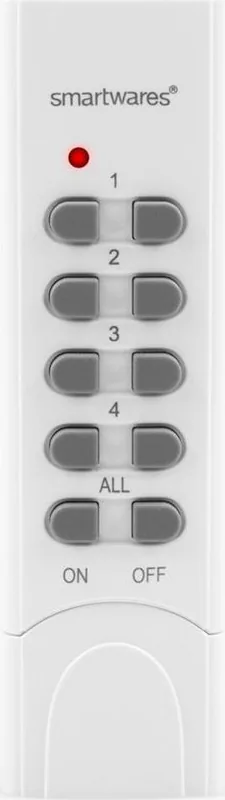
Yes, you can pair the remote with up to four different receivers. You can also use the ALL button to turn all connected devices on or off at the same time.

Is this answer helpful?

A

First, put the receiver into pairing mode according to its instructions. Then, press the ON button on the remote. The LED on the receiver will light up to confirm the connection.

Is this answer helpful?

A

Yes, but you need a compatible dimmer receiver. Briefly press the ON button to dim the light and press it again to stop dimming. Press OFF to turn it off completely.

Is this answer helpful?

A

The Smartwares SH5-TDR-F operates at a frequency of 433.92MHz, which is standard for many household remote controls.

Is this answer helpful?

A

To disconnect a receiver, press the OFF button on the remote. The LED on the receiver will turn off, indicating that the link has been broken.

Is this answer helpful?

M: QW-35-FL

Advantages and Disadvantages

Advantages

  • Supports simultaneous control of up to four different devices
  • Includes a convenient ALL button for group operations
  • Compatible with dimmer receivers for adjustable lighting levels
  • Simple pairing process with visual LED confirmation
  • Compact design fits easily in hand
VS

Disadvantages

  • Requires separate purchase of A23 battery
  • Limited to 433.92MHz frequency compatibility
  • No wireless smart home integration like Wi-Fi or Bluetooth
  • Dimmer function requires specific receiver support
  • Battery cover may feel loose if not secured tightly
M: QW-35-FL

Product Specification

Type

Remote control

Standard

Radio bus (433 MHz)

Function

Control

Features

IP20, battery operated

M: QW-35-FL

Product Description

Smart Home Lighting Control Made Simple

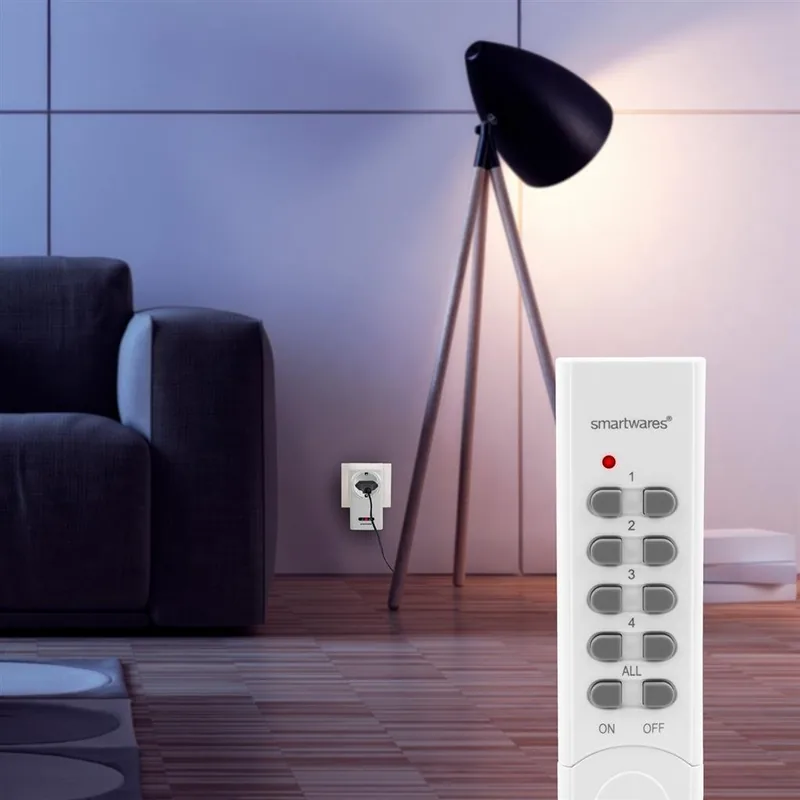
The Smartwares SH5-TDR-F is a versatile remote control designed to simplify your daily lighting routine. This device allows you to manage multiple electrical appliances with ease, offering both individual and group control options. Whether you are turning on a single lamp or dimming the lights in your entire living room, this remote provides a seamless experience.

Essential Features for Modern Homes

Setting up the Smartwares SH5-TDR-F is straightforward. The unit requires one A23 battery, which must be inserted into the front compartment after sliding off the cover. Once powered, the remote pairs effortlessly with compatible receivers. To pair, simply put your receiver into pairing mode and press the ON button on the remote. An LED indicator on the receiver confirms a successful connection. You can repeat this process to link up to four different devices.

The remote features dedicated buttons for ON, OFF, and an ALL function. Pressing the ALL button activates all paired devices simultaneously, while the OFF ALL button turns them all off instantly. For those who enjoy ambiance, the device supports dimmer receivers. When controlling a dimmer, a brief press of the ON button lowers the light intensity, and a second press locks that setting. Turning off the dimmer is as simple as pressing the OFF button.

Operating at a frequency of 433.92MHz, this remote ensures reliable communication between the sender and receiver without interference. It is an ideal solution for homes where convenience and energy efficiency are priorities. The intuitive design makes it accessible for users of all ages, ensuring that controlling your home environment remains effortless.

Important Notes

  • Ensure the receiver is in pairing mode before attempting to connect.
  • The A23 battery is not included in the package.
  • Use only compatible dimmer receivers for light adjustment features.
M: QW-35-FL

© Copyright 2026 Manual.ly