
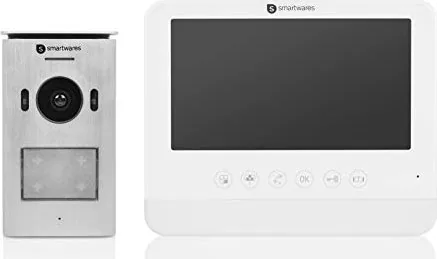
Smartwares DIC-22212 Manual
PDF manual · 147 Pages
English



Quick check
Incorrect answer, please try again.
Chat with your Smartwares DIC-22212 manual using AI
Get instant AI answers from your Smartwares DIC-22212 manual
Ask anything about the Smartwares DIC-22212. Answers come from this manual, with the pages they are based on.
Ask a Question
Do you recommend DIC-22212?
Yes NoFrequently Asked Questions
It is a video door intercom system that lets you see and speak to visitors before opening the door. It is mainly intended for home entrances, small houses, and apartments that need simple access monitoring.
Is this answer helpful?
The indoor monitor has a 7-inch diagonal screen. This size is practical for checking who is at the door without taking up too much wall space.
Is this answer helpful?
Yes. The outdoor unit supports low-light operation with a 1 Lux/F1.2 minimum illumination rating and night vision capability, so it can still help with visitor identification in darker conditions.
Is this answer helpful?
The outdoor camera has a viewing angle of about 100 degrees. That helps cover the area in front of the entrance and makes it easier to see visitors standing slightly off-center.
Is this answer helpful?
The indoor unit runs on 15V at 1A. It is a wired system, so proper installation and matching power supply are important for stable operation.
Is this answer helpful?
The outdoor unit should not be exposed to rain or water. It is best installed in a sheltered position to help protect the device and ensure reliable performance.
Is this answer helpful?
Advantages and Disadvantages
Advantages

- 7-inch indoor monitor gives a convenient viewing size for visitor checks.
- Wide-angle outdoor camera improves coverage near the entrance.
- Supports PAL/NTSC video formats for flexible compatibility.
- Low-light and night-vision features help after dark.
- Simple single-participant setup suits smaller homes and apartments.
Disadvantages

- Designed for one participant only, so it is not ideal for multi-unit needs.
- Requires wired installation and a 15V power supply.
- Night vision range is limited compared with higher-end systems.
- Outdoor unit should be protected from rain and water exposure.
- Best used in domestic settings, not as a heavy-duty commercial solution.
Product Specification
Display
7" Color LCD, Touchscreen
Detection Range
not specified (horizontal), not specified (vertical)
Connection
2-Wire
Users
1
Protection Class
IP23
Expandability
1x Indoor Station
Package Contents
1x Indoor Station, 1x Outdoor Station
Product Description
Smartwares DIC-22212 Video Door Intercom System, 1 Participant Manual
The Smartwares DIC-22212 Video Door Intercom System is designed for homeowners who want a simple and effective way to see and speak with visitors before opening the door. Built around a single indoor monitor and one outdoor camera unit, it focuses on essential access control rather than complicated smart-home features. That makes it a straightforward choice for apartments, small houses, and private entrances where ease of use matters.
At the center of the system is a 7-inch indoor monitor with a clear display and support for PAL/NTSC video formats. The screen offers practical visibility for identifying visitors, while the indoor unit runs on 15V power and is made for domestic use. The system also captures JPEG images and AVI video, giving users basic visual records and reliable live monitoring in day-to-day use.
The outdoor unit adds another layer of confidence with a 1/4-inch CMOS sensor and a viewing angle of about 100 degrees. That wider field of view helps cover the area near the entrance more effectively, making it easier to spot callers at the door. Low-light performance is supported as well, with a minimum illumination rating of 1 Lux/F1.2 and night vision capability for dim conditions.
Installation flexibility is another useful point. The wiring guidance suggests support for different distance ranges between units, which can help when the monitor and door station are not mounted close together. The product is intended for indoor and outdoor coordination, but the outdoor component should still be placed in a sheltered location and protected from rain and standing water.
This model is best understood as a dependable entry-level video intercom system: focused, practical, and easy to integrate into a home setup. It emphasizes clear communication, basic video monitoring, and essential safety-minded design. For users who want a no-nonsense door communication solution, the Smartwares DIC-22212 offers a balanced mix of visibility, usability, and everyday security.
Notes
- Keep ventilation around the units clear.
- Avoid installing the outdoor unit where it may be exposed to water.
- The system is intended for household use only.
- Follow the wiring and power specifications for stable operation.
Search for 67,706 Manuals online


Type-in Brand or Model
Lukas Zimmermann
9 months ago
How easy is it to adjust the camera angle after installation? Do I have to remove the outdoor unit, and is there a risk of losing small screws during alignment?
Manual.ly
9 months ago
The initial mounting is usually quick, but fine optical alignment can take some patience. In practice, you may need to loosen the outdoor unit fasteners and sometimes remove the outdoor unit briefly to reach the adjustment range, because the built-in mounting holes provide limited horizontal/vertical play. There is a small risk when handling the tiny security screw, so we recommend using a magnetized screwdriver or keeping the screw in a small tray while adjusting. For best results, mark drilling positions carefully, use a level before fixing, tighten only partially first, then aim using the app/live view (if available) and finish tightening once the picture is aligned. After final mounting, functionality is reported as reliable.