
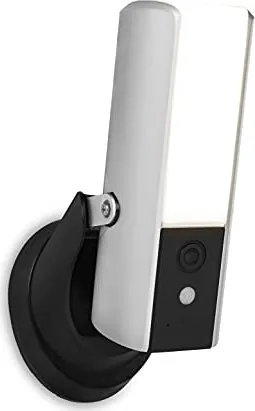
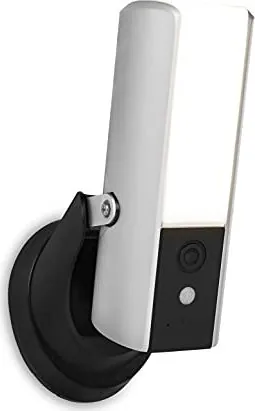
Smartwares CIP-39901 Manual
PDF manual · 28 Pages
English



Quick check
Incorrect answer, please try again.
Chat with your Smartwares CIP-39901 manual using AI
Get instant AI answers from your Smartwares CIP-39901 manual
Ask anything about the Smartwares CIP-39901. Answers come from this manual, with the pages they are based on.
Ask a Question
Do you recommend CIP-39901?
Yes NoFrequently Asked Questions
It is an outdoor security unit that combines a Full HD camera, LED light, motion sensor, microphone, speaker, and alarm features. It can provide live video, record motion events, illuminate an area after dark, and support two-way communication through the Smartwares View app.
Is this answer helpful?
Yes. In automatic mode, the LED light activates when the camera detects movement in darkness. The light remains on for about one minute after motion is detected. It can also be switched on or off manually in the app, and a schedule mode is available.
Is this answer helpful?
The camera supports 2.4 GHz Wi-Fi only. It does not connect to 5 GHz networks. For stronger performance, place it within good range of the router, use a Wi-Fi extender if needed, or consider the optional Ethernet connection.
Is this answer helpful?
Motion recordings are saved to a compatible Class 10 MicroSD card installed in the camera. The app provides an event list where recordings can be filtered by date and time, played back, deleted, or downloaded to a mobile device.
Is this answer helpful?
If overwrite storage is enabled, the camera automatically replaces the oldest recorded events with new ones. This helps maintain space for recent activity. Important recordings should be downloaded or backed up regularly before they are overwritten.
Is this answer helpful?
Yes. The integrated microphone and speaker support two-way audio through the app. You can listen to nearby sound and use the talk function to communicate with a visitor at the camera location.
Is this answer helpful?
Advantages and Disadvantages
Advantages

- Combines Full HD outdoor video, motion sensing, and LED lighting in one unit.
- Supports live viewing, two-way audio, snapshots, manual recording, and a controllable alarm.
- Stores motion events on MicroSD and can overwrite older clips automatically when space is full.
- Works through 2.4 GHz Wi-Fi and offers an optional Ethernet connection for flexible setup.
Disadvantages

- Does not support 5 GHz Wi-Fi networks, which may require router configuration changes.
- Reliable live viewing and playback depend on strong internet and wireless signal quality.
- MicroSD storage is required for local event recording and must be Class 10.
- Downloading an event can temporarily prevent other users from using live view and recording.
Product Specification
Image sensor
1/4" CMOS
Resolution
1920 x 1080 pixels
Viewing angle
140 degrees (horizontal)
Connections
1 x RJ-45 100 Mbps LAN
Wireless
Wi-Fi
Data storage
1 x microSD slot
Microphone
integrated
Speaker
integrated
Illumination
IR illumination
Protection rating
IP05
System control and operation
Mobile app (Android, iOS)
Zone and analysis functions
Motion detection
Product Description
Smartwares Security Camera and Light - Read, Download & Print Free
The Smartwares Security Camera and Light combines outdoor monitoring, motion detection, and bright LED illumination in one practical security solution. Designed for entrances, driveways, patios, and other exterior areas, it provides a Full HD camera view alongside responsive lighting to help make activity around a property easier to see.
Smart outdoor visibility with connected control
A built-in motion sensor can activate the LED light when movement is detected in low-light conditions. The light can also be managed manually through the Smartwares View app, giving users flexible control whether they are at home or away. This combination of lighting and monitoring can provide a useful visual deterrent while improving visibility after dark.
The camera supports live viewing through a compatible mobile device over Wi-Fi or a 4G connection. Its integrated microphone, speaker, and two-way audio function allow users to hear activity near the camera and speak to visitors through the app. A manual alarm option adds another way to respond quickly when attention is needed.
Recording and event playback
Motion events can be captured as snapshots or video recordings and stored on a Class 10 MicroSD card. Users can review available events in the app, select recordings by date and time, and download important clips to a mobile device. When overwrite recording is enabled, the oldest clips are replaced when storage becomes full, helping preserve space for new activity.
Video settings can be adapted for the available connection and storage needs. Choose HD resolution for clearer detail or a lower resolution when bandwidth is limited. Adjustable video brightness, frame rate, image orientation, recording mode, and lighting mode make it easier to tailor the system to the installation area.
Installation and connection options
For best coverage, the unit is intended for installation at approximately 2.5 to 4 metres high. The camera angle and tilt can be adjusted after mounting to focus on the desired area. It works with 2.4 GHz Wi-Fi networks and also supports an optional Ethernet connection for locations where a wired network link is preferred.
A stable network is important for smooth live viewing and playback. A connection of at least 1 Mbit/s upload and download is recommended, while no more than two simultaneous viewers is advised for better performance. The camera also supports push notifications, firmware updates, and password protection for device and administrator access.
Notes
- Change the default device and administrator passwords during setup.
- Use a Class 10 MicroSD card for recording performance.
- Check local privacy rules before positioning an outdoor camera.
- Avoid aiming the camera toward busy trees, bushes, or direct sunlight to reduce unwanted recordings.
Search for 67,706 Manuals online


Type-in Brand or Model